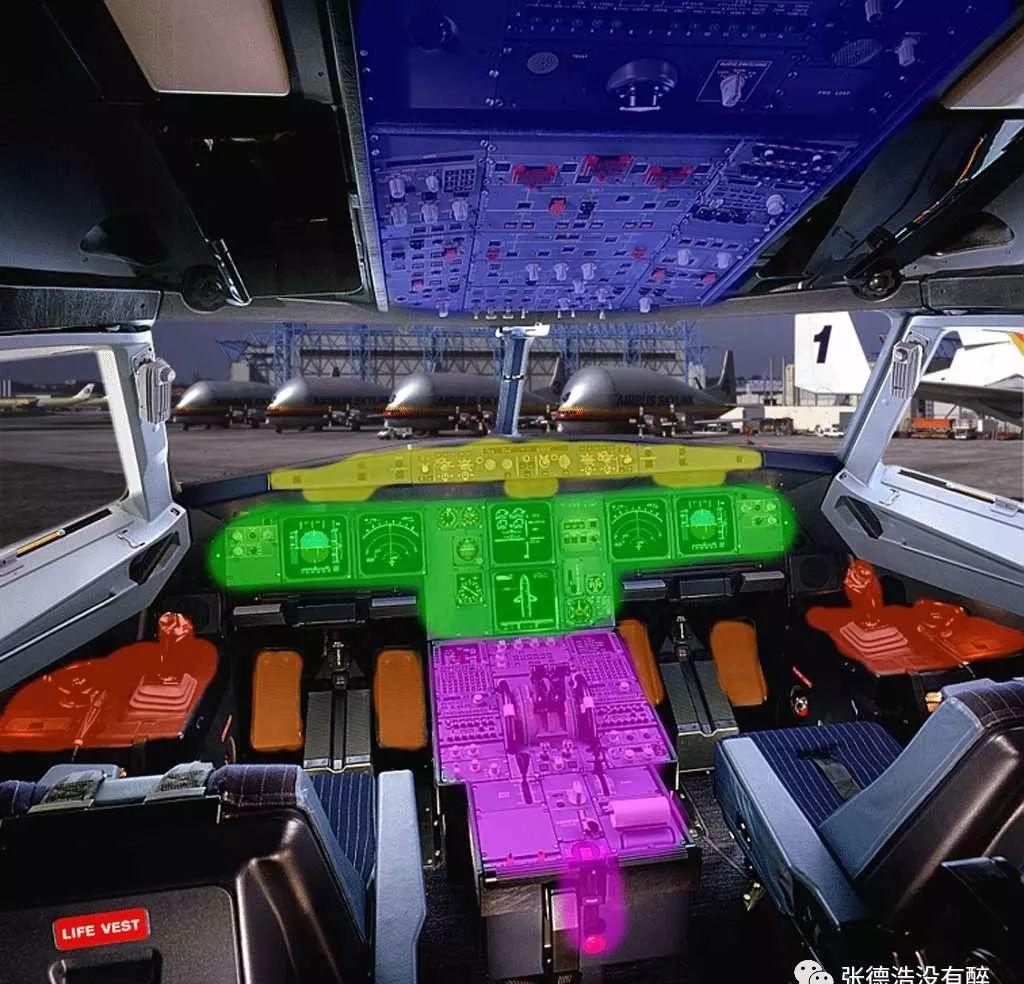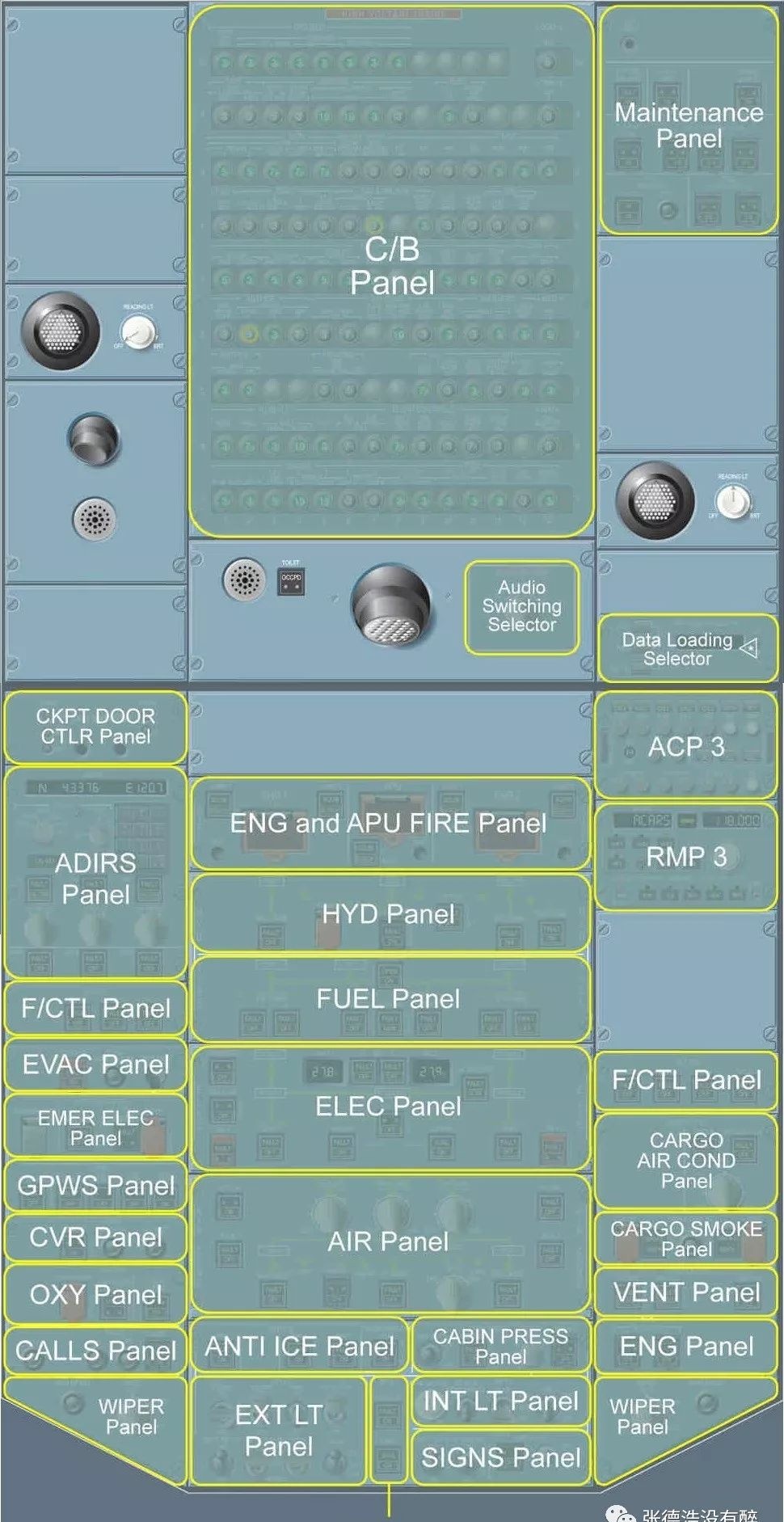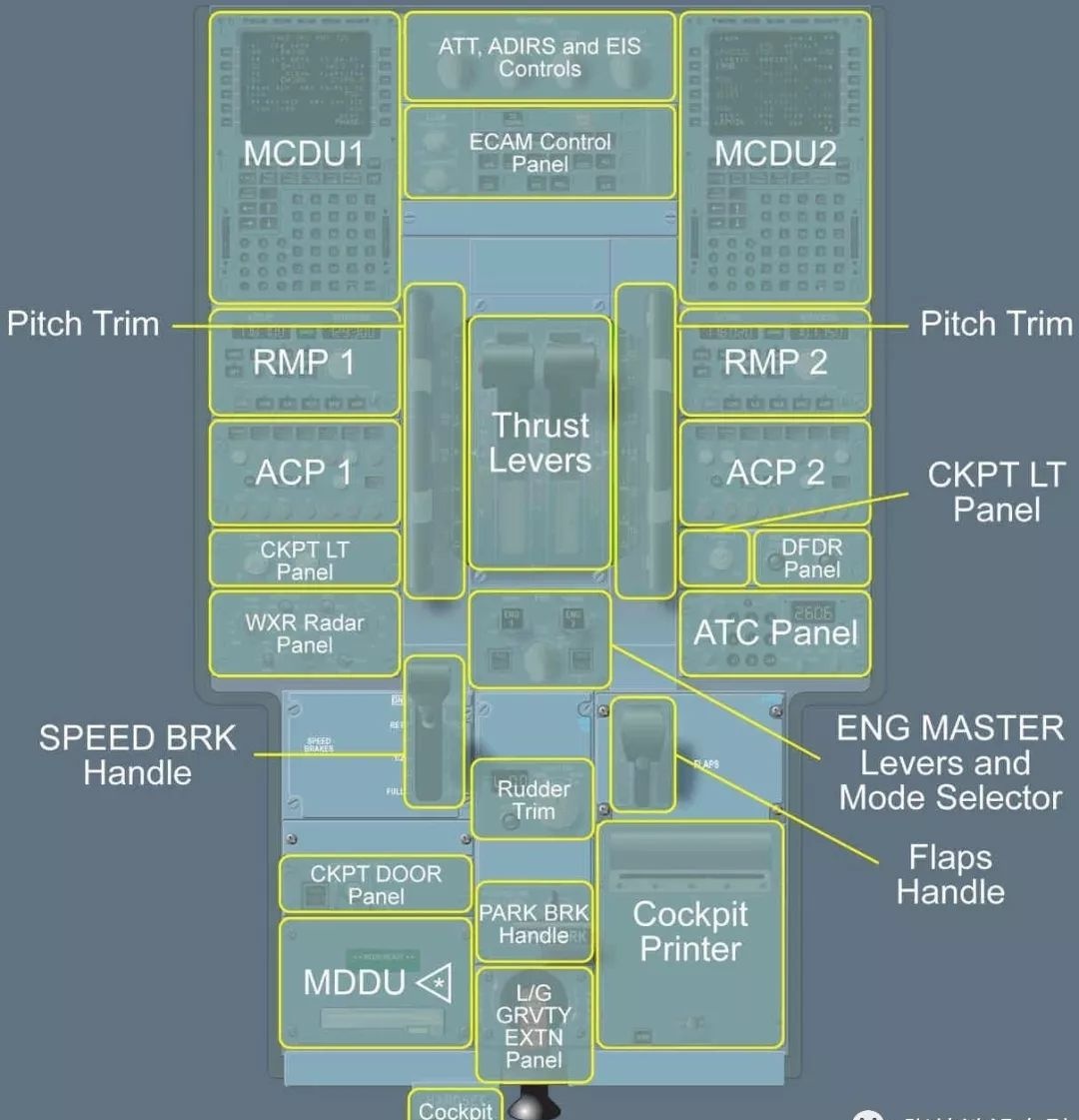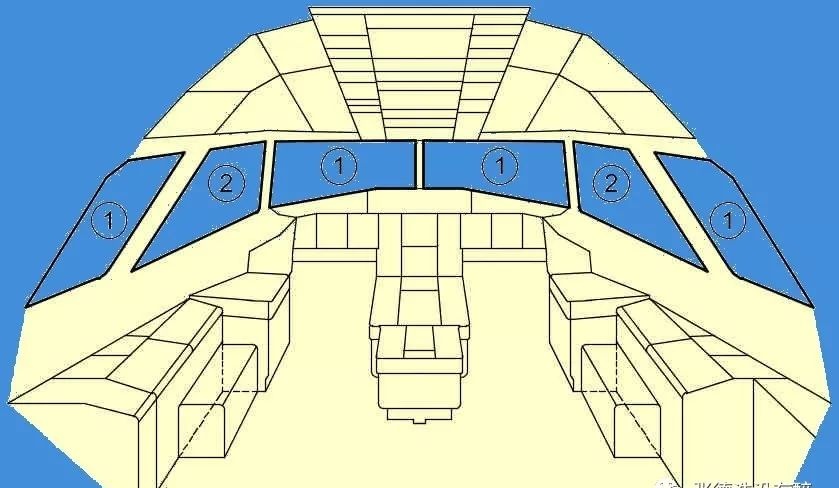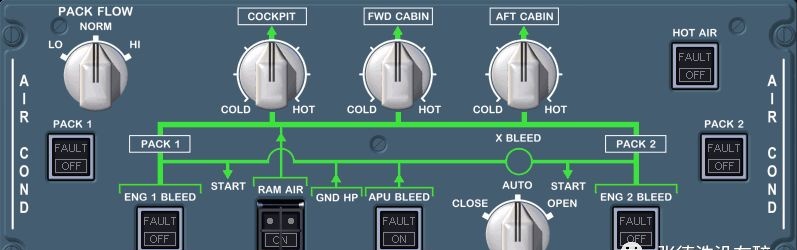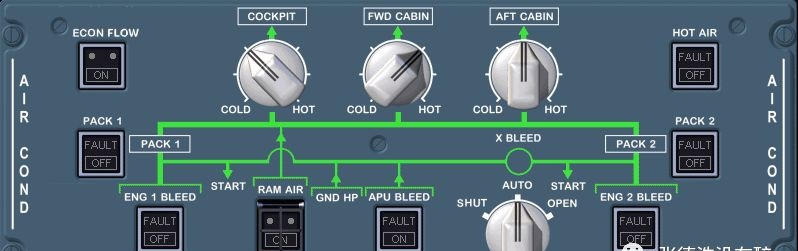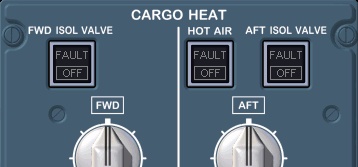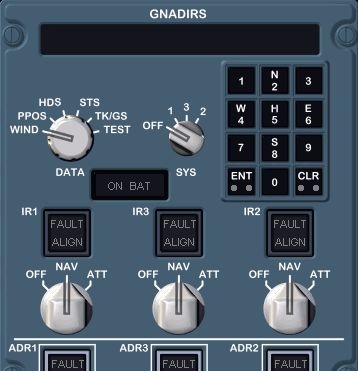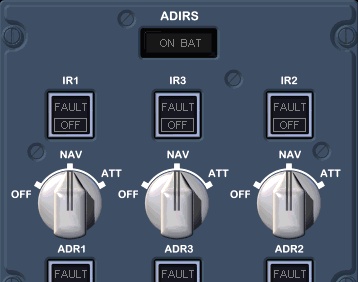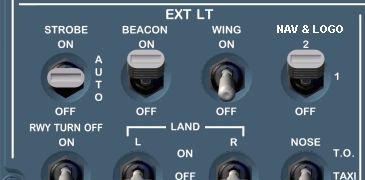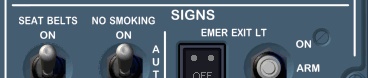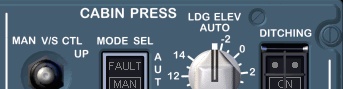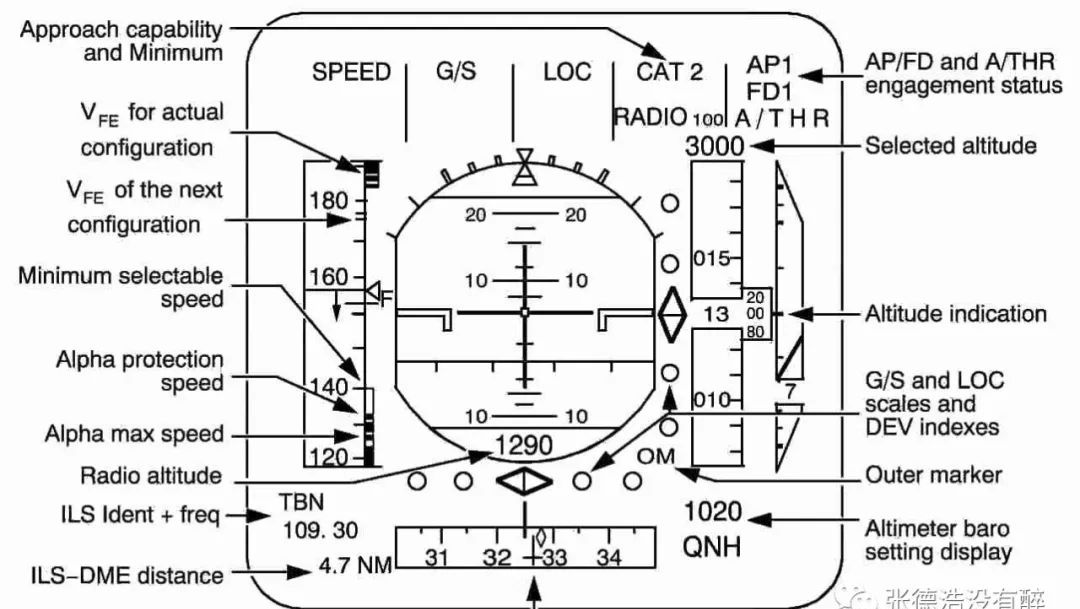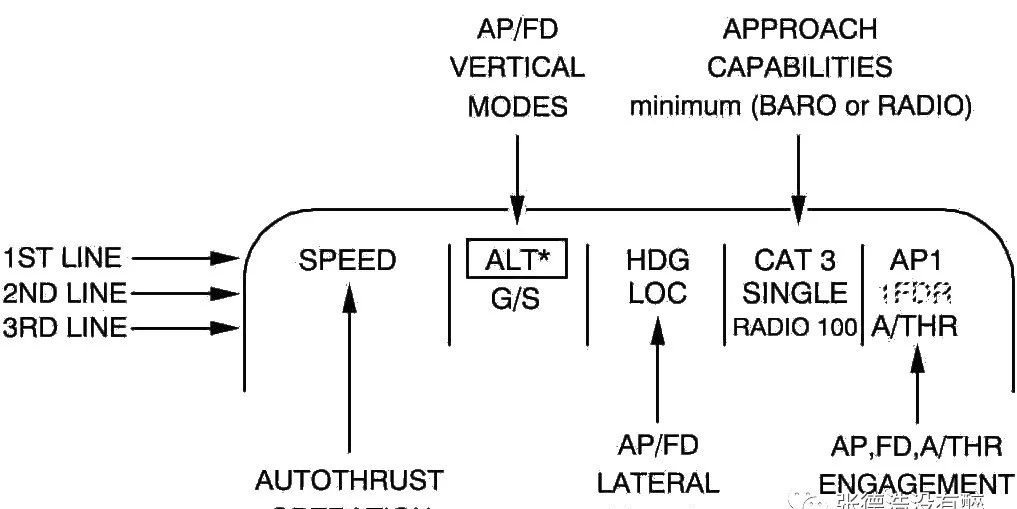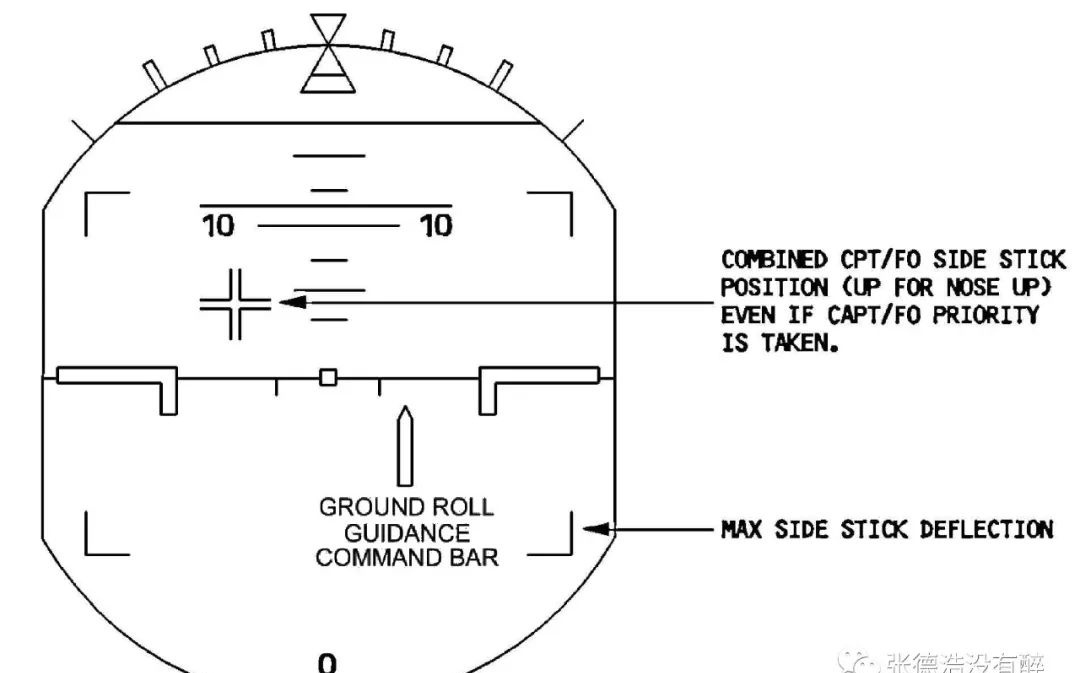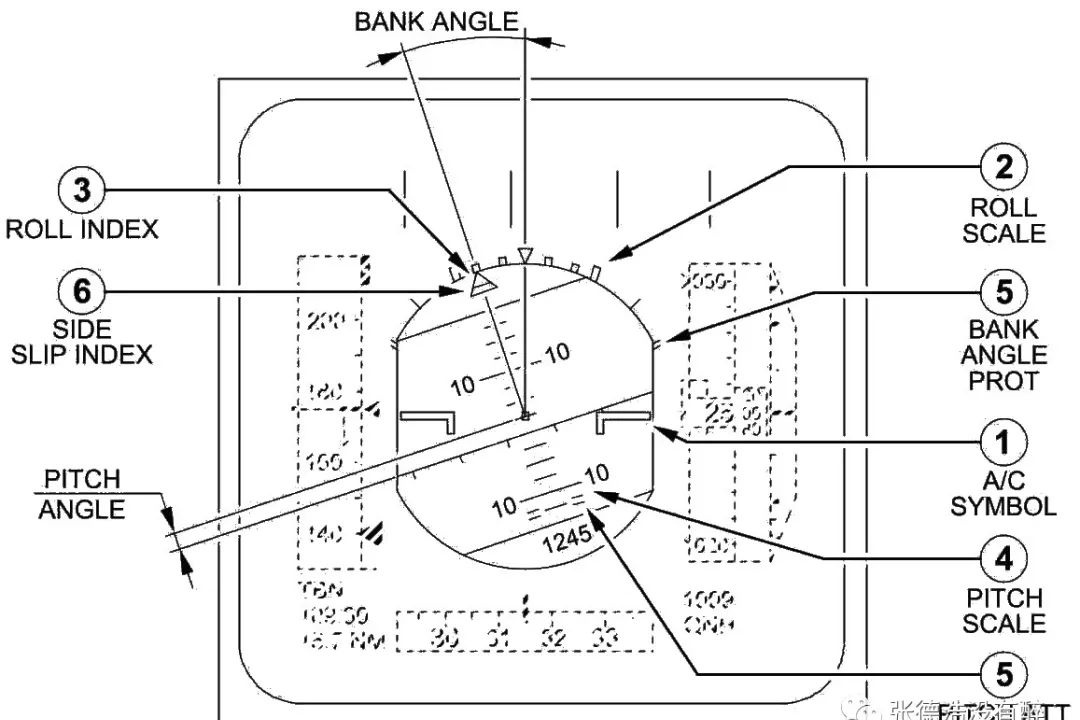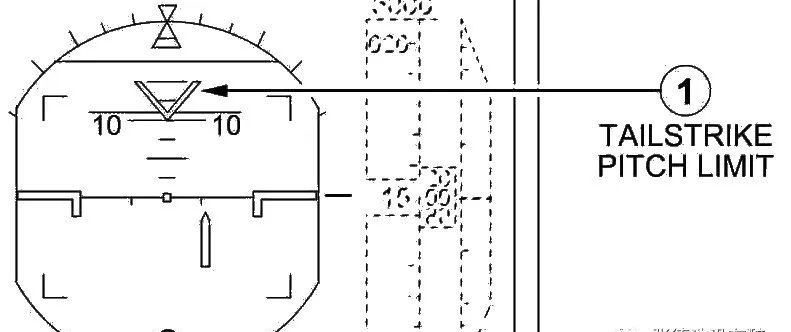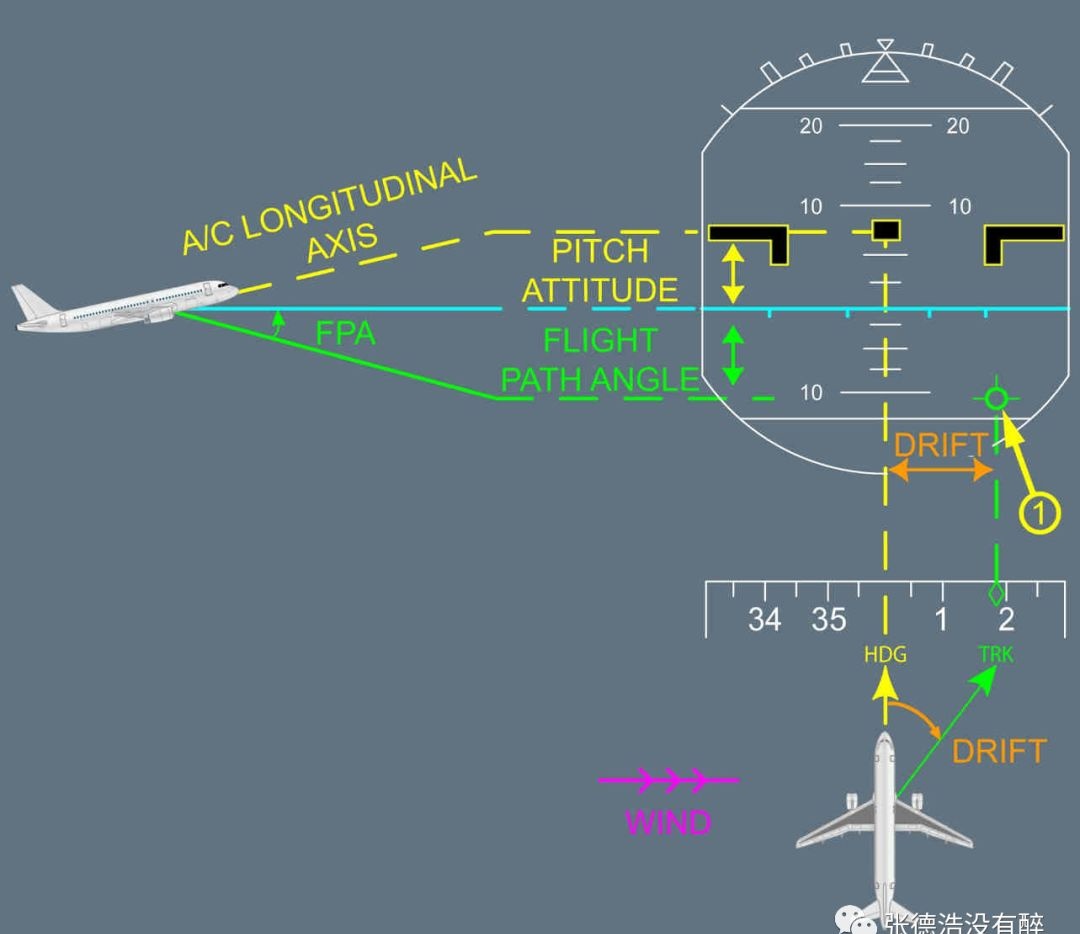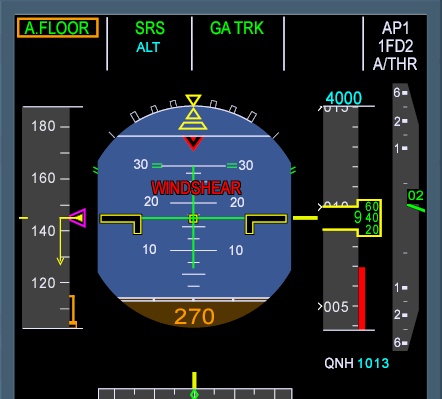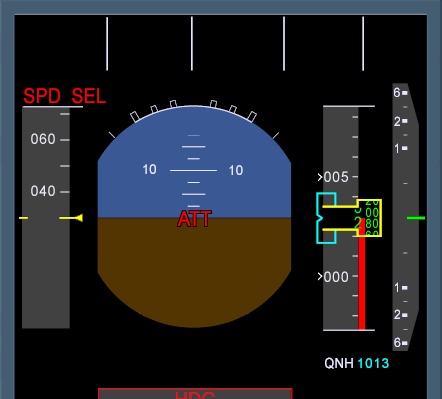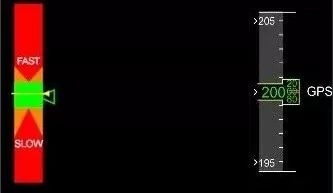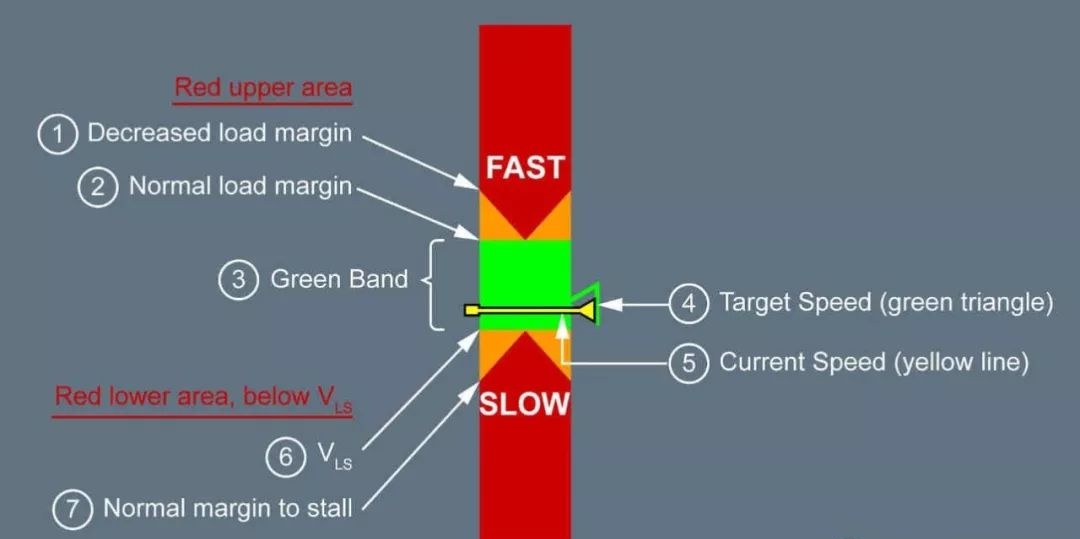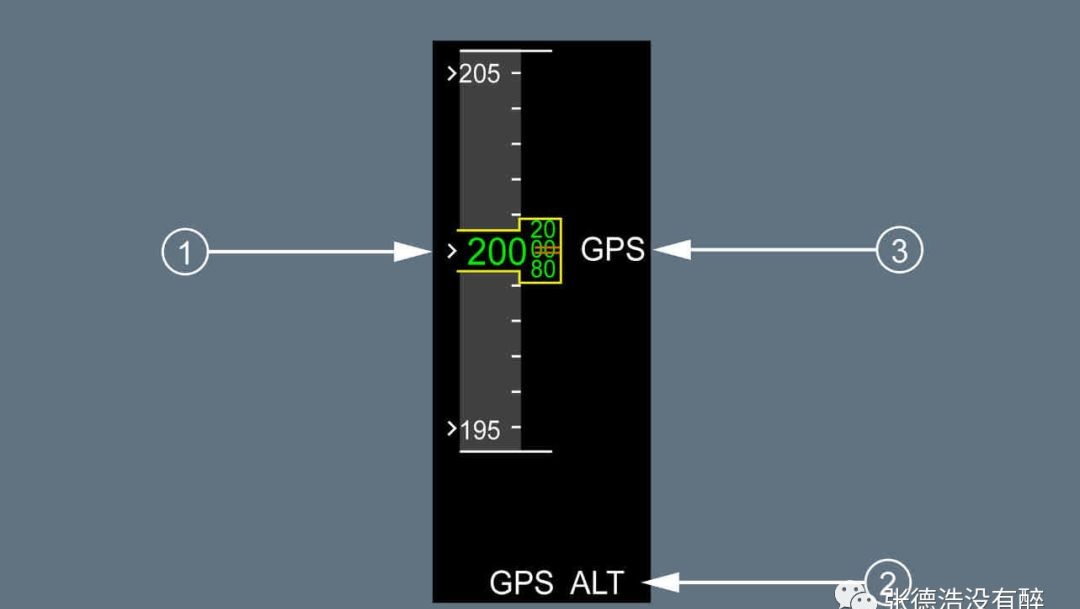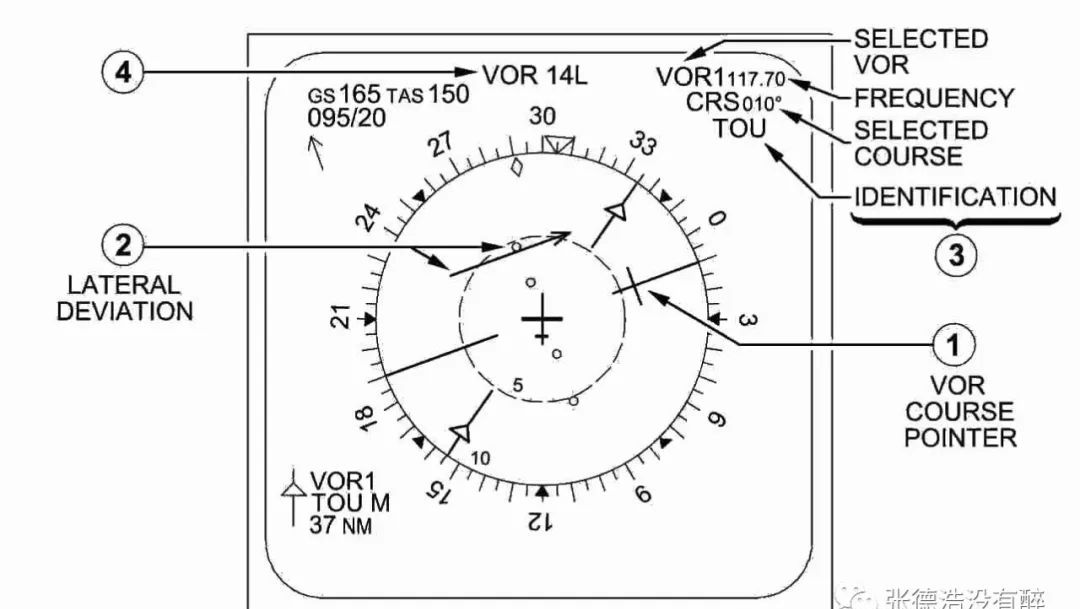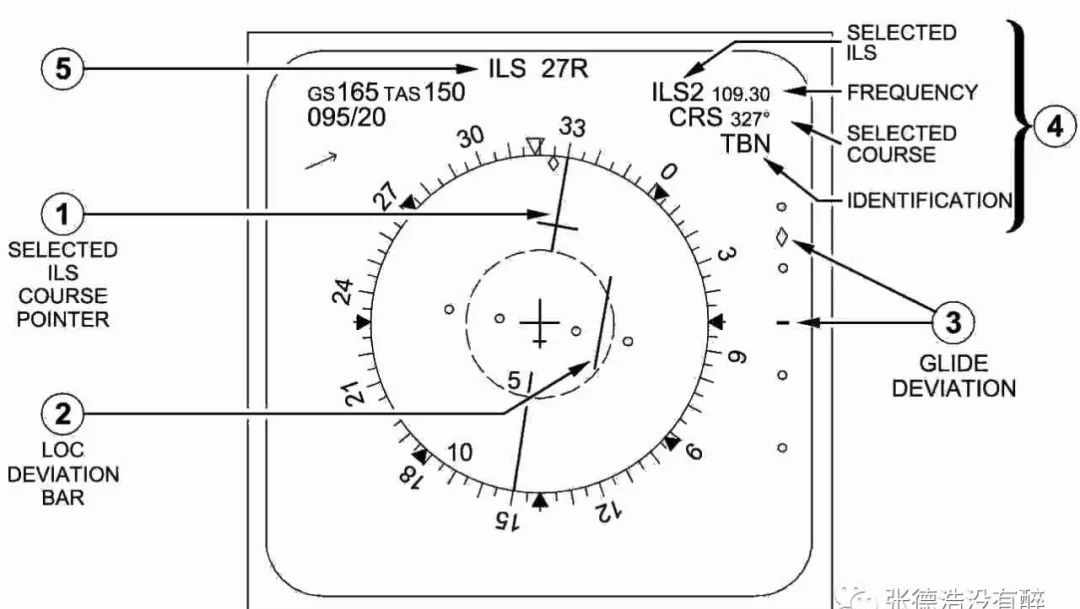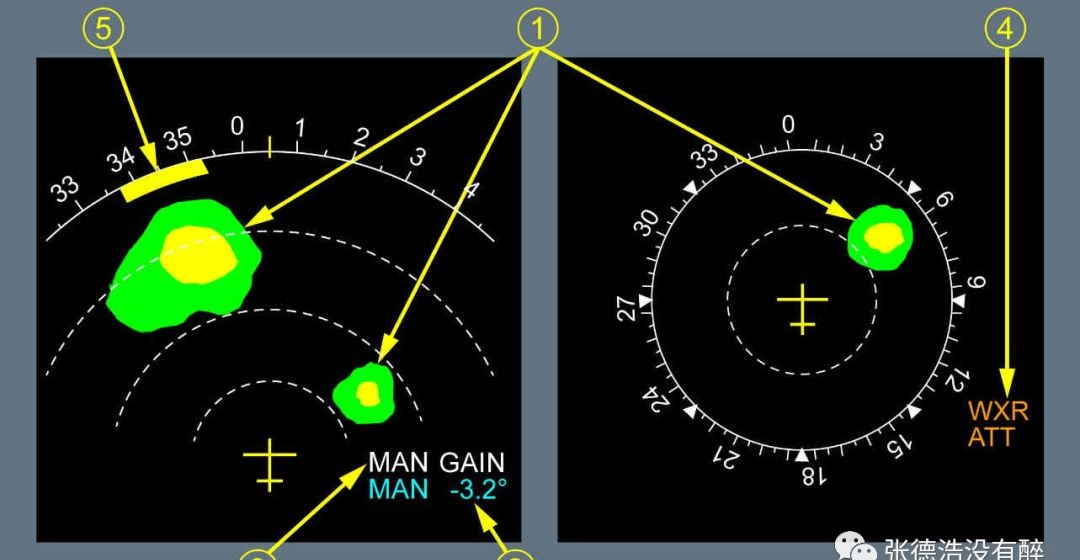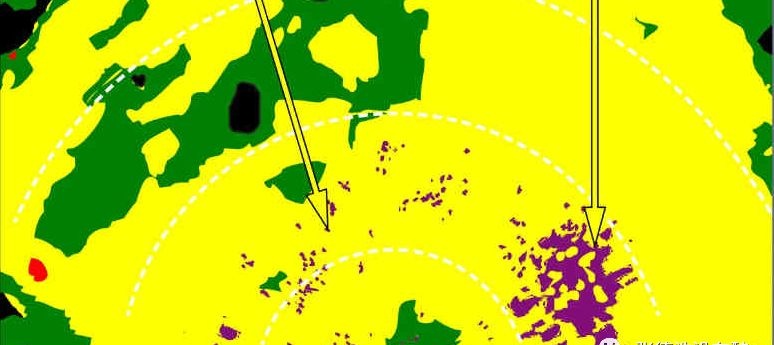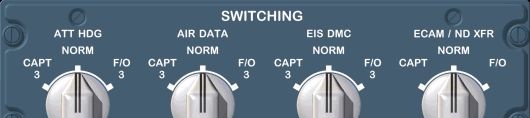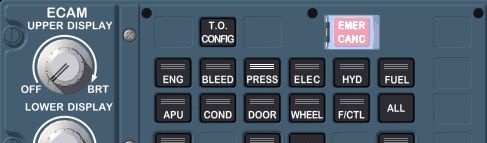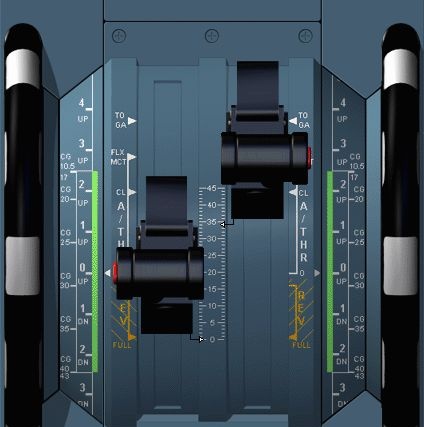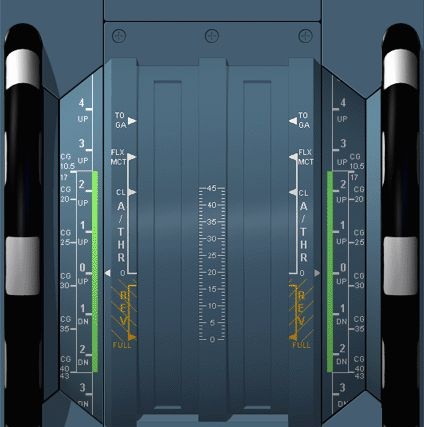
<?xml version="1.0" encoding="utf-8"?>
<feed xmlns="http://www.w3.org/2005/Atom">
  <author>
    <name>Sean</name>
  </author>
  <generator uri="https://hexo.io/">Hexo</generator>
  <id>https://blog.td/</id>
  <link href="https://blog.td/" rel="alternate"/>
  <link href="https://blog.td/atom.xml" rel="self"/>
  <rights>All rights reserved 2026, Sean</rights>
  <subtitle>一位乐于探索技术与知识的边界的技术宅，喜欢搞机(器)，搞积(分)，搞基(?)(VRC这一块)，乐于创作内容与开辟新领域。</subtitle>
  <title>Sean's blog</title>
  <updated>2026-02-27T02:41:55.185Z</updated>
  <entry>
    <author>
      <name>Sean</name>
    </author>
    <category term="MFS" scheme="https://blog.td/tags/MFS/"/>
    <category term="A320" scheme="https://blog.td/tags/A320/"/>
    <category term="空客" scheme="https://blog.td/tags/%E7%A9%BA%E5%AE%A2/"/>
    <content>
      <![CDATA[<blockquote><p>源自 @张德浩没有醉</p></blockquote><h2 id="驾驶舱理念（FCTM-AOP-10-20-10）"><a href="#驾驶舱理念（FCTM-AOP-10-20-10）" class="headerlink" title="驾驶舱理念（FCTM-AOP-10-20-10）"></a>驾驶舱理念（FCTM-AOP-10-20-10）</h2><p>空客飞机驾驶舱的设计通过飞机操作环境满足飞行机组的操作需求，<br>同时保证电传操纵家族最大的共性。</p><hr><h2 id="A320-系列飞机驾驶舱面板布局"><a href="#A320-系列飞机驾驶舱面板布局" class="headerlink" title="A320 系列飞机驾驶舱面板布局"></a>A320 系列飞机驾驶舱面板布局</h2><p><img src="https://blog.td/static/a320_1/image1.jpeg" alt="A320 驾驶舱面板布局 / Cockpit panel layout"></p><div class="table-container"><table><thead><tr><th>中文</th><th>English</th></tr></thead><tbody><tr><td>顶板</td><td>Overhead Panel</td></tr><tr><td>遮光板</td><td>Glareshield</td></tr><tr><td>主仪表板</td><td>Main Instrument Panel</td></tr><tr><td>中央操纵台</td><td>Pedestal</td></tr><tr><td>侧操纵台</td><td>Lateral Consoles</td></tr><tr><td>脚蹬</td><td>Pedals</td></tr></tbody></table></div><hr><h2 id="设计理念（FCTM-AOP-10-20-20）"><a href="#设计理念（FCTM-AOP-10-20-20）" class="headerlink" title="设计理念（FCTM-AOP-10-20-20）"></a>设计理念（FCTM-AOP-10-20-20）</h2><h3 id="OVERHEAD-PANEL-顶板"><a href="#OVERHEAD-PANEL-顶板" class="headerlink" title="OVERHEAD PANEL 顶板"></a>OVERHEAD PANEL 顶板</h3><p>与发动机相连的系统控制面板是垂直布局的，以便能直接并本能的完成正常/非正常程序。此外，这个布局的目的是尽可能减少飞行机组的错误。</p><p><img src="https://blog.td/static/a320_1/image2.jpeg" alt="OVERHEAD PANEL"></p><hr><h3 id="GLARESHIELD-遮光板"><a href="#GLARESHIELD-遮光板" class="headerlink" title="GLARESHIELD 遮光板"></a>GLARESHIELD 遮光板</h3><p>遮光板支持自动飞行系统(AFS)的短期的策略控制。可以”抬头”进行操纵并对于两名飞行员都能容易进行操纵。</p><p><img src="https://blog.td/static/a320_1/image3.jpeg" alt="GLARESHIELD"></p><hr><h3 id="MAIN-INSTRUMENT-PANEL-主仪表板"><a href="#MAIN-INSTRUMENT-PANEL-主仪表板" class="headerlink" title="MAIN INSTRUMENT PANEL 主仪表板"></a>MAIN INSTRUMENT PANEL 主仪表板</h3><p>主仪表板主要支持对于以下功能是必须的显示组件：</p><ul><li>FLY 飞行 (PFD)</li><li>NAVIGATE 导航 (ND)</li><li>COMMUNICATE 通讯 (DCDU（新飞机部分选装）)</li><li>MONITOR the various aircraft systems 监控各个飞机系统 (ECAM)</li></ul><div class="tabs" id="mip-display"><ul class="nav-tabs"><button type="button" class="tab " data-href="mip-display-1">English</button><button type="button" class="tab  active" data-href="mip-display-2">中文</button></ul><div class="tab-contents"><div class="tab-item-content" id="mip-display-1"><p>The display units are located in the full and non-obstructed view of<br>both pilots.</p></div><div class="tab-item-content active" id="mip-display-2"><p>显示组件位于两名飞行员全部并无遮挡的视野中。</p></div></div><div class="tab-to-top"><button type="button" aria-label="scroll to top"><i class="anzhiyufont anzhiyu-icon-arrow-up"></i></button></div></div><p><img src="https://blog.td/static/a320_1/image4.jpeg" alt="MAIN INSTRUMENT PANEL"></p><hr><h3 id="PEDESTAL-中央操纵台"><a href="#PEDESTAL-中央操纵台" class="headerlink" title="PEDESTAL 中央操纵台"></a>PEDESTAL 中央操纵台</h3><p>中央操纵台主要支持以下控制：</p><ul><li>发动机和推力（发动机主电门，推力手柄）</li><li>飞机形态（减速板手柄，襟翼手柄，方向舵配平）</li><li>导航(MCDU, FMS)</li><li>通信(RMP)</li></ul><p><img src="https://blog.td/static/a320_1/image5.jpeg" alt="PEDESTAL"></p><hr><h2 id="风挡参考（CCOM-05-020-Clearview-Windows）"><a href="#风挡参考（CCOM-05-020-Clearview-Windows）" class="headerlink" title="风挡参考（CCOM/05-020 Clearview Windows）"></a>风挡参考（CCOM/05-020 Clearview Windows）</h2><p><img src="https://blog.td/static/a320_1/image6.jpeg" alt="Clearview Windows"></p><ol><li>fixed windows  </li><li>sliding windows</li></ol><blockquote><p>侧窗操作 参考 FCOM/DSC-56-40 Sliding Windows</p></blockquote><hr><h2 id="驾驶舱照明（FCOM-DSC-33-10-Cockpit-Lighting）"><a href="#驾驶舱照明（FCOM-DSC-33-10-Cockpit-Lighting）" class="headerlink" title="驾驶舱照明（FCOM/DSC-33-10 Cockpit Lighting）"></a>驾驶舱照明（FCOM/DSC-33-10 Cockpit Lighting）</h2><p><img src="https://blog.td/static/a320_1/image7.jpeg" alt="Cockpit Lighting 1"></p><p><img src="https://blog.td/static/a320_1/image8.jpeg" alt="Cockpit Lighting 2"></p><hr><h2 id="驾驶舱通风（CCOM-02-090-Cockpit-Air-Conditioning）"><a href="#驾驶舱通风（CCOM-02-090-Cockpit-Air-Conditioning）" class="headerlink" title="驾驶舱通风（CCOM/02-090 Cockpit Air Conditioning）"></a>驾驶舱通风（CCOM/02-090 Cockpit Air Conditioning）</h2><p><img src="https://blog.td/static/a320_1/image9.jpeg" alt="Cockpit Air Conditioning"></p><hr><h2 id="驾驶舱应急设备"><a href="#驾驶舱应急设备" class="headerlink" title="驾驶舱应急设备"></a>驾驶舱应急设备</h2><ul><li>FCOM/DSC-25-10 Flight Deck  </li><li>FCOM/DSC-25-20 Emergency Equipment</li></ul><p><img src="https://blog.td/static/a320_1/image10.jpeg" alt="Emergency Equipment 1"></p><p><img src="https://blog.td/static/a320_1/image11.jpeg" alt="Emergency Equipment 2"></p><h3 id="撤离绳（CCOM-05-020-Escape-Rope）"><a href="#撤离绳（CCOM-05-020-Escape-Rope）" class="headerlink" title="撤离绳（CCOM/05-020 Escape Rope）"></a>撤离绳（CCOM/05-020 Escape Rope）</h3><p><img src="https://blog.td/static/a320_1/image12.jpeg" alt="Escape Rope"></p><h3 id="氧气（FCOM-DSC-35-20-Fixed-Oxygen-System-for-Cockpit）"><a href="#氧气（FCOM-DSC-35-20-Fixed-Oxygen-System-for-Cockpit）" class="headerlink" title="氧气（FCOM/DSC-35-20 Fixed Oxygen System for Cockpit）"></a>氧气（FCOM/DSC-35-20 Fixed Oxygen System for Cockpit）</h3><p><img src="https://blog.td/static/a320_1/image13.jpeg" alt="Fixed Oxygen 1"></p><p><img src="https://blog.td/static/a320_1/image14.jpeg" alt="Fixed Oxygen 2"></p><h3 id="FCOM-PRO-NOR-SOP-EMERGENCY-EQUIPMENT"><a href="#FCOM-PRO-NOR-SOP-EMERGENCY-EQUIPMENT" class="headerlink" title="FCOM/PRO-NOR-SOP EMERGENCY EQUIPMENT"></a>FCOM/PRO-NOR-SOP EMERGENCY EQUIPMENT</h3><p>驾驶舱预先准备检查下列应急设备</p><ul><li>救生衣存放</li><li>Xxx stowed</li><li>防烟罩或PBE存放</li><li>便携灭火瓶保险在位/压力绿区</li><li>氧气面罩存放</li><li>应急手电筒存放</li><li>撤离绳存放</li></ul><hr><h2 id="顶板信息索引（按-SOP-检查操作顺序）"><a href="#顶板信息索引（按-SOP-检查操作顺序）" class="headerlink" title="顶板信息索引（按 SOP 检查操作顺序）"></a>顶板信息索引（按 SOP 检查操作顺序）</h2><h3 id="风挡雨刷-WIPER"><a href="#风挡雨刷-WIPER" class="headerlink" title="风挡雨刷 WIPER"></a>风挡雨刷 WIPER</h3><blockquote><p>参考 FCOM/DSC-30-60-20 Rain Removal</p></blockquote><p><img src="https://blog.td/static/a320_1/image15.jpeg" alt="WIPER 1"></p><p><img src="https://blog.td/static/a320_1/image16.jpeg" alt="WIPER 2"></p><hr><h3 id="电源-ELEC"><a href="#电源-ELEC" class="headerlink" title="电源 ELEC"></a>电源 ELEC</h3><blockquote><p>参考 FCOM/DSC-24-20 Electrical</p></blockquote><p><img src="https://blog.td/static/a320_1/image17.jpeg" alt="ELEC"></p><hr><h3 id="火警-FIRE"><a href="#火警-FIRE" class="headerlink" title="火警 FIRE"></a>火警 FIRE</h3><blockquote><p>参考 FCOM/DSC-26-20-20 Fire Protrction - Engines and APU<br>参考 FCOM/DSC-31-05-30 Attention - Getters</p></blockquote><p><img src="https://blog.td/static/a320_1/image18.jpeg" alt="FIRE"></p><hr><h3 id="APU"><a href="#APU" class="headerlink" title="APU"></a>APU</h3><blockquote><p>APU 参考 FCOM/DSC-49-20 APU</p></blockquote><p><img src="https://blog.td/static/a320_1/image19.jpeg" alt="APU"></p><hr><h3 id="空调-AIR-COND"><a href="#空调-AIR-COND" class="headerlink" title="空调 AIR COND"></a>空调 AIR COND</h3><blockquote><p>参考 FCOM/DSC-21-10 Air Conditioning<br>参考 FCOM/DSC-36-20 Peneumatic</p></blockquote><div class="tabs" id="aircond-a320-a321"><ul class="nav-tabs"><button type="button" class="tab " data-href="aircond-a320-a321-1">A320</button><button type="button" class="tab  active" data-href="aircond-a320-a321-2">A321</button></ul><div class="tab-contents"><div class="tab-item-content" id="aircond-a320-a321-1"><p><img src="https://blog.td/static/a320_1/image20.jpeg" alt="AIR COND A320"></p></div><div class="tab-item-content active" id="aircond-a320-a321-2"><p><img src="https://blog.td/static/a320_1/image21.jpeg" alt="AIR COND A321"></p></div></div><div class="tab-to-top"><button type="button" aria-label="scroll to top"><i class="anzhiyufont anzhiyu-icon-arrow-up"></i></button></div></div><hr><h3 id="通风-Ventilation"><a href="#通风-Ventilation" class="headerlink" title="通风 Ventilation"></a>通风 Ventilation</h3><blockquote><p>参考 FCOM/DSC-21-30 Ventilation</p></blockquote><p><img src="https://blog.td/static/a320_1/image22.jpeg" alt="Ventilation"></p><hr><h3 id="货舱加温-CARGO-HEAT（选装）"><a href="#货舱加温-CARGO-HEAT（选装）" class="headerlink" title="货舱加温 CARGO HEAT（选装）"></a>货舱加温 CARGO HEAT（选装）</h3><blockquote><p>参考 FCOM/DSC-21-40 Cargo</p></blockquote><p><img src="https://blog.td/static/a320_1/image23.jpeg" alt="CARGO HEAT"></p><hr><h3 id="驾驶舱灯光-INT-LT"><a href="#驾驶舱灯光-INT-LT" class="headerlink" title="驾驶舱灯光 INT LT"></a>驾驶舱灯光 INT LT</h3><blockquote><p>参考 FCOM/DSC-33-10 Cockpit Lighting</p></blockquote><p><img src="https://blog.td/static/a320_1/image24.jpeg" alt="INT LT"></p><hr><h3 id="舱音记录器-RCDR"><a href="#舱音记录器-RCDR" class="headerlink" title="舱音记录器 RCDR"></a>舱音记录器 RCDR</h3><blockquote><p>参考 FCOM/DSC-23-10-40 Cockpit Voice Recorder<br>参考 FCOM/DSC-31-60-20 FLT Recorders</p></blockquote><p><img src="https://blog.td/static/a320_1/image25.jpeg" alt="RCDR"></p><hr><h3 id="撤离-EVAC"><a href="#撤离-EVAC" class="headerlink" title="撤离 EVAC"></a>撤离 EVAC</h3><blockquote><p>撤离 EVAC 参考 FCOM/DSC-23-40-10 Emergency Evacuation</p></blockquote><p><img src="https://blog.td/static/a320_1/image26.jpeg" alt="EVAC"></p><hr><h3 id="ADIRS"><a href="#ADIRS" class="headerlink" title="ADIRS"></a>ADIRS</h3><blockquote><p>ADIRS 参考 FCOM/DSC-34-NAV-10-20 ADIRS</p></blockquote><div class="tabs" id="adirs-style"><ul class="nav-tabs"><button type="button" class="tab " data-href="adirs-style-1">经典款</button><button type="button" class="tab  active" data-href="adirs-style-2">时尚款</button></ul><div class="tab-contents"><div class="tab-item-content" id="adirs-style-1"><p><img src="https://blog.td/static/a320_1/image27.jpeg" alt="ADIRS 经典款"></p></div><div class="tab-item-content active" id="adirs-style-2"><p><img src="https://blog.td/static/a320_1/image28.jpeg" alt="ADIRS 时尚款"></p></div></div><div class="tab-to-top"><button type="button" aria-label="scroll to top"><i class="anzhiyufont anzhiyu-icon-arrow-up"></i></button></div></div><hr><h3 id="外部照明-EXT-LT"><a href="#外部照明-EXT-LT" class="headerlink" title="外部照明 EXT LT"></a>外部照明 EXT LT</h3><blockquote><p>外部照明 EXT LT 参考 FCOM/DSC-33-20-20</p></blockquote><p><img src="https://blog.td/static/a320_1/image29.jpeg" alt="EXT LT"></p><hr><h3 id="旅客通知-SIGNS"><a href="#旅客通知-SIGNS" class="headerlink" title="旅客通知 SIGNS"></a>旅客通知 SIGNS</h3><blockquote><p>参考 FCOM/DSC-33-30-20 Emergency Lighting<br>参考 FCOM/DSC-33-40-10 Signs</p></blockquote><p><img src="https://blog.td/static/a320_1/image30.jpeg" alt="SIGNS"></p><hr><h3 id="机舱增压-CABIN-PRESS"><a href="#机舱增压-CABIN-PRESS" class="headerlink" title="机舱增压 CABIN PRESS"></a>机舱增压 CABIN PRESS</h3><blockquote><p>参考 FCOM/DSC-21-20-40 Pressurizition</p></blockquote><p><img src="https://blog.td/static/a320_1/image31.jpeg" alt="CABIN PRESS"></p><hr><h3 id="燃油-FUEL"><a href="#燃油-FUEL" class="headerlink" title="燃油 FUEL"></a>燃油 FUEL</h3><blockquote><p>燃油 FUEL 参考 FCOM/DSC-28-20 Fuel</p></blockquote><p><strong>构型 I</strong></p><p><img src="https://blog.td/static/a320_1/image32.jpeg" alt="FUEL 构型I"></p><p><strong>构型 II</strong></p><p><img src="https://blog.td/static/a320_1/image33.jpeg" alt="FUEL 构型II"></p><p>(部分新飞机加装额外中央油箱ACT)</p><hr><h3 id="音频转换-AUDIO-SWITCHING"><a href="#音频转换-AUDIO-SWITCHING" class="headerlink" title="音频转换 AUDIO SWITCHING"></a>音频转换 AUDIO SWITCHING</h3><blockquote><p>参考 FCOM-DSC-23-10-50 Audio Switching</p></blockquote><p><img src="https://blog.td/static/a320_1/image34.jpeg" alt="AUDIO SWITCHING"></p><hr><h3 id="RMP"><a href="#RMP" class="headerlink" title="RMP"></a>RMP</h3><blockquote><p>RMP 参考 FCOM/DSC-23-10-20 Radio Management Panel</p></blockquote><p><img src="https://blog.td/static/a320_1/image35.jpeg" alt="RMP"></p><hr><h3 id="ACP"><a href="#ACP" class="headerlink" title="ACP"></a>ACP</h3><blockquote><p>ACP 参考 FCOM/DSC-23-10-50 Audio Control Panel</p></blockquote><p><img src="https://blog.td/static/a320_1/image36.jpeg" alt="ACP"></p><hr><h2 id="使用原理（FCTM-AOP-10-20-30）"><a href="#使用原理（FCTM-AOP-10-20-30）" class="headerlink" title="使用原理（FCTM/AOP-10-20-30）"></a>使用原理（FCTM/AOP-10-20-30）</h2><h3 id="顶板的暗舱概念"><a href="#顶板的暗舱概念" class="headerlink" title="顶板的暗舱概念"></a>顶板的暗舱概念</h3><p>每个按钮都有一盏或两盏灯:</p><ul><li>上部表示告警或系统状态(e.g. FAULT light, OPEN light).</li></ul><p><img src="https://blog.td/static/a320_1/image37.jpeg" alt="暗舱概念-上部"></p><p>如果无需显示警告或系统状态，两个灰点取代灯的位置</p><p><img src="https://blog.td/static/a320_1/image38.jpeg" alt="灰点-上部"></p><ul><li>下部对应于:<ul><li>在按钮电门上，对应系统控制的选项(e.g. ON, OFF, OVRD), or</li></ul></li></ul><p><img src="https://blog.td/static/a320_1/image39.jpeg" alt="暗舱概念-下部-电门"></p><ul><li>在按钮上，对应系统的状态(e.g. MAN).</li></ul><p><img src="https://blog.td/static/a320_1/image40.jpeg" alt="暗舱概念-下部-状态"></p><p>如果无需显示系统控制的选项，两个灰点取代灯的位置。</p><p><img src="https://blog.td/static/a320_1/image41.jpeg" alt="灰点-下部"></p><p>一般的操作规则是：灯灭原理。系统准备好并适合飞行。</p><hr><h3 id="按钮-按钮电门灯：颜色编码（表示系统的状态）"><a href="#按钮-按钮电门灯：颜色编码（表示系统的状态）" class="headerlink" title="按钮/按钮电门灯：颜色编码（表示系统的状态）"></a>按钮/按钮电门灯：颜色编码（表示系统的状态）</h3><ul><li>Amber:</li></ul><p><img src="https://blog.td/static/a320_1/image42.jpeg" alt="Amber"></p><p>系统失效</p><ul><li>Red:</li></ul><p><img src="https://blog.td/static/a320_1/image43.jpeg" alt="Red"></p><p>可能需要立即修正动作的失效</p><ul><li>Green:</li></ul><p><img src="https://blog.td/static/a320_1/image44.jpeg" alt="Green"></p><p>系统工作正常</p><ul><li>Blue:</li></ul><p><img src="https://blog.td/static/a320_1/image45.jpeg" alt="Blue"></p><p>临时选择的系统工作正常</p><ul><li>White:</li></ul><p><img src="https://blog.td/static/a320_1/image46.jpeg" alt="White"></p><p>按钮的不正常位置或着维护/测试结果指示</p><ul><li>Blank 空的: 该系统适合飞行。</li></ul><hr><h2 id="磁罗盘（FCOM-DSC-34-NAV-20-Compass）"><a href="#磁罗盘（FCOM-DSC-34-NAV-20-Compass）" class="headerlink" title="磁罗盘（FCOM/DSC-34-NAV-20 Compass）"></a>磁罗盘（FCOM/DSC-34-NAV-20 Compass）</h2><p><img src="https://blog.td/static/a320_1/image47.jpeg" alt="Compass"></p><p>可收放的直读磁罗盘位于风挡以上中间位置</p><p>磁差牌置于磁罗盘之上</p><blockquote><p>Note: 由于APU继电器在驾驶舱中的位置，APU起动过程可能干扰磁罗盘读数。</p></blockquote><hr><h2 id="目视结冰指示器（FCOM-DSC-30-70-10-Visual-Ice-Indicator）"><a href="#目视结冰指示器（FCOM-DSC-30-70-10-Visual-Ice-Indicator）" class="headerlink" title="目视结冰指示器（FCOM/DSC-30-70-10 Visual Ice Indicator）"></a>目视结冰指示器（FCOM/DSC-30-70-10 Visual Ice Indicator）</h2><div class="tabs" id="ice-indicator"><ul class="nav-tabs"><button type="button" class="tab " data-href="ice-indicator-1">English</button><button type="button" class="tab  active" data-href="ice-indicator-2">中文</button></ul><div class="tab-contents"><div class="tab-item-content" id="ice-indicator-1"><p>An external visual ice indicator is installed between the two<br>windshields.</p><p>There can be also an external ice detector light</p></div><div class="tab-item-content active" id="ice-indicator-2"><p>位于机身外两风挡之间。</p><p>磁罗盘和结冰指示器灯光使用同一个顶板电门<br>参考 FCOM/DSC-33-10-30</p></div></div><div class="tab-to-top"><button type="button" aria-label="scroll to top"><i class="anzhiyufont anzhiyu-icon-arrow-up"></i></button></div></div><hr><h2 id="遮光板"><a href="#遮光板" class="headerlink" title="遮光板"></a>遮光板</h2><p><img src="https://blog.td/static/a320_1/image48.jpeg" alt="Glareshield"></p><h3 id="FCU"><a href="#FCU" class="headerlink" title="FCU"></a>FCU</h3><blockquote><p>FCU 参考 FCOM/DSC-22_10-40-20  FCU</p></blockquote><p><img src="https://blog.td/static/a320_1/image49.jpeg" alt="FCU"></p><h3 id="其它遮光板指示灯-电门"><a href="#其它遮光板指示灯-电门" class="headerlink" title="其它遮光板指示灯/电门"></a>其它遮光板指示灯/电门</h3><ul><li>FCOM/DSC-31-50 EFIS Control Panel &amp; Chronometer  </li><li>FCOM/DSC-31-30 Attention Getters</li></ul><p><img src="https://blog.td/static/a320_1/image50.jpeg" alt="EFIS / Chronometer"></p><ul><li>FCOM/DSC-27-20-30 SIDE STICK PRIORITY lt</li></ul><p><img src="https://blog.td/static/a320_1/image51.jpeg" alt="SIDE STICK PRIORITY"></p><ul><li>FCOM/DSC-22_30-80-30-10 Autoland Warning Light</li></ul><p><img src="https://blog.td/static/a320_1/image43.jpeg" alt="Autoland Warning Light"></p><ul><li>FCOM/DSC-46-10-40-10 ATC</li></ul><p><img src="https://blog.td/static/a320_1/image52.jpeg" alt="ATC"></p><hr><h2 id="主仪表面板显示"><a href="#主仪表面板显示" class="headerlink" title="主仪表面板显示"></a>主仪表面板显示</h2><h3 id="PFD"><a href="#PFD" class="headerlink" title="PFD"></a>PFD</h3><ul><li>PFD  FCOM/DSC-22_10-40-40 Primary Flight Display  </li><li>FCOM/DSC-31-40 Indications on PFD</li></ul><p><img src="https://blog.td/static/a320_1/image53.jpeg" alt="PFD 1"></p><p><img src="https://blog.td/static/a320_1/image54.jpeg" alt="PFD 2"></p><p><img src="https://blog.td/static/a320_1/image55.jpeg" alt="PFD 3"></p><hr><h3 id="FMA"><a href="#FMA" class="headerlink" title="FMA"></a>FMA</h3><blockquote><p>FMA 参考 FCOM/DSC-22_30-100 Flight Mode Annunciator</p></blockquote><p><img src="https://blog.td/static/a320_1/image56.jpeg" alt="FMA"></p><p>飞行方式信号牌位于PFD的顶部，显示自动推力的状态，AP/FD的垂直和水平方式，进近能力以及AP/FD/自动推力的接通状态。</p><p>新的信号牌出现外围会有白框显示10秒。某些模式转换情形下白框显示延长到15秒并伴有三下滴答声。</p><h4 id="左边的三列"><a href="#左边的三列" class="headerlink" title="左边的三列"></a>左边的三列</h4><p>第一行以绿色显示接通的模式。</p><p>第二行以蓝色或洋红色显示预位的模式。</p><p>洋红色表示预位或接通的模式存在限制。</p><p>第三行显示特殊信息</p><ul><li>飞行操纵相关的信息最优先<ul><li>红色仅俯仰配平闪烁9秒后稳定</li><li>琥珀色使用人工俯仰配平闪烁9秒后稳定</li></ul></li><li>FMGS相关信息次优先</li></ul><h4 id="THE-FOURTH-COLUMN"><a href="#THE-FOURTH-COLUMN" class="headerlink" title="THE FOURTH COLUMN"></a>THE FOURTH COLUMN</h4><p>以白色显示进近能力。</p><p>以蓝色显示最低高度。</p><p>注：FMA的气压或无线电数值不取整：输入在MCDU PERF<br>APPR页面上的精确数值显示在FMA上。</p><h4 id="THE-FIFTH-COLUMN-第五列"><a href="#THE-FIFTH-COLUMN-第五列" class="headerlink" title="THE FIFTH COLUMN 第五列"></a>THE FIFTH COLUMN 第五列</h4><p>以白色显示AP，FD和自动推力的接通状态。</p><p>FMGC自动转换在FD外围显示10秒的框</p><p>当自动推力预位而没有激活以蓝色显示A/THR。</p><p>注：FMGS同步自动推力模式，AP/FD模式和进近能力在两部PFD上显示相同的信息。</p><hr><h2 id="中心区域"><a href="#中心区域" class="headerlink" title="中心区域"></a>中心区域</h2><h3 id="特定地面指示"><a href="#特定地面指示" class="headerlink" title="特定地面指示"></a>特定地面指示</h3><ul><li>参考 FCOM/DSC-17-20-30 Side Stick Indications On PFD  </li><li>参考 FCOM/DSC-31-40  Specific Ground Indication</li></ul><p><img src="https://blog.td/static/a320_1/image57.jpeg" alt="Specific Ground Indication 1"></p><p>在地面，第一台发动机起动后，两部PFD上出现白色侧杆位置的指示。</p><p>飞机从地面到空中时，指示消失。</p><p>地面滑跑引导指令杆为绿色，如有航向信标台信号，飞机在地面或空中时低于无线电高度30ft，显示该符号。它显示飞行指引偏航指令，以保持飞机处于跑道中心线。</p><p><img src="https://blog.td/static/a320_1/image58.jpeg" alt="Specific Ground Indication 2"></p><h2 id="姿态信息"><a href="#姿态信息" class="headerlink" title="姿态信息"></a>姿态信息</h2><blockquote><p>参考 FCOM/DSC-31-40 Attitude Data<br>参考 FCOM/DSC-22-30-20 Flight Director</p></blockquote><p><img src="https://blog.td/static/a320_1/image59.jpeg" alt="Attitude Data"></p><h3 id="组成与说明"><a href="#组成与说明" class="headerlink" title="组成与说明"></a>组成与说明</h3><ol><li><p>Fixed Aircraft Symbol 固定飞机符号</p></li><li><p>This symbol is in black, and outlined in yellow. The yellow outline is dimmed if the flight crew selects TRK-FPA, unless the FMA is in TOGA or FLX mode.<br>符号为黑色，边框是黄色，当飞行机组选择 TRK-FPA 黄色边框暗淡，除非 FMA 在 TOGA 或 FLEX 模式。</p></li><li><p>Roll Scale 横滚刻度</p></li><li><p>This scale is in white, and has markers at 0, 10, 20, 30, and 45° of bank.<br>在坡度 0、10、20、30 和 45° 的位置标有白色刻度。</p></li><li><p>Roll Index (yellow) 横滚指标</p></li><li><p>This pointer indicates the bank angle. When the bank angle exceeds 45°, all the PFD symbols except those for attitude, speed, heading, altitude, and vertical speed, disappear. The display returns to normal when the bank angle decreases below 40°.<br>此游标指示坡度。当坡度超过 45°，PFD 上除姿态、速度、航向、高度和垂直速度以外的其它符号都消失。当坡度减小到低于 40° 时显示恢复正常。</p></li><li><p>Pitch Scale (white) 俯仰刻度</p></li><li><p>This scale has markers every 10° between 80° nose up and 80° nose down (every 2.5° between 10° nose down and 30° nose up). When pitch angle exceeds 25° nose up or 13° nose down, all the PFD displays except attitude, speed, speed trend, heading, altitude, and vertical speed disappear. Beyond 30°, large red arrowheads indicate that the attitude has become excessive and show the direction to move the nose in order to reduce it. The display returns to normal when pitch angle becomes less than 22° nose up or 10° nose down.<br>在俯仰角 ±80° 范围内每 10°（30° 抬头和 10° 低头范围中间是每 2.5°）有个刻度。当俯仰角超出 25° 抬头或 13° 低头，PFD 上除了姿态、速度、速度趋势、航向、高度和垂直速度以外的其它显示消失。超过 30°，大红箭头表示姿态过量并指示移动机头的方向以减少幅度。当俯仰角少于 22° 抬头或 10° 低头显示恢复正常。</p></li><li><p>Flight Control Protection Symbols 飞行操纵保护符号</p></li><li><p>The display shows these symbols (=) in green:<br>显示器以绿色呈现 (=) 符号</p></li><li><p>· On the roll scale to mark the bank angle protection availability.<br>在横滚刻度上标记坡度保护的可用区间。</p></li><li><p>· On the pitch scale at 15° nose down or 30° nose up to mark the pitch limits.<br>在俯仰刻度上位于 15° 低头和 30° 抬头以标记俯仰限制。</p></li><li><p>An amber x replaces these symbols if the corresponding protection is lost.<br>当失去对应的保护，琥珀色的 x 取代这些符号。</p></li><li><p>(参考 FCOM/DSC-27-20-10-20 Protections - General)</p></li><li><p>Sideslip Index (yellow) 侧滑指标</p></li><li><p>This trapezoidal index moves beneath the roll index. On ground, it represents the lateral acceleration of the aircraft. In flight, it shows sideslip (as computed by the FAC). One centimeter of displacement indicates 0.2 g. The sideslip index is against its stop at 0.3 g.<br>梯形指标在横滚指标底下移动。在地面上表示飞机的横向加速度，飞行中则指示侧滑（由 FAC 计算）。1 厘米的偏移表示 0.2 g。侧滑指标在 0.3 g 达到量程极限。</p></li></ol><p><img src="https://blog.td/static/a320_1/image60.jpeg" alt="Sideslip Index (yellow)"></p><p><img src="https://blog.td/static/a320_1/image61.jpeg" alt="Sideslip Index (blue)"></p><p>In case of engine failure at takeoff or go around, the sideslip index changes from yellow to blue.<br>在发动机失效的起飞和复飞时，侧滑指标由黄变蓝</p><p>In this case, the sideslip index is called β target.<br>在这种情况下，侧滑指标被称为 β 目标。</p><hr><h2 id="擦机尾俯仰限制指示"><a href="#擦机尾俯仰限制指示" class="headerlink" title="擦机尾俯仰限制指示"></a>擦机尾俯仰限制指示</h2><p><img src="https://blog.td/static/a320_1/image62.jpeg" alt="Tailstrike Pitch Limit"></p><p><strong>Tailstrike Pitch Limit 擦机尾俯仰限制</strong></p><p>The pitch limit indicates the maximum pitch attitude to avoid the tailstrike risk at landing.<br>俯仰限制显示最大俯仰姿态以避免着陆擦机尾。</p><p>The indication is a fixed value corresponding to the main landing gear compressed.<br>该指示固定显示主起落架压缩时的限制值。</p><p>The indication appears at 400 ft radio height. The indication disappears, when there is no longer a risk of tailstrike.<br>该指示在无线电高度 400 ft 时出现直到不存在擦机尾风险后消失。</p><hr><h2 id="无线电高度"><a href="#无线电高度" class="headerlink" title="无线电高度"></a>无线电高度</h2><p>A value appears, when the aircraft is lower than 2 500 ft.<br>当飞机高度低于 2500 ft 时显示无线电高度值。</p><ul><li><p>If a DH has been entered, the radio height appears:<br>输入过 DH 后，无线电高度在以下情况出现</p><ul><li>In green, when DH + 100 ft &lt; RA &lt; 2 500 ft</li><li>In amber, when RA &lt; DH + 100 ft</li></ul></li></ul><p>If “NO” is entered as the DH on the MCDU APPROACH page, 0 ft becomes a default value.<br>当 MCDU APPROACH 页面的 DH 输的是 “NO” 时，0 ft 成为默认值。</p><p>When the aircraft reaches the decision height selected on the MCDU, DH letters flash amber for 9 s, then remain amber above the radio height indication.<br>当飞机到达 MCDU 预选的决断高度，DH 在无线电高度指示之上以琥珀色闪烁 9 秒后保持。</p><ul><li><p>If no DH has been entered, or if both FMGCs fail, the radio height appears:<br>如果没有输入 DH 或双 FMGC 失效，无线电高度以如下方式呈现</p><ul><li>In green, when 400 ft &lt; RA &lt; 2 500 ft</li><li>In amber, when RA ≤ 400 ft</li></ul></li></ul><p>The radio height indication changes every 10 ft down to 50 ft, then every 5 ft down to 10 ft, then every foot.<br>无线电高度指示每 10 ft 变动一次至下降到 50 ft，每 5 ft 变动一次至下降到 10 ft，之下每英尺都变动。</p><hr><h2 id="飞行航径向量-Flight-Path-Vector"><a href="#飞行航径向量-Flight-Path-Vector" class="headerlink" title="飞行航径向量 Flight Path Vector"></a>飞行航径向量 Flight Path Vector</h2><p>The Flight Path Vector (FPV) is the flight reference with the TRK and FPA as basic guidance parameters.<br>飞行航径向量(FPV)是以 TRK 和 FPA 为基本向导参数的飞行参考。</p><p>The FPV appears on the PFD as a symbol, known as the ‘bird’. The bird indicates the track and flight patch angle in relation to the ground.<br>PFD 显示的 FPV 符号也叫 “小鸟”。小鸟指示相对地面的航迹和飞行航径角。</p><p>The track is indicated on the PFD by a green diamond on the compass, in addition to the lateral movement of the bird in relation to the fixed aircraft symbol.<br>PFD 罗盘上的 ◇ 表示航迹，随着小鸟相对固定飞机符号的水平运动。</p><p>On the ND, the track is indicated by a green diamond on the compass scale.<br>ND 罗盘刻度上的 ◇ 表示航迹。</p><p>The difference in angle between track and heading indicates the drift.<br>航迹和航向之差表示偏流。</p><p>The flight path angle is indicated on the PFD by the vertical movement of the bird in relation to the pitch scale.<br>PFD 上小鸟相对垂直刻度的移动表示飞行航径角。</p><p>With the flight directors (FD) ON, the Flight Path Director (FPD) replaces the HDG-VS Flight Director (FD). With both FD pb set to OFF, the blue track index appears on the PFD horizon.<br>当飞行指引(FD)接通时，飞行航径指引(FPD)取代 HDS-VS 飞行指引(FD)。当两个 FD 按钮都位于 OFF，蓝色的航径指标显示在 PFD 地平线上。</p><p><img src="https://blog.td/static/a320_1/image63.jpeg" alt="Flight Path Vector / Bird"></p><p>The bird is the flying reference that should be used when flying a stabilized segment of trajectory. In dynamic manoeuvres, the bird is directly affected by the aircraft inertia and has a delayed reaction. As a result, the bird should not be used as a flight reference in dynamic manoeuvres.<br>小鸟应该被用于在稳定航段上作为飞行参考，比如非精密进近或目视起落。在做机动时小鸟直接受飞机惯性的影响有延迟效应，所以小鸟不应作为机动飞行时的参考。</p><p><strong>FCTM/AS-BIRD</strong></p><p>The attitude flight reference should be used for dynamic manoeuvres, for example, take-off or go-around. An action on the sidestick has an immediate effect on the aircraft attitude. The flight crew can monitor this flight reference directly and accurately during these manoeuvres.<br>姿态飞行基准应用于动态机动飞行，比如起飞或复飞。侧杆上的一个动作会立刻对飞机姿态产生影响。飞行机组在这些机动飞行中能够直接并准确地监控飞行基准。</p><h3 id="RELIABILITY-可靠性"><a href="#RELIABILITY-可靠性" class="headerlink" title="RELIABILITY 可靠性"></a>RELIABILITY 可靠性</h3><p>The FPV is computed from IRS data, therefore, it is affected by ADIRS errors. An error may be indicated by a small track error, usually of up to ±2°. This can be easily determined during the approach.<br>因为飞行轨迹矢量(FPV)由 IRS 数据计算，因此它会受到 ADIRS 误差的影响。这种误差可由小的航迹误差指示，通常最大为 ±2°。在进近阶段可比较容易确定。</p><p>The FPV is also computed from static pressure information. Therefore, the bird must be considered as not reliable, if altitude information is not reliable.<br>FPV 计算还使用静压信息。因此，如果（气压）高度信息不可靠，那么小鸟必须被认为是不可靠的。</p><h3 id="PRACTICAL-USE-OF-THE-BIRD-小鸟的实际使用"><a href="#PRACTICAL-USE-OF-THE-BIRD-小鸟的实际使用" class="headerlink" title="PRACTICAL USE OF THE BIRD 小鸟的实际使用"></a>PRACTICAL USE OF THE BIRD 小鸟的实际使用</h3><p>一般规则</p><p>When using the ‘bird’, the flight crew should first change attitude, and then check the result with reference to the ‘bird’.<br>当使用 “小鸟” 时，首先飞行机组应改变姿态，然后参考 “小鸟” 来检查结果。</p><hr><h2 id="WINDSHEAR-风切变"><a href="#WINDSHEAR-风切变" class="headerlink" title="WINDSHEAR 风切变"></a>WINDSHEAR 风切变</h2><blockquote><p>FCOM/DSC-22_40-40 Windshear Detection Function<br>【记忆项目】FCOM/PRO-ABN-SURV [MEM] WINDSHEAR</p></blockquote><p>The windshear detection function is provided by the Flight Augmentation Computer (FAC) in takeoff and approach phase in the following conditions:<br>风切变探测由 FAC 提供，在以下情况</p><ul><li>At takeoff, 3 s after liftoff, up to 1 300 ft RA</li><li>At landing, from 1 300 ft RA to 50 ft RA</li><li>With at least CONF 1 selected.</li></ul><p>The warning consists of:</p><ul><li>A visual “WINDSHEAR” red message displayed on both PFDs for a minimum of 15 s.<br>PFD 显示 “WINDSHEAR” 至少 15 秒</li><li>An aural synthetic voice announcing “WINDSHEAR” three times.<br>合成音响 “WINDSHEAR” 三次</li></ul><p><img src="https://blog.td/static/a320_1/image64.jpeg" alt="WINDSHEAR"></p><hr><h2 id="W-S-AHEAD-前方风切变"><a href="#W-S-AHEAD-前方风切变" class="headerlink" title="W/S AHEAD 前方风切变"></a>W/S AHEAD 前方风切变</h2><blockquote><p>FCOM/DSC-34-SURV-30-30 Predictive Windshear System<br>【记忆项目】FCOM/PRO-ABN-SURV [MEM] WINDSHEAR AHEAD</p></blockquote><p><img src="https://blog.td/static/a320_1/image65.jpeg" alt="W/S AHEAD"></p><ol><li><p>W/S AHEAD message on the PFD</p></li><li><p>This message is displayed, when the Predictive WindShear system detects windshear ahead of the aircraft.<br>预测式风切变系统探测飞机前方的风切变，根据警告级别在 PFD 显示琥珀色或红色的 “W/S AHEAD”</p></li><li><p>The message is in amber or red, depending on the level of the alert.</p></li><li><p>Predictive WindShear area indication</p></li><li><p>PWS SCAN message on the ND</p></li></ol><hr><h2 id="空速-Airspeed"><a href="#空速-Airspeed" class="headerlink" title="空速 Airspeed"></a>空速 Airspeed</h2><p><img src="https://blog.td/static/a320_1/image66.jpeg" alt="Airspeed"></p><ol><li><p>Actual Airspeed Reference Line and Scale 实际空速基准线及刻度</p></li><li><p>A white scale, on a grey background, moves in front of a fixed yellow reference line (next to a yellow triangle) to indicate airspeed. The minimum airspeed indication is 30 kt.<br>最小的空速指示是 30 kt。</p></li><li><p>Speed Trend (yellow) 速度趋势</p></li><li><p>This pointer starts at the speed symbol. The tip indicates the speed the aircraft will reach in 10 s, if its acceleration remains constant.<br>速度变化稳定时，箭头指示空速在 10 秒后将要达到的位置。</p></li><li><p>It also disappears, if the FACs fail.<br>当 FAC 失效也会消失。</p></li><li><p>Target Airspeed (magenta or blue) 目标速度</p></li><li><p>This symbol gives the target airspeed, or the airspeed corresponding to the target Mach number.<br>目标空速或目标马赫数对应的空速。</p></li><li><p>The target airspeed is the airspeed computed by FMGC in managed speed mode (magenta), or the airspeed manually entered on the FCU in selected speed mode (blue). The target speed is indicated by a magenta or blue triangle.<br>FMGC 计算的管理速度，或 FCU 上手动选择的目标速度，以洋红色或者蓝色三角表示。</p></li><li><p>When the target speed is off the speed scale, its value is displayed as numbers, either above or below the speed scale.<br>当目标速度超出速度刻度以数字显示在速度刻度顶上或底下。</p></li><li><p>Mach Number (green) 马赫数</p></li><li><p>It is displayed, when it is greater than 0.5.<br>当马赫数大于 0.5 时显示</p></li><li><p>Speed Protection (green) 速度保护</p></li><li><p>This symbol indicates the speed (VMO 6 kt or MMO 0.01) at which overspeed protection becomes active (Refer to DSC-27-20-10-20 Protections - General). Note: The ECAM displays an ‘O/SPEED’ warning at VMO 4 kt and MMO 0.006.<br><img src="https://blog.td/static/a320_1/image67.jpeg" alt="Speed Protection"></p></li><li><p>ECON Speed Range (magenta) 经济速度范围</p></li><li><p>In descent mode with the ECON/AUTO SPD mode active, these two thick lines replace the selected speed symbol. It shows the upper and lower limits, calculated by the FMGC.<br>由 FMGC 计算，以两条粗线显示上下限制，在 DES 模式并且 ECON.AUTO SPD 模式激活时取代选择速度的符号。</p></li><li><ul><li>The upper speed is target speed +20 kt, limited to VMAX or VMO -3 kt or MMO -0.006, whichever is lowest.<br>上限是目标速度 +20 kt，限制在 VMAX、VMO-3 kt 或 MMO-0.006 三者中的最低值之下。</li></ul></li><li><p>If a speed limit or a speed constraint applies, the upper margin is limited to ECON SPD +5 kt.<br>如果存在速度限制（limit 飞机气动限制，constraint 飞行程序限制，自己领会）上限是 ECON SPD +5 kt。</p></li><li><ul><li>The lower speed margin is the target speed -20 kt, limited to green dot, F, S, or VLS, whichever is higher.<br>下限是目标速度 -20 kt，限制在绿点速度、F、S 或最小可选速度四者最高值以上。</li></ul></li></ol><p><img src="https://blog.td/static/a320_1/image68.jpeg" alt="Speed Scale Protections"></p><ol><li><p>Minimum Selectable Speed (VLS) 最小可选速度</p></li><li><p>The top of the amber strip along the speed scale indicates this speed. It represents the lowest selectable speed providing an appropriate margin to the stall speed.<br>最小可选速度在失速速度之上提供适当的余度(Refer to DSC-27-20-10-20 Protections - High Speed Protection)</p></li><li><p>VLS information is inhibited from touchdown until 10 s after liftoff.<br>VLS 信息在接地以后到离地 10 s 内被抑制。</p></li><li><p>Alpha Protection Speed 迎角保护速度</p></li><li><p>The top of a black and amber strip along the speed scale indicates this speed. It represents the speed corresponding to the angle of attack at which alpha protection becomes active.<br>表示 α 保护被激活时的迎角所对应的空速(Refer to DSC-27-20-10-20 Protections - General).</p></li><li><p>It is displayed when in pitch normal law.<br>俯仰正常法则下显示。</p></li><li><p>Alpha MAX Speed 最大迎角速度</p></li><li><p>The top of a red strip along the speed scale indicates this speed. It represents the speed corresponding to the maximum angle of attack that the aircraft can attain in pitch normal law.<br>表示飞机在俯仰正常法则下所能达到的最大迎角对应的空速(Refer to DSC-27-20-10-20 Protections - General).</p></li><li><p>It is displayed when in pitch normal law.<br>俯仰正常法则下显示。</p></li><li><p>VMAX 最大速度</p></li><li><p>The lower end of a red and black strip along the speed scale defines this speed.</p></li><li><p>It is the lowest of the following: 以下的最低值</p></li><li><ul><li>VMO or the speed corresponding to MMO</li></ul></li><li><ul><li>VLE</li></ul></li><li><ul><li>VFE</li></ul></li><li><p>(Refer to DSC-27-20-10-20 Protections - High Speed Protection)</p></li><li><p>Stall Warning Speed (VSW) 失速警告速度</p></li><li><p>The top of a red and black strip along the speed scale defines this speed.</p></li><li><p>It is the speed corresponding to the stall warning.<br>失速警告对应的空速(Refer to DSC-27-20-10-20 Protections - General).</p></li><li><p>VSW information is inhibited from touchdown until 5 s after liftoff.<br>VSW 在接地以后到离地 5 s 内被抑制。</p></li><li><p>It is displayed when operating in pitch alternate or pitch direct law.<br>在俯仰备用法则或俯仰直接法则下显示。</p></li></ol><p><img src="https://blog.td/static/a320_1/image69.jpeg" alt="Other Speed Indications"></p><ol><li><p>Decision Speed (V1) 决断速度</p></li><li><p>This is a blue symbol (numeral one) that the crew manually inserts via the MCDU. When it is off the scale, the upper part of the scale shows it in numbers.<br>机组在 MCDU 手动输入，速度带符号为数字 1，超出空速带刻度则以数字显示在顶上。</p></li><li><p>It disappears after liftoff 离地后消失 (Refer to DSC-22_10-50-50 Other Speeds).</p></li><li><p>Minimum Flap Retraction Speed 最小收襟翼速度</p></li><li><p>This is a green symbol (letter F).</p></li><li><p>It appears when the flap selector is in position 3 or 2.<br>当襟翼手柄位于 3 或 2 出现(Refer to DSC-27-20-10-20 Protections - High Speed Protection).</p></li><li><p>Minimum Slat Retraction Speed 最小收缝翼速度</p></li><li><p>This is a green symbol (letter S).</p></li><li><p>It appears when the flap selector is in position 1.<br>当襟翼手柄位于 1 时出现(Refer to DSC-27-20-10-20 Protections - High Speed Protection).</p></li><li><p>VFE NEXT 下一档襟翼最大速度</p></li><li><p>The VFE next symbol is an amber equal sign showing the VFE corresponding to the next flap lever position.<br>= 表示 VFE 最大襟翼速度，对应下一档襟翼手柄位置</p></li><li><p>It appears when the aircraft altitude is below 15 000 ft or 20 000 ft, depending upon the FAC standard 在 20000 ft 出现 (Refer to DSC-22_10-50-30 Limit Speeds).</p></li><li><p>Green Dot (Engine-out operating speed in clean configuration)<br>绿点（光洁形态单发操作速度）</p></li><li><p>This green dot appears, when the aircraft is flying in the clean configuration. 光洁形态下出现 ○<br>It shows the speed corresponding to the best lift-to-drag ratio. 表示最佳升阻比对应的空速。</p></li><li><p>Rotation speed: (VR) 抬轮速度</p></li><li><p>VR is entered on the PERF takeoff page of the MCDU, and is indicated by a cyan circle.<br>MCDU 的 PERF takeoff 页面输入 VR，由 ○ 表示。</p></li><li><p>This cyan circle is visible during takeoff.<br>○ 起飞时可见</p></li><li><p>Note: V2 is represented by the target speed index during takeoff.<br>V2 代表起飞时的目标速度指标。</p></li></ol><p>V2 is manually inserted by the crew via the MCDU.<br>V2 由机组在 MCDU 上手工输入。</p><blockquote><p>【记忆项目】不可靠空速指示 PRO-ABN-NAV [MEM] UNRELIABLE SPEED INDICATION</p></blockquote><hr><h2 id="高度-Altitude"><a href="#高度-Altitude" class="headerlink" title="高度 Altitude"></a>高度 Altitude</h2><p><img src="https://blog.td/static/a320_1/image70.jpeg" alt="Altitude"></p><ol><li><p>Altitude Indication 高度指示</p></li><li><p>This appears both as a white moving scale, and as a green digital readout on a grey background. Small white marks are positioned on the scale against the round values (e.g. 280, 290…). “NEG” appears in the window in white for negative values. The altitude window changes from yellow to amber, if the aircraft deviates from the FCU-selected altitude or flight level.<br>当飞机偏离 FCU 上选择的高度或高度层，高度窗由黄色变为琥珀色</p></li><li><p>On any approach for which an minimum is entered in the FMGS, the altitude numbers change from green to amber, when the aircraft goes below the minimum.<br>在 FMGS 输入 minimum 后当飞机下降通过该数值高度数字由绿色变为琥珀色。</p></li><li><p>Linear Deviation (green filled circle)</p></li><li><p>This symbol appears next to the altitude corresponding to the theoretical vertical profile computed by the FMGC. It is displayed from the top of descent down to the MAP altitude.<br>FMGC 计算的理论垂直剖面对应的高度以 ● 符号呈现。从下降顶点之下到复飞点高度该符号都显示。</p></li><li><p>Target Altitude or Selected Flight Level Symbol (blue) 目标高度或选择高度层符号</p></li><li><p>This symbol shows the FCU selected altitude (if QNH or QFE BARO reference is selected) or the selected flight level (if STD BARO reference is selected.)</p></li><li><p>When the FMGC operates in the vertical managed mode, this symbol is magenta if it represents a flight plan altitude constraint that the FMGC will follow. If the target altitude or flight level is on the scale, the symbol is displayed and the numerical value appears inside the symbol.<br>垂直管理方式当存在高度限制，符号为洋红色。</p></li><li><p>If it is off the scale, the symbol is not displayed, and the numerical value appears above or underneath the scale.<br>超出刻度范围，符号以数值显示在刻度带顶上或底下。</p></li><li><p>Barometric Reference 气压基准</p></li><li><p>The display shows “STD” or it shows “QNH” or ‘QFE’ and the numerical setting in hectoPascals or inches of mercury.</p></li><li><p>It pulses when the selection made by the flight crew is not correct (STD not selected above transition altitude in climb or STD still selected in approach below transition level).<br>过渡高度以上未选 STD 或过渡高度层以下仍选 STD 会闪烁。</p></li></ol><h2 id="Metric-Altitude-Indication-米制高度显示"><a href="#Metric-Altitude-Indication-米制高度显示" class="headerlink" title="Metric Altitude Indication 米制高度显示"></a>Metric Altitude Indication 米制高度显示</h2><p><img src="https://blog.td/static/a320_1/image71.jpeg" alt="Metric Altitude Indication"></p><ol><li><p>Target altitude or selected flight level (magenta or blue) meters.<br>米制显示所选高度</p></li><li><p>Altitude indication (green) in meters.<br>米制显示飞机当前实际高度</p></li></ol><hr><h2 id="进近-Minimum-指示"><a href="#进近-Minimum-指示" class="headerlink" title="进近 Minimum 指示"></a>进近 Minimum 指示</h2><p>Approach minimum is displayed on the altitude scale by an amber indication.<br>在高度刻度上以琥珀色指示。</p><p><img src="https://blog.td/static/a320_1/image72.jpeg" alt="Approach Minimum"></p><ol><li><p>Radio Height 无线电高度</p></li><li><p>Landing Elevation (brown) 着陆标高</p></li><li><p>The top of the brown surface on the altitude scale represents the landing elevation at the flight-planned destination.<br>棕色区域的顶端在高度表刻度上表示飞行计划目的地机场着陆标高。</p></li><li><p>It is displayed:</p></li><li><ul><li>during flight phases 7 and 8 and</li></ul></li><li><ul><li>if the STD reference mode is not selected.<br>没有选择STD模式</li></ul></li><li><p>Ground reference 地面基准</p></li><li><p>A red ribbon on the right of the altitude scale represents the field elevation. This ribbon, which is driven by the radio altimeter signal, is displayed below 570 ft.<br>高度刻度右边的红带表示无线电高度表对应的机场标高，在570ft以下显示。</p></li></ol><hr><h2 id="垂直速度-Vertical-Speed"><a href="#垂直速度-Vertical-Speed" class="headerlink" title="垂直速度 Vertical Speed"></a>垂直速度 Vertical Speed</h2><p>The displayed vertical speed information is normally based on both inertial and barometric data.<br>垂直速度显示基于惯性和气压数据合成。</p><p>If inertial data is not available, it is automatically replaced by barometric information.<br>当惯性数据不可用，自动由气压信息代替。</p><p>In this case, the window around the numerical value becomes amber.<br>这种情况包围数值的窗口显示琥珀色。</p><p><img src="https://blog.td/static/a320_1/image73.jpeg" alt="Vertical Speed"></p><ol><li><p>Analog pointer 模拟指针</p></li><li><p>This pointer, which is normally in green, points to a white vertical speed scale, displayed on a grey background</p></li><li><p>Digital indication 数字指示</p></li><li><p>This number, normally in green, is the vertical speed in hundreds of feet per minute.<br>数字单位是100ft/min。<br>It disappears, if the vertical speed is less than 200 ft/min.<br>垂直速度小于200ft/min时消失</p></li><li><p>The analog pointer and the digital indication become amber, if:</p></li><li><p>· V/S is greater than 6 000 ft/min, (climb or descent)</p></li><li><p>· V/S is greater than 2 000 ft/min, during descent when 1 000 ft &lt; RA &lt; 2 500 ft, or</p></li><li><p>· V/S is greater than 1 200 ft/min, during descent and RA &lt; 1 000 ft.</p></li></ol><hr><h2 id="TCAS-RA"><a href="#TCAS-RA" class="headerlink" title="TCAS RA"></a>TCAS RA</h2><blockquote><p>TCAS RA FCOM/DSC-34-SURV-60-20<br>FCOM/PRO-ABN-SURV [MEM] TCAS WARNINGS</p></blockquote><p><img src="https://blog.td/static/a320_1/image74.jpeg" alt="TCAS RA"></p><p><strong>Red area 红区</strong><br>Indicates the vertical speed range, when there is a high risk of conflict.<br>冲突风险高的垂直速度区间</p><p><strong>Green area 绿区</strong><br>Indicates the recommended vertical speed range. It is wider than the red area.<br>推荐的垂直速度区间，比红区要宽</p><p><strong>TCAS message</strong><br>Appears in amber provided that the TCAS is not in standby, when the TCAS cannot deliver RA data, or in case of an internal TCAS failure.<br>TCAS无法提供RA信息或内部失效，显示”TCAS”</p><hr><h2 id="航向-Heading"><a href="#航向-Heading" class="headerlink" title="航向 Heading"></a>航向 Heading</h2><p><img src="https://blog.td/static/a320_1/image75.jpeg" alt="Heading"></p><ol><li><p>Heading Reference Line and Scale</p></li><li><p>A white scale on a grey background moves in front of a fixed yellow reference line to indicate the actual magnetic heading.<br>通常指示实际的磁航向</p></li><li><p>“TRUE” appears, when the display indicates the true heading, rather than the magnetic heading (latitude above 73 ° North or below 60 ° South).<br>当出现”TRUE”则显示真航向。</p></li><li><p>Selected Heading or Track Index (blue)</p></li><li><p>This pointer is in blue, and indicates the heading or track displayed on the FCU HDG-TRK window.<br>同步显示FCU HDG-TRK窗口。</p></li><li><p>If the FD pushbutton is OFF, a second heading/track symbol appears on the horizon line, and markers are displayed every 10 °.<br>当FD按钮处于OFF，第二个航向/航迹符号出现在地平线上，每10°显示一个标记。</p></li><li><p>Actual Track Symbol 实际航迹符号</p></li><li><p>This symbol is a small green diamond.<br>标志是◇</p></li></ol><hr><h2 id="PFD-显示的故障旗和信息"><a href="#PFD-显示的故障旗和信息" class="headerlink" title="PFD 显示的故障旗和信息"></a>PFD 显示的故障旗和信息</h2><p><img src="https://blog.td/static/a320_1/image76.jpeg" alt="PFD Flags &amp; Messages"></p><blockquote><p>参考 FCOM/DSC-31-40 Flags and Messages Displayed on PFD</p></blockquote><p><img src="https://blog.td/static/a320_1/image77.jpeg" alt="PFD Flags Example"></p><hr><h2 id="备用速度-高度带-BUSS"><a href="#备用速度-高度带-BUSS" class="headerlink" title="备用速度/高度带 BUSS"></a>备用速度/高度带 BUSS</h2><p><img src="https://blog.td/static/a320_1/image78.jpeg" alt="BUSS"></p><p>The BUSS is displayed on both PFDs when the flight crew turn off all ADRs.<br>当飞行机组关闭所有ADR后BUSS显示在两部PFD上。</p><p>The activation of this BUSS is not reversible.<br>启用BUSS是不可逆的</p><p>The BUSS information is based on the angle of attack (AOA), and depends on the slat/flap configuration.<br>BUSS信息基于迎角，并且参考襟缝翼构型。</p><hr><h2 id="备用速度带-Backup-Speed-Scale"><a href="#备用速度带-Backup-Speed-Scale" class="headerlink" title="备用速度带 Backup Speed Scale"></a>备用速度带 Backup Speed Scale</h2><p><img src="https://blog.td/static/a320_1/image79.jpeg" alt="Backup Speed Scale"></p><ol><li>Red FAST area  </li><li>Amber FAST area  </li><li>Green area  </li><li>Target speed (green triangle)  </li><li>Actual speed reference (yellow line)  </li><li>Amber SLOW area  </li><li>Red SLOW area  </li></ol><hr><h2 id="备用高度带-Backup-Altitude-Scale"><a href="#备用高度带-Backup-Altitude-Scale" class="headerlink" title="备用高度带 Backup Altitude Scale"></a>备用高度带 Backup Altitude Scale</h2><p><img src="https://blog.td/static/a320_1/image80.jpeg" alt="Backup Altitude Scale"></p><ol><li><p>Current GPS altitude 当前GPS高度</p></li><li><p>GPS ALT flag</p></li><li><p>GPS flag (displayed depending of the aircraft configuration)</p></li></ol><p>Note: The vertical speed indication is no longer displayed.<br>垂直速度不再显示</p><hr><h2 id="ND-导航显示器"><a href="#ND-导航显示器" class="headerlink" title="ND 导航显示器"></a>ND 导航显示器</h2><blockquote><p>参考 FCOM/DSC-22_10-40-50 Navigation Display<br>FCOM/DSC-31-45 Indications on ND</p></blockquote><p>The FMGS generates the following information, displayed on the EFIS Navigation Displays:</p><div class="table-container"><table><thead><tr><th>English</th><th>中文</th></tr></thead><tbody><tr><td>Flight plan (active secondary, temporary, dashed)</td><td>飞行计划</td></tr><tr><td>Aircraft position and lateral deviation from the flight plan</td><td>飞机位置以及相对飞行计划的水平偏移</td></tr><tr><td>Pseudo-waypoints along the flight plan</td><td>沿飞行计划的虚拟航路点</td></tr><tr><td>Raw data from tuned Navaids and type of selected approach</td><td>所调谐的导航台的原始数据以及所选的进近类型</td></tr><tr><td>Various display options (waypoints, Navaids, NDBs, airports, constraints)</td><td>各种显示选项（航路点、导航台、NDB、机场、限制）</td></tr><tr><td>Wind information and various messages.</td><td>风信息与各种信息</td></tr></tbody></table></div><p>通过遮光板上的EFIS控制面板选择ND显示模式和显示范围</p><p><img src="https://blog.td/static/a320_1/image81.jpeg" alt="EFIS Control Panel"></p><p>There are five different displays (five modes to display navigation information)五种不同的导航显示模式 :</p><ul><li>ROSE LS</li><li>ROSE VOR</li><li>ROSE NAV</li><li>ARC</li><li>PLAN</li></ul><p>The Navigation Display (ND) can provide a weather radar image in all modes, except PLAN.</p><hr><h2 id="PLAN-MODE"><a href="#PLAN-MODE" class="headerlink" title="PLAN MODE"></a>PLAN MODE</h2><p><img src="https://blog.td/static/a320_1/image82.jpeg" alt="PLAN MODE"></p><ol><li><p>Aircraft Position and True Track 飞机位置和真航迹</p></li><li><p>Map Reference Point 地图基准点</p></li></ol><hr><h2 id="ARC-MODE"><a href="#ARC-MODE" class="headerlink" title="ARC MODE"></a>ARC MODE</h2><p>ROSE NAV and ARC modes give the pilot the same information, but ARC mode limits it to the forward 90 ° sector.<br>ROSE NAV和ARC给飞行相同信息，ARC模式只显示前方90°扇区。</p><p><img src="https://blog.td/static/a320_1/image83.jpeg" alt="ARC MODE"></p><hr><h2 id="Waypoint-航路点"><a href="#Waypoint-航路点" class="headerlink" title="Waypoint: 航路点"></a>Waypoint: 航路点</h2><p><strong>Flight plan waypoints 计划航路点</strong><br>The ND displays these as green diamonds (white, for TO waypoints).</p><p><strong>Pseudo waypoint 虚拟航路点</strong><br>Point of the flight path where the aircraft is predicted to reach a selected altitude or speed.<br>预计飞机到达所选高度或速度的位置。</p><p><strong>TO Waypoint</strong><br>This is the next waypoint to be overflown, except when a DIR TO with ABEAM PTS has been performed (in this case, the DIR TO waypoint is displayed on the top of the screen instead of the NEXT ABEAM waypoint).</p><blockquote><p>符号定义 参考 FCOM/DSC-31-45 ROSE NAV MODE/ARC MODE</p></blockquote><hr><h2 id="ROSE-MODES-通用符号"><a href="#ROSE-MODES-通用符号" class="headerlink" title="ROSE MODES 通用符号"></a>ROSE MODES 通用符号</h2><p><img src="https://blog.td/static/a320_1/image84.jpeg" alt="ROSE MODES"></p><blockquote><p>参考 FCOM/DSC-31-45 ROSE MODES</p></blockquote><hr><h2 id="ROSE-VOR-模式专属符号"><a href="#ROSE-VOR-模式专属符号" class="headerlink" title="ROSE VOR 模式专属符号"></a>ROSE VOR 模式专属符号</h2><p><img src="https://blog.td/static/a320_1/image85.jpeg" alt="ROSE VOR MODE"></p><blockquote><p>参考 FCOM/DSC-31-45 ROSE VOR MODE</p></blockquote><hr><h2 id="ROSE-LS-MODE-专属符号"><a href="#ROSE-LS-MODE-专属符号" class="headerlink" title="ROSE LS MODE 专属符号"></a>ROSE LS MODE 专属符号</h2><p><img src="https://blog.td/static/a320_1/image86.jpeg" alt="ROSE LS MODE"></p><blockquote><p>参考 FCOM/DSC-31-45 ROSE LS MODE</p></blockquote><hr><h2 id="ND-其它显示"><a href="#ND-其它显示" class="headerlink" title="ND 其它显示"></a>ND 其它显示</h2><h3 id="气象雷达-amp-PWS"><a href="#气象雷达-amp-PWS" class="headerlink" title="气象雷达 &amp; PWS"></a>气象雷达 &amp; PWS</h3><blockquote><p>气象雷达 &amp; PWS FCOM/DSC-34-SURV-30-30</p></blockquote><p><img src="https://blog.td/static/a320_1/image87.jpeg" alt="Weather Radar &amp; PWS"></p><ol><li>Weather Radar Picture 气象雷达图像  </li><li>Tilt Angle 倾斜角  </li><li>Gain Mode 增益模式  </li><li>Failure Messages 故障信息  </li><li>Path Attenuation Compensation (PAC) Alert PAC警告  </li></ol><hr><h3 id="Severe-and-Moderate-Turbulence-Display"><a href="#Severe-and-Moderate-Turbulence-Display" class="headerlink" title="Severe and Moderate Turbulence Display"></a>Severe and Moderate Turbulence Display</h3><p><img src="https://blog.td/static/a320_1/image88.jpeg" alt="Severe and Moderate Turbulence Display"></p><hr><h3 id="Core-Threat-Assessment"><a href="#Core-Threat-Assessment" class="headerlink" title="Core Threat Assessment"></a>Core Threat Assessment</h3><p><img src="https://blog.td/static/a320_1/image89.jpeg" alt="Core Threat Assessment"></p><hr><h3 id="Associated-Threat-Assessment"><a href="#Associated-Threat-Assessment" class="headerlink" title="Associated Threat Assessment"></a>Associated Threat Assessment</h3><p><img src="https://blog.td/static/a320_1/image90.jpeg" alt="Associated Threat Assessment"></p><hr><h3 id="Predictive-Overflight-Function"><a href="#Predictive-Overflight-Function" class="headerlink" title="Predictive Overflight Function"></a>Predictive Overflight Function</h3><p><img src="https://blog.td/static/a320_1/image91.jpeg" alt="Predictive Overflight Function"></p><hr><h2 id="GPWS"><a href="#GPWS" class="headerlink" title="GPWS"></a>GPWS</h2><blockquote><p>GPWS FCOM/DSC-34-SURV-40-40 GPWS</p></blockquote><h3 id="Terrain-on-ND"><a href="#Terrain-on-ND" class="headerlink" title="Terrain on ND"></a>Terrain on ND</h3><p><img src="https://blog.td/static/a320_1/image92.jpeg" alt="TERR Pushbuttons"></p><p>These pushbutton are located on either side of the ECAM. Each pushbutton controls the onside terrain display.</p><div class="tabs" id="terr-on-off"><ul class="nav-tabs"><button type="button" class="tab " data-href="terr-on-off-1">ON</button><button type="button" class="tab  active" data-href="terr-on-off-2">OFF</button></ul><div class="tab-contents"><div class="tab-item-content" id="terr-on-off-1"><p>ON : The terrain is displayed on the ND if the:<br>满足以下条件ND显示地形图像</p><ul><li>TERR pb-sw is selected ON, and</li><li>TERR FAULT light is not on.</li><li>TERR STBY ECAM memo is not displayed.</li><li>The FMGS navigation accuracy is high.</li></ul><p>The ON light comes on.</p></div><div class="tab-item-content active" id="terr-on-off-2"><p>OFF : The terrain data is not displayed on the ND.</p></div></div><div class="tab-to-top"><button type="button" aria-label="scroll to top"><i class="anzhiyufont anzhiyu-icon-arrow-up"></i></button></div></div><p><img src="https://blog.td/static/a320_1/image93.jpeg" alt="Terrain Display Example"></p><p>同时参考 FCOM/DSC-31-45 GPWS terrain picture</p><p><img src="https://blog.td/static/a320_1/image94.jpeg" alt="GPWS terrain picture 1"></p><p><img src="https://blog.td/static/a320_1/image95.jpeg" alt="GPWS terrain picture 2"></p><p>图自 ACSS T3CAS Traffic Management Computer Pilot’s Guide</p><hr><h2 id="ATSAW-amp-TCAS"><a href="#ATSAW-amp-TCAS" class="headerlink" title="ATSAW &amp; TCAS"></a>ATSAW &amp; TCAS</h2><p><img src="https://blog.td/static/a320_1/image96.jpeg" alt="ATSAW &amp; TCAS"></p><blockquote><p>FCOM/DSC-34-SURV-20-30<br>FCOM/DSC-34-SURV-60-20</p></blockquote><hr><h2 id="ND-显示的故障旗和信息"><a href="#ND-显示的故障旗和信息" class="headerlink" title="ND 显示的故障旗和信息"></a>ND 显示的故障旗和信息</h2><p><img src="https://blog.td/static/a320_1/image97.jpeg" alt="ND Flags &amp; Messages"></p><blockquote><p>参考 FCOM/DSC-31-45 Flags and Messages Displayed on ND</p></blockquote><hr><h2 id="ECAM-显示组件布局"><a href="#ECAM-显示组件布局" class="headerlink" title="ECAM 显示组件布局"></a>ECAM 显示组件布局</h2><p><img src="https://blog.td/static/a320_1/image98.jpeg" alt="ECAM Layout"></p><p>The Engine Warning Display (E/WD) appears on the ECAM’s upper Display Unit (DU).<br>参考 FCOM/DSC-31-15</p><ul><li><p>The upper part of this DU displays:</p><ul><li>Engine parameters 发动机参数(Refer to DSC-70-90-40 Engine Warning Display)</li><li>Feedback messages 反馈信息(Refer to DSC-31-05-60 Feedback Messages)</li><li>Fuel On Board (FOB) 机载燃油(Refer to DSC-28-20 ECAM Upper Display)</li><li>Slats/Flaps’ position 缝翼/襟翼位置(Refer to DSC-27-30-20 ECAM Upper Display)</li></ul></li><li><p>The lower part of this DU displays messages generated by the FWC:</p><ul><li>Warning and caution messages, when a failure occurs<br>发生故障时的警告和注意信息</li><li>Memos when there is no failure.<br>没有故障显示备忘信息</li></ul></li></ul><h3 id="E-WD-CFM"><a href="#E-WD-CFM" class="headerlink" title="E/WD (CFM)"></a>E/WD (CFM)</h3><p><img src="https://blog.td/static/a320_1/image99.jpeg" alt="E/WD (CFM)"></p><h3 id="E-WD-IAE"><a href="#E-WD-IAE" class="headerlink" title="E/WD (IAE)"></a>E/WD (IAE)</h3><p><img src="https://blog.td/static/a320_1/image100.jpeg" alt="E/WD (IAE)"></p><p>The lower part of the DU, dedicated to ECAM messages, is divided into two sections of several lines each.</p><p>Bottom left : - Primary or independent warnings and cautions, or<br>主要或独立的警告和注意，或</p><ul><li>Memo information.<br>备忘信息</li></ul><p>Bottom right : - Title of the system affected by a primary or independent warning or caution, in case of overflow on the bottom left part, or<br>左下角满了显示受主要或独立警告或注意的系统标题，或</p><ul><li><p>Secondary failure, or<br>次级故障，或</p></li><li><p>Memo, or<br>备忘</p></li><li><p>Special lines (such as “AP OFF”, “LAND ASAP”).<br>特殊行</p></li></ul><hr><h2 id="故障的类型：Type-of-Failures"><a href="#故障的类型：Type-of-Failures" class="headerlink" title="故障的类型：Type of Failures"></a>故障的类型：Type of Failures</h2><p><strong>Independent</strong> : a failure that affects an isolated system or item of equipment without degrading the performance of others in the aircraft.<br>独立：只影响单独系统或设备而不会导致飞机其他部分性能降级的故障。</p><p><img src="https://blog.td/static/a320_1/image101.jpeg" alt="Independent Failure"></p><p>If there are too many ECAM messages for the amount of space available in the lower part of the E/WD, a green arrow appears at the bottom of the display, pointing down to show that the information has overflowed off the screen. The pilot can scroll down to view additional messages by pushing the CLR pushbutton on the ECAM control panel (on the pedestal, just below the lower ECAM DU).<br>消息太多了会有绿色↓指示飞行员用ECP的CLR翻页</p><p><strong>Primary</strong> : a failure of a system or an item of equipment that costs the aircraft the use of other systems or items of equipment.<br>主要：系统或设备的故障会牵连飞机的其它部分。</p><p><strong>Secondary</strong> : the loss of a system or an item of equipment resulting from a primary failure.<br>次要：受其它主要故障牵连的系统或设备失效。</p><p><img src="https://blog.td/static/a320_1/image102.jpeg" alt="Primary &amp; Secondary"></p><p>The ECAM DU displays a primary failure as a boxed title.<br>主要故障标题带框</p><p>It identifies a secondary failure by putting a star in front of the title of the affected system.<br>次级故障标题前面带★</p><p>Note: The DU displays the overflow symbol, if primary or secondary failures overflow. In case of ELEC EMER CONFIG, the secondary failures are inhibited.<br>应急电气形态，次级故障被抑制。</p><hr><h2 id="备忘-MEMO"><a href="#备忘-MEMO" class="headerlink" title="备忘 MEMO"></a>备忘 MEMO</h2><p>Memos appear in the lower part of the E/WD. They are normally in green, but may be amber in abnormal situations.</p><p>Memos list functions or systems that are temporarily used in normal operations.<br>备忘列出正常操作下临时使用的功能或系统。</p><h3 id="TO-AND-LDG-MEMOS-起飞着陆备忘"><a href="#TO-AND-LDG-MEMOS-起飞着陆备忘" class="headerlink" title="TO AND LDG MEMOS 起飞着陆备忘"></a>TO AND LDG MEMOS 起飞着陆备忘</h3><p>During the takeoff and landing phases, the right side of the memo area displays specific TO INHIBIT or LDG INHIBIT (magenta) memos.</p><p>Takeoff and landing memos are displayed, as follows, during the related flight phases:</p><p><img src="https://blog.td/static/a320_1/image103.jpeg" alt="TO/LDG MEMOS 1"></p><p>(★) This line disappears when the test is completed. It is replaced by “TO CONFIG NORMAL”, if aircraft configuration is correct.</p><p>The test is requested again, if the configuration becomes abnormal.</p><p><img src="https://blog.td/static/a320_1/image104.jpeg" alt="TO/LDG MEMOS 2"></p><p>(★) “CONF 3” is displayed in alternate or direct law, or if the GPWS LDG FLAP 3 pushbutton is ON.</p><p>Note: After a go-around, if the aircraft does not climb above 2 200 ft RA, the landing memo appears only below 800 ft RA during the subsequent approach.<br>复飞后飞机没有爬到2200ft RA以上，接下来进近到低于800ft RA才出现着陆MEMO。</p><hr><h2 id="SD-系统显示器"><a href="#SD-系统显示器" class="headerlink" title="SD 系统显示器"></a>SD 系统显示器</h2><blockquote><p>SD 系统显示器 参考 FCOM/DSC-31-20</p></blockquote><p>The system/status display (SD) uses the lower ECAM DU to display :</p><ul><li>pages showing synoptic diagrams of the aircraft systems, or<br>飞机系统的示意图，或</li><li>the status page.<br>状态页</li></ul><h3 id="系统页面-Syetem-Page"><a href="#系统页面-Syetem-Page" class="headerlink" title="系统页面 Syetem Page"></a>系统页面 Syetem Page</h3><p>The lower ECAM DU can display 12 system pages (For description see relevant FCOM chapter):<br>一共有12个系统页面</p><div class="table-container"><table><thead><tr><th>System Page</th><th>中文</th></tr></thead><tbody><tr><td>ENGINE (secondary engine parameters)</td><td>次要发动机参数</td></tr><tr><td>BLEED (air bleed)</td><td>引气</td></tr><tr><td>CAB PRESS (cabin pressurization)</td><td>客舱增压</td></tr><tr><td>ELEC (electric power)</td><td>电源</td></tr><tr><td>HYD (hydraulic)</td><td>液压</td></tr><tr><td>FUEL (fuel)</td><td>燃油</td></tr><tr><td>APU (auxiliary power unit)</td><td>辅助动力单元</td></tr><tr><td>COND (air conditioning)</td><td>空调</td></tr><tr><td>DOOR/OXY (doors/oxygen)</td><td>舱门/氧气</td></tr><tr><td>WHEEL (landing gear, braking, ground spoilers, etc.)</td><td>起落架，刹车，扰流板等</td></tr><tr><td>F/CTL (flight controls)</td><td>飞行操纵</td></tr><tr><td>CRUISE (cruise)</td><td>巡航</td></tr></tbody></table></div><p>The relevant system page automatically appears, as soon as any fault or malfunction triggers a caution or warning message.<br>当任何故障或异常触发注意和警告消息相关系统页面自动出现。</p><ul><li><p>The relevant system page automatically appears, when a parameter drifts out of its normal range.<br>当参数偏出正常范围相关系统页面自动出现。</p></li><li><p>The value (shown in green) pulses, as long as it is outside its limits.<br>数值超限，以绿色闪烁。</p></li><li><p>The advisory mode is inhibited in some flight phases.<br>某些飞行阶段抑制咨询模式。</p></li><li><p>If no other mode is engaged, the SD displays the system page related to the present flight phase, as shown in the following diagram.<br>飞行阶段示意图</p></li></ul><p><img src="https://blog.td/static/a320_1/image105.jpeg" alt="SD Flight Phase Diagram"></p><ul><li><p>Phase 2 : The F/CTL page replaces the WHEEL page for 20 s when either pilot moves his sidestick (more than 3 ° in pitch or roll) or when the rudder pedal deflection is more than 22 °.<br>阶段2侧杆移动超过3°或脚蹬偏转超过22° F/CTL页面取代WHEEL页面显示20秒。</p></li><li><p>The APU page appears when the APU MASTER switch is ON. It disappears when APU RPM has been above 95 % for 10 s, or when the APU MASTER switch is switched OFF.</p></li><li><p>The ENGINE page appears at the beginning of start sequence or when a pilot selects “CRANK”. It disappears 10 s after the end of the start sequence, when the ENG MODE sel is set to NORM.</p></li></ul><hr><h2 id="状态页"><a href="#状态页" class="headerlink" title="状态页"></a>状态页</h2><p><img src="https://blog.td/static/a320_1/image106.jpeg" alt="Status Page"></p><hr><h2 id="固定数据"><a href="#固定数据" class="headerlink" title="固定数据"></a>固定数据</h2><p><img src="https://blog.td/static/a320_1/image107.jpeg" alt="Fixed Data"></p><ol><li>Temperature 温度  </li><li>G LOAD 载荷  </li><li>UTC  </li><li>GW 总重  </li></ol><hr><h2 id="EIS-系统构成"><a href="#EIS-系统构成" class="headerlink" title="EIS 系统构成"></a>EIS 系统构成</h2><blockquote><p>EIS 系统构成参考 FCOM/DSC-31-05-30</p></blockquote><p><img src="https://blog.td/static/a320_1/image108.jpeg" alt="EIS"></p><hr><h2 id="ADIRS-1"><a href="#ADIRS-1" class="headerlink" title="ADIRS"></a>ADIRS</h2><blockquote><p>ADIRS 参考FCOM/DSC-34-NAV-10-10</p></blockquote><p><img src="https://blog.td/static/a320_1/image109.jpeg" alt="ADIRS 1"></p><p><img src="https://blog.td/static/a320_1/image110.jpeg" alt="ADIRS 2"></p><hr><h2 id="DMC-再构型"><a href="#DMC-再构型" class="headerlink" title="DMC 再构型"></a>DMC 再构型</h2><blockquote><p>DMC再构型 参考FCOM/DSC-31-05-50</p></blockquote><p>In normal operation, each DMC drives the following Display Units :</p><ul><li>DMC 1 drives the CAPT PFD, CAPT ND and the ECAM DUs.</li><li>DMC 2 drives the F/O PFD and F/O ND.</li><li>DMC 3 is on standby, ready to drive any DU.</li></ul><p>If DMC 1 or 2 fails (the “INVALID DATA” message is displayed on the DUs), the crew manually selects the DMC 3 source (“CAPT 3” or “F/O 3”).</p><p>If DMC 1 fails (or DMC 3, if “CAPT 3” was selected), DMC 2 automatically drives the ECAM.</p><hr><h2 id="DU-再构型"><a href="#DU-再构型" class="headerlink" title="DU 再构型"></a>DU 再构型</h2><blockquote><p>DU再构型 参考 FCOM/DSC-31-05-60</p></blockquote><p><img src="https://blog.td/static/a320_1/image111.jpeg" alt="DU Reconfiguration"></p><hr><h2 id="应急电气形态"><a href="#应急电气形态" class="headerlink" title="应急电气形态"></a>应急电气形态</h2><blockquote><p>应急电气形态 参考 [QRH] ELEC EMER CONFIG SYS REMAINING</p></blockquote><p><img src="https://blog.td/static/a320_1/image112.jpeg" alt="ELEC EMER CONFIG"></p><hr><h2 id="颜色编码-Color-Code"><a href="#颜色编码-Color-Code" class="headerlink" title="颜色编码 Color Code"></a>颜色编码 Color Code</h2><blockquote><p>颜色编码 参考 FCOM/DSC-31-10 Color Code</p></blockquote><p>The ECAM display uses a color code that indicates the importance of the failure or the indication.</p><ul><li><p>RED : The configuration or failure requires immediate action.<br>需要立即采取措施</p></li><li><p>AMBER : The flight crew should be aware of the configuration or failure, but need not take immediate action.<br>应当知晓情况，不必马上行动</p></li><li><p>GREEN : The item is operating normally.<br>正常</p></li><li><p>WHITE : These titles and remarks guide the flight crew, as they execute various procedures.<br>标题和执行程序的说明。</p></li><li><p>BLUE : These are actions to be carried out, or limitations.<br>限制或将要采取的措施。</p></li><li><p>MAGENTA : These are particular messages that apply to particular pieces of equipment or situations (inhibition messages, for example).<br>特定情况下的信息，例如抑制信息。</p></li></ul><hr><h2 id="告警-Alerts"><a href="#告警-Alerts" class="headerlink" title="告警 Alerts"></a>告警 Alerts</h2><blockquote><p>告警 FCTM/AOP-10-20-20 Alerts</p></blockquote><h3 id="ALERT-TRIGGERING-告警触发"><a href="#ALERT-TRIGGERING-告警触发" class="headerlink" title="ALERT TRIGGERING 告警触发"></a>ALERT TRIGGERING 告警触发</h3><p>As a general rule, an alert is required when:<br>一般情况下，当出现下列情况时触发告警</p><ul><li><p>A system failure occurs<br>出现系统失效</p></li><li><p>The aircraft violates the normal flight envelope<br>飞机违反正常飞行包线</p></li><li><p>An unexpected event related to safety occurs (e.g. TCAS, TAWS)<br>出现安全有关的以外事件(e.g. TCAS, TAWS)</p></li><li><p>An outside message is coming up (e.g. cabin 客舱, ATC)<br>出现来自外界的信息(e.g. cabin 客舱, ATC)</p></li><li><p>A system automatically changes its mode of operation (e.g. AP auto-disconnection AP自动断开, mode reversion 模式转换).<br>系统自动改变操作方式(e.g. AP auto-disconnection AP自动断开, mode reversion 模式转换).</p></li></ul><p>The alerts:<br>该告警</p><ul><li><p>Trigger visual and/or aural indications<br>触发目视和/或音响指示</p></li><li><p>Are ranked by severity and priority<br>根据严重性和优先性排序</p></li><li><p>Are inhibited when not relevant in some specific flight phases.<br>与某些特定的飞行阶段无关时被抑制。</p></li></ul><h2 id="ALEART-INDICATION-告警指示"><a href="#ALEART-INDICATION-告警指示" class="headerlink" title="ALEART INDICATION 告警指示"></a>ALEART INDICATION 告警指示</h2><div class="tabs" id="alert-indication"><ul class="nav-tabs"><button type="button" class="tab " data-href="alert-indication-1">English</button><button type="button" class="tab  active" data-href="alert-indication-2">中文</button></ul><div class="tab-contents"><div class="tab-item-content" id="alert-indication-1"><p>The alerts indications are presented to the flight crew as follows</p></div><div class="tab-item-content active" id="alert-indication-2"><p>告警指示以下列方式呈现给飞行机组:</p></div></div><div class="tab-to-top"><button type="button" aria-label="scroll to top"><i class="anzhiyufont anzhiyu-icon-arrow-up"></i></button></div></div><ol><li><p>Initial indication (visual or aural) via the MASTER CAUTION or MASTER WARNING<br>视觉或听觉初始指示</p><p><img src="https://blog.td/static/a320_1/image50.jpeg" alt="MASTER CAUTION / MASTER WARNING"></p></li><li><p>The Engine Warning Display (EWD) displays the title of the alert related to the failure<br>发动机警告显示器(EWD)显示与失效有关的告警标题</p><p><img src="https://blog.td/static/a320_1/image113.jpeg" alt="EWD Alert Title"></p></li><li><p>The System Display (SD) automatically displays the affected system<br>系统显示器(SD)自动显示受影响的系统</p><p><img src="https://blog.td/static/a320_1/image114.jpeg" alt="SD Affected System"></p></li><li><p>On the overhead panel, the pushbutton/pushbutton-switch light of the affected system comes on in amber or red.<br>在顶板上，受影响系统的按钮灯亮琥珀色或红色</p></li></ol><hr><h2 id="警告-注意分级"><a href="#警告-注意分级" class="headerlink" title="警告/注意分级"></a>警告/注意分级</h2><blockquote><p>警告/注意分级 参考 FCOM/DSC-31-10 Warning/Caution Classification</p></blockquote><h3 id="优先原则"><a href="#优先原则" class="headerlink" title="优先原则"></a>优先原则</h3><p>There are three priority levels for warnings and cautions :</p><ul><li>A level 3 warning has priority over a level 2 caution which has priority over a level 1 caution.<br>3级警告优先于2级注意优先于1级注意。</li></ul><p>The FWC observes these priorities.<br>FWC监控这些优先级。</p><hr><h2 id="ECAM-Operating-Modes"><a href="#ECAM-Operating-Modes" class="headerlink" title="ECAM Operating Modes"></a>ECAM Operating Modes</h2><p>The following outlines the ECAM’s operating modes:</p><ul><li>Normal Mode: 正常模式</li><li>Failure Mode: 故障模式</li><li>Advisory Mode: 咨询模式</li><li>Manual Mode: 人工模式</li></ul><p>Most warnings and cautions are inhibited during critical phases of flight (T/O INHIBIT — LDG INHIBIT), because most system failures will not affect the aircraft’s ability to continue a takeoff or landing.<br>大多数警告和注意在飞行关键阶段被抑制，因为大多数系统故障不影响飞机继续起飞或着陆的能力。</p><hr><h2 id="飞行警告计算机-FWC"><a href="#飞行警告计算机-FWC" class="headerlink" title="飞行警告计算机 FWC"></a>飞行警告计算机 FWC</h2><blockquote><p>飞行警告计算机 FCOM/DSC-31-05-30 Flight Warning Computer (FWC)</p></blockquote><p>The two identical FWCs generate alert messages 警告消息, memos 备忘, aural alerts 音响警告, and synthetic voice messages 合成语音消息. For this purpose they acquire data:</p><ul><li>Directly from aircraft sensors, or systems, to generate red warnings</li><li>Through the SDACs to generate amber cautions.</li></ul><p>The ECAM display units display the alert messages generated by the FWCs.</p><p>The FWCs also generate:</p><ul><li>Radio height callouts 无线电高度喊话<br>（参考 FCOM/DSC-34-NAV-40-10 Automatic Callout）</li><li>Decision height callouts 决断高喊话</li><li>Landing distance and landing speed increments.<br>着陆距离和着陆速度增量。</li></ul><p>The communications loudspeakers announce aural alerts and voice messages, and do so even when they are turned off.<br>扬声器播放音响警告和语言消息，即使被关闭依然如此。</p><hr><h2 id="相关告警-音响索引"><a href="#相关告警-音响索引" class="headerlink" title="相关告警/音响索引"></a>相关告警/音响索引</h2><ul><li>低能量警告 参考FCOM/DSC-22_40-30 Low - Energy Aural Alert</li><li>音响指示 参考 FCOM/DSC-31-10 Audio Indicators</li><li>高度警告 参考 FCOM/DSC-31-40 Altitude Alert</li></ul><p><img src="https://blog.td/static/a320_1/image115.jpeg" alt="Altitude Alert"></p><p>EGPWS (Refer to DSC-34-SURV-40-10 Overview)</p><p>TCAS (Refer to DSC-34-SURV-60-20 Aural Messages)</p><hr><h2 id="侧仪表面板"><a href="#侧仪表面板" class="headerlink" title="侧仪表面板"></a>侧仪表面板</h2><p><img src="https://blog.td/static/a320_1/image116.jpeg" alt="侧仪表面板"></p><ul><li>FCOM/DSC-34-SURV-40-40 PULL UP — GPWS pushbutton</li><li>FCOM/DSC-31-50 OFF/BRT knobs &amp; PFD/ND Pushbutton</li><li>FCOM/DSC-23-10-50 Loudspeaker Volume Knob</li><li>FCOM/DSC-33-10-30 CONSOLE/FLOOR sw</li><li>FCOM/DSC-34-SURV-20-30 Traffic Selector (目前公司A321全部选装)</li></ul><hr><h2 id="起落架指示"><a href="#起落架指示" class="headerlink" title="起落架指示"></a>起落架指示</h2><blockquote><p>起落架指示 FCOM/DSC-32-10-40 Landing Gear Indicator Panel</p></blockquote><p>This panel is connected to LGCIU1, which receives signals from proximity detectors.</p><ul><li>▿ light: comes on green if the gear is locked down.  </li><li>UNLK light: comes on red if the gear is not locked in the selected position.</li></ul><p><img src="https://blog.td/static/a320_1/image117.jpeg" alt="Landing Gear Indicator Panel"></p><hr><h2 id="刹车风扇"><a href="#刹车风扇" class="headerlink" title="刹车风扇"></a>刹车风扇</h2><blockquote><p>刹车风扇 FCOM/DSC-32-30-20 Brake Fan</p></blockquote><ul><li>ON light : The brake fans run if the lefthand main landing gear is down and locked</li><li>Off : The brake fans stop</li><li>HOT light : This amber light comes on when the brakes get too hot (A caution appears on ECAM, also)</li></ul><hr><h2 id="自动刹车"><a href="#自动刹车" class="headerlink" title="自动刹车"></a>自动刹车</h2><blockquote><p>自动刹车 FCOM/DSC-32-30-20 Auto Brake Panel</p></blockquote><p>The springloaded MAX, MED, and LO pushbutton switches arm the appropriate deceleration rate.<br>预位大致的减速率</p><ul><li>ON light : comes on blue to indicate positive arming<br>预位显示ON</li><li>DECEL light : comes on green when the actual deceleration is 80 % of the selected rate<br>实际减速率达到所选档位的80%</li><li>Off : The corresponding autobrake mode is not armed</li></ul><p><img src="https://blog.td/static/a320_1/image118.jpeg" alt="Auto Brake Panel"></p><hr><h2 id="防滞-amp-前轮转弯"><a href="#防滞-amp-前轮转弯" class="headerlink" title="防滞 &amp; 前轮转弯"></a>防滞 &amp; 前轮转弯</h2><blockquote><p>防滞&amp;前轮转弯 FCOM/DSC-32-30-20 A/SKID &amp; N/W STRG sw</p></blockquote><ul><li>ON : If green hydraulic pressure is available, then antiskid is available.<br>绿液压可以，防滞可用</li><li>OFF : The yellow hydraulic system supplies pressure to the brakes.<br>黄液压系统供应刹车压力</li></ul><hr><h2 id="时钟"><a href="#时钟" class="headerlink" title="时钟"></a>时钟</h2><blockquote><p>时钟 DSC-31-55 Clock</p></blockquote><p><img src="https://blog.td/static/a320_1/image119.jpeg" alt="Clock"></p><ol><li>UTC (GMT) counter</li><li>Elapsed Time (ET) 经过时间</li><li>Chrono (CHR) counter 计时器</li><li>CHR pushbutton 计时器按钮</li><li>Reset (RST) pushbutton 重置按钮</li><li>ET selector 经过时间选择器</li><li>DATE/SET pushbutton 日期/设置按钮</li><li>UTC selector UTC选择器</li></ol><hr><h2 id="起落架选择手柄"><a href="#起落架选择手柄" class="headerlink" title="起落架选择手柄"></a>起落架选择手柄</h2><blockquote><p>起落架选择手柄 FCOM/DSC-32-10-40 Landing Gear Selector Lever</p></blockquote><p><img src="https://blog.td/static/a320_1/image120.jpeg" alt="L/G LEVER"></p><ul><li>UP : This position selects landing gear retraction.</li><li>DOWN : This position selects landing gear extension.</li></ul><p><strong>RED ARROW 红色箭头↓</strong><br>This red arrow lights up if the landing gear is not locked down when the aircraft is in the landing configuration, and a red warning appears on ECAM.<br>着陆形态起落架没有放下锁定，ECAM显示红色警告</p><hr><h2 id="刹车和储压器压力指示"><a href="#刹车和储压器压力指示" class="headerlink" title="刹车和储压器压力指示"></a>刹车和储压器压力指示</h2><blockquote><p>刹车和储压器压力指示 FCOM/DSC-32-30-20 BRAKES and ACCU PRESS indicator</p></blockquote><p><img src="https://blog.td/static/a320_1/image121.jpeg" alt="BRAKES and ACCU PRESS indicator"></p><p>Brake pressure is only indicated when the yellow hydraulic system controls the brake pressure, This is when the:<br>刹车压力只显示黄液压系统控制的刹车压力，当</p><ul><li>Alternate braking system is activated, or<br>启用备用刹车，或</li><li><p>Parking brake is applied.<br>设置了停留刹车</p></li><li><p>ACCU PRESS : Indicates the pressure in the yellow brake accumulator.<br>显示黄刹车储压器压力</p></li><li>BRAKES : Indicates the yellow pressure delivered to the left and right brakes, as measured upstream of the alternate servovalves.<br>分别显示左右刹车上游备用伺服活门压力。</li></ul><hr><h2 id="ISIS"><a href="#ISIS" class="headerlink" title="ISIS"></a>ISIS</h2><blockquote><p>ISIS FCOM/DSC-34-NAV-20 Integrated Standby Instrument System</p></blockquote><h3 id="基础功能（类似PFD）"><a href="#基础功能（类似PFD）" class="headerlink" title="基础功能（类似PFD）"></a>基础功能（类似PFD）</h3><p><img src="https://blog.td/static/a320_1/image122.jpeg" alt="ISIS 基础功能"></p><h3 id="游标功能"><a href="#游标功能" class="headerlink" title="游标功能"></a>游标功能</h3><blockquote><p>FCOM/DSC-34-NAV-20 Bugs Function</p></blockquote><p><img src="https://blog.td/static/a320_1/image123.jpeg" alt="Bugs Function"></p><p>BUGS function selection pushbutton</p><p>Pressing the BUGS pushbutton will activate the BUGS function and display the bug values to be selected.<br>故障旗 FCOM/DSC-34-NAV-20 Flags</p><p><img src="https://blog.td/static/a320_1/image124.jpeg" alt="ISIS Flags"></p><hr><h2 id="DDRMI"><a href="#DDRMI" class="headerlink" title="DDRMI"></a>DDRMI</h2><blockquote><p>DDRMI FCOM/DSC-34-NAV-30-30 Digital Distance and Radio Magnetic Indicator</p></blockquote><p><img src="https://blog.td/static/a320_1/image125.jpeg" alt="DDRMI"></p><hr><h2 id="DCDU"><a href="#DCDU" class="headerlink" title="DCDU"></a>DCDU</h2><blockquote><p>DCDU FCOM/DSC-46-10-40-20 Datalink Control and Display Unit</p></blockquote><p><img src="https://blog.td/static/a320_1/image126.jpeg" alt="DCDU"></p><hr><h2 id="小桌板-Sliding-Table"><a href="#小桌板-Sliding-Table" class="headerlink" title="小桌板 Sliding Table"></a>小桌板 Sliding Table</h2><p><img src="https://blog.td/static/a320_1/image127.jpeg" alt="Sliding Table"></p><p>放这张图的意思是导轨也能掉东西进去</p><hr><h2 id="中央操纵台"><a href="#中央操纵台" class="headerlink" title="中央操纵台"></a>中央操纵台</h2><h3 id="MCDU"><a href="#MCDU" class="headerlink" title="MCDU"></a>MCDU</h3><blockquote><p>MCDU FCOM/DSC-22_10-40-10 Multipurpose Control and Display Unit</p></blockquote><p><img src="https://blog.td/static/a320_1/image128.jpeg" alt="MCDU"></p><h3 id="MCDU-信号牌"><a href="#MCDU-信号牌" class="headerlink" title="MCDU 信号牌"></a>MCDU 信号牌</h3><p><img src="https://blog.td/static/a320_1/image129.jpeg" alt="MCDU Annunciator"></p><ul><li>FM 1 and FM 2 (amber) The onside FM is failed</li><li>IND (amber) The onside FM detects an independent mode of operation while both FM are healthly.</li><li>RDY (green) MCDU has passed its power up test after it was turned off using its DIM key.</li></ul><p><img src="https://blog.td/static/a320_1/image130.jpeg" alt="MCDU Panel 1"><br><img src="https://blog.td/static/a320_1/image131.jpeg" alt="MCDU Panel 2"></p><ul><li>FAIL (amber) Indicates that the Multipurpose Control and Display Unit (MCDU) has failed.</li><li>MCDU MENU (white) Indicates that the flight crew should call up a peripheral linked to the MCDU (such as ACARS, ATSU or CFDS).</li><li>FM (white) Comes on while the flight crew is using the MCDU to display peripherals.</li></ul><h3 id="MCDU-相关操作索引"><a href="#MCDU-相关操作索引" class="headerlink" title="MCDU 相关操作索引"></a>MCDU 相关操作索引</h3><ul><li>MCDU飞行管理操作<br>FCOM/DSC-22_20-50-10-28</li><li>MCDU AOC功能<br>FCOM/DSC-22_45</li><li>MCDU ADS-B IN操作<br>FCOM/DSC-34-SURV-20-40 ATSAW</li><li>MCDU CFDS集中故障显示/维护系统操作<br>FCOM/DSC-45-20 Maintenance System</li><li>MCDU ACARS数据链页面<br>FCOM/DSC-46-10-40-30 MCDU Datalink Pages</li></ul><hr><h2 id="气象雷达"><a href="#气象雷达" class="headerlink" title="气象雷达"></a>气象雷达</h2><blockquote><p>气象雷达 FCOM/DSC-34-SURV-30 Weather Radar</p></blockquote><p><img src="https://blog.td/static/a320_1/image132.jpeg" alt="Weather Radar"></p><hr><h2 id="减速板"><a href="#减速板" class="headerlink" title="减速板"></a>减速板</h2><blockquote><p>减速板 FCOM/DSC-27-20-30 Speed Brake</p></blockquote><p><img src="https://blog.td/static/a320_1/image133.jpeg" alt="Speed Brake"></p><hr><h2 id="驾驶舱门"><a href="#驾驶舱门" class="headerlink" title="驾驶舱门"></a>驾驶舱门</h2><blockquote><p>驾驶舱门 FCOM/DSC-52-40</p></blockquote><hr><h2 id="切换旋钮"><a href="#切换旋钮" class="headerlink" title="切换旋钮"></a>切换旋钮</h2><blockquote><p>FCOM/DSC-34-NAV-10-20 ADIRS<br>FCOM/DSC-31-05-40 EIS</p></blockquote><p><img src="https://blog.td/static/a320_1/image134.jpeg" alt="切换旋钮"></p><hr><h2 id="ECAM-控制"><a href="#ECAM-控制" class="headerlink" title="ECAM 控制"></a>ECAM 控制</h2><blockquote><p>ECAM 控制 FCOM/DSC-31-30 ECAM Control Panel</p></blockquote><p><img src="https://blog.td/static/a320_1/image135.jpeg" alt="ECAM Control Panel"></p><hr><h2 id="推力手柄"><a href="#推力手柄" class="headerlink" title="推力手柄"></a>推力手柄</h2><blockquote><p>FCOM/DSC-22_10-40-30 Thrust Levers<br>FCOM/DSC-70-90-20 Thrust Levers</p></blockquote><p><img src="https://blog.td/static/a320_1/image136.jpeg" alt="Thrust Levers"></p><h3 id="FCTM-AOP-10-30-10-电传操纵设计原理"><a href="#FCTM-AOP-10-30-10-电传操纵设计原理" class="headerlink" title="FCTM/AOP-10-30-10 电传操纵设计原理"></a>FCTM/AOP-10-30-10 电传操纵设计原理</h3><p><strong>NON BACK-DRIVEN THRUST LEVER CONCEPT 非自动驱动收回推力手柄的概念</strong></p><p>Airbus has selected the non-back-driven thrust lever concept<br>空客选择了非自动驱动收回推力手柄的概念:</p><ul><li><p>The flight crew can easily and intuitively monitor the energy of the aircraft via current energy cues (speed, speed trend, engine parameters), and not via ambiguous thrust levers movement<br>飞行机组可以通过当前的飞机能量提示（速度、速度趋势、发动机参数）方便、直观地监控飞机的能量而不是通过不精确的推力手柄的移动。</p></li><li><p>When the autothrust is engaged, the Thrust Lever Position determines the maximum authorized thrust that may be commanded by the autothrust<br>接通自动推力时，推力手柄的位置决定自动推力可以指令的最大允许推力。</p></li><li><p>When the flight crew uses manual thrust, the Thrust Lever Position determines the current thrust (as on any aircraft not equipped with autothrust).<br>当飞行机组使用人工推力时，推力手柄的位置决定当前的推力（如同其它没有安装自动推力的飞机）</p></li></ul><hr><h2 id="俯仰配平轮"><a href="#俯仰配平轮" class="headerlink" title="俯仰配平轮"></a>俯仰配平轮</h2><blockquote><p>俯仰配平轮 FCOM/DSC-27-20-30 Pitch Trim Wheel</p></blockquote><p><img src="https://blog.td/static/a320_1/image137.jpeg" alt="Pitch Trim Wheel"></p><hr><h2 id="发动机"><a href="#发动机" class="headerlink" title="发动机"></a>发动机</h2><blockquote><p>发动机 FCOM/DSC-70-90-20 ENG MODE selector and ENG MASTER Levers</p></blockquote><p><img src="https://blog.td/static/a320_1/image138.jpeg" alt="ENG MODE selector and ENG MASTER Levers"></p><hr><h2 id="方向舵配平"><a href="#方向舵配平" class="headerlink" title="方向舵配平"></a>方向舵配平</h2><blockquote><p>方向舵配平 FCOM/DSC-27-20-30</p></blockquote><p><img src="https://blog.td/static/a320_1/image139.jpeg" alt="Rudder Trim"></p><hr><h2 id="停留刹车"><a href="#停留刹车" class="headerlink" title="停留刹车"></a>停留刹车</h2><blockquote><p>停留刹车 FCOM/DSC-32-30-20 PARKING BRK handle</p></blockquote><p><img src="https://blog.td/static/a320_1/image140.jpeg" alt="PARKING BRK handle"></p><hr><h2 id="重力放轮"><a href="#重力放轮" class="headerlink" title="重力放轮"></a>重力放轮</h2><blockquote><p>重力放轮 FCOM/DSC-32-10-40 Landing Gear Gravity Extension</p></blockquote><p><img src="https://blog.td/static/a320_1/image141.jpeg" alt="Landing Gear Gravity Extension"></p><hr><h2 id="手持电话"><a href="#手持电话" class="headerlink" title="手持电话"></a>手持电话</h2><blockquote><p>手持电话 FCOM/DSC-23-20-40 Passenger Address</p></blockquote><p><img src="https://blog.td/static/a320_1/image142.jpeg" alt="Handset"></p><hr><h2 id="DFDR-EVENT-pushbutton"><a href="#DFDR-EVENT-pushbutton" class="headerlink" title="DFDR EVENT pushbutton"></a>DFDR EVENT pushbutton</h2><blockquote><p>DFDR EVENT pushbutton FCOM/DSC-31-60-20</p></blockquote><p>Pressing this button (briefly) sets an event mark on the Flight Data records.</p><p><img src="https://blog.td/static/a320_1/image143.jpeg" alt="DFDR EVENT pushbutton"></p><hr><h2 id="AIDS-PRINT-pushbutton"><a href="#AIDS-PRINT-pushbutton" class="headerlink" title="AIDS PRINT pushbutton"></a>AIDS PRINT pushbutton</h2><blockquote><p>AIDS PRINT pushbutton FCOM/DSC-31-60-30</p></blockquote><p>Pushing this pushbutton causes the immediate printing of a specific report, depending on the flight phase. The crew may then use the MCDU to select another report for immediate printing.</p><hr><h2 id="ATC"><a href="#ATC" class="headerlink" title="ATC"></a>ATC</h2><blockquote><p>ATC FCOM/DSC-34-SURV-10-20</p></blockquote><p><img src="https://blog.td/static/a320_1/image144.jpeg" alt="ATC"></p><hr><h2 id="襟翼"><a href="#襟翼" class="headerlink" title="襟翼"></a>襟翼</h2><blockquote><p>襟翼 FCOM/DSC-27-30-20</p></blockquote><p><img src="https://blog.td/static/a320_1/image145.jpeg" alt="Flaps"></p><p>Before selecting any position, the pilot must pull the lever out of the detent. Balks at positions 1 and 3 prevent the pilot from calling for excessive flap/slat travel with a single action.<br>选择任何位置之前必须将手柄从卡位中拉起。位置1和3有阻挡，防止飞行员一次动作导致过多的襟缝翼行程。</p><p>Note: The pilot cannot select an intermediate lever position.<br>飞行员无法选择手柄档位之间的位置</p><hr><h2 id="打印机"><a href="#打印机" class="headerlink" title="打印机"></a>打印机</h2><blockquote><p>打印机 FCOM/DSC-45-30 Printer</p></blockquote><p><img src="https://blog.td/static/a320_1/image146.jpeg" alt="Printer"></p><p>更换打印纸请教机长，手册没写</p><h2 id="侧操纵台"><a href="#侧操纵台" class="headerlink" title="侧操纵台"></a>侧操纵台</h2><hr><h2 id="侧杆"><a href="#侧杆" class="headerlink" title="侧杆"></a>侧杆</h2><blockquote><p>侧杆 FCOM/DSC-27-20-30 Sidesticks</p></blockquote><p><img src="https://blog.td/static/a320_1/image147.jpeg" alt="Sidestick"></p><div class="tabs" id="sidestick-basic"><ul class="nav-tabs"><button type="button" class="tab " data-href="sidestick-basic-1">English</button><button type="button" class="tab  active" data-href="sidestick-basic-2">中文</button></ul><div class="tab-contents"><div class="tab-item-content" id="sidestick-basic-1"><p>Each pilot has on his lateral console a sidestick he can use to control pitch and roll manually. Each sidestick is springloaded to neutral.</p></div><div class="tab-item-content active" id="sidestick-basic-2"><p>侧杆弹性回到中立</p></div></div><div class="tab-to-top"><button type="button" aria-label="scroll to top"><i class="anzhiyufont anzhiyu-icon-arrow-up"></i></button></div></div><div class="tabs" id="ap-detent"><ul class="nav-tabs"><button type="button" class="tab " data-href="ap-detent-1">English</button><button type="button" class="tab  active" data-href="ap-detent-2">中文</button></ul><div class="tab-contents"><div class="tab-item-content" id="ap-detent-1"><p>When the autopilot is engaged, a solenoid-operated detent locks both sidesticks in the neutral position. If the pilot applies a force above a given threshold (5 daN in pitch, 3.5 daN in roll) the stick becomes free and the autopilot disengages.</p></div><div class="tab-item-content active" id="ap-detent-2"><p>当接通自动驾驶，侧杆电磁锁定在中立位。飞行员在侧杆上施加力量超过阈值（俯仰50 N，横滚35 N）侧杆被释放同时自动驾驶解除。</p></div></div><div class="tab-to-top"><button type="button" aria-label="scroll to top"><i class="anzhiyufont anzhiyu-icon-arrow-up"></i></button></div></div><h3 id="手柄开关"><a href="#手柄开关" class="headerlink" title="手柄开关"></a>手柄开关</h3><p>The hand grip has two switches: 手柄有两个开关</p><ul><li>Autopilot disconnect and sidestick takeover pushbutton.<br>自动驾驶解除和侧杆接管按钮</li><li>Push-to-talk button.</li></ul><p><img src="https://blog.td/static/a320_1/image148.jpeg" alt="Hand grip switches"></p><hr><h2 id="Sidestick-priority-logic-侧杆优先逻辑"><a href="#Sidestick-priority-logic-侧杆优先逻辑" class="headerlink" title="Sidestick priority logic 侧杆优先逻辑"></a>Sidestick priority logic 侧杆优先逻辑</h2><ul><li><p>When only one pilot operates the sidestick, it sends his control signals to the computers.<br>只有一个飞行员操作侧杆，信号传输给计算机。</p></li><li><p>When the pilots move both side stick simultaneously in the same or opposite direction and neither takes priority, the system adds the signals of both pilots algebraically. The total is limited to the signal that would result from the maximum deflection of a single sidestick.<br>当俩飞行员同时移动侧杆并且没有取得优先权，系统代数叠加两边的信号。叠加的信号和单侧杆偏转的信号极限相同。</p></li><li><p>A pilot can deactivate the other stick and take full control by pressing and keeping pressed his priority takeover pushbutton.<br>飞行员可以通过持续按压优先权接管按钮抑制另一个侧杆获得完全操纵。</p></li><li><p>For latching the priority condition, it is recommended to press the takeover push button for more than 40 s.<br>为了保持优先权，建议按压接管按钮40秒以上。</p></li></ul><p><img src="https://blog.td/static/a320_1/image149.jpeg" alt="SIDESTICK PRIORITY lt"><br><img src="https://blog.td/static/a320_1/image150.jpeg" alt="SIDESTICK PRIORITY lt (other side)"></p><p>如图所示，双侧杆输入量都大于2°，伴有”DUAL INPUT”音响提示</p><p><img src="https://blog.td/static/a320_1/image149.jpeg" alt="DUAL INPUT"><br><img src="https://blog.td/static/a320_1/image151.jpeg" alt="DUAL INPUT (aural/visual)"></p><p>如图所示，左侧杆接管操纵，右侧杆被抑制，伴有”PRIORITY LEFT”音响提示</p><hr><h2 id="FCTM-AOP-10-30-10-电传操纵设计原理-1"><a href="#FCTM-AOP-10-30-10-电传操纵设计原理-1" class="headerlink" title="FCTM/AOP-10-30-10 电传操纵设计原理"></a>FCTM/AOP-10-30-10 电传操纵设计原理</h2><h3 id="OPERATIONAL-BENEFITS-操作优势"><a href="#OPERATIONAL-BENEFITS-操作优势" class="headerlink" title="OPERATIONAL BENEFITS 操作优势"></a>OPERATIONAL BENEFITS 操作优势</h3><p>The main operational benefits of the side-mounted stick<br>侧杆的主要操作优势:</p><ul><li><p>It enables a non-obstructed view of the main instrument panel<br>主仪表面板视线不受遮挡得以实现</p></li><li><p>It is adapted for emergency situations (e.g. incapacitation, stick jamming, control failures)<br>适应紧急的情形（例如：失能、侧杆卡阻、操纵失效）</p></li><li><p>It fits comfortably into the hand with a correct adjustment of the armrest<br>适当调节扶手即可与手舒适配合</p></li><li><p>It makes the sliding table installation possible (e.g. for maps, documents, meals).<br>可以安装滑动桌板（例如：用于地图、文件、用餐）</p></li></ul><p>When the autopilot is engaged 当自动驾驶仪接通时:</p><ul><li><p>The sidesticks are locked in neutral position (immediate tactile feedback)<br>侧杆锁定于中立位置（即时触觉反馈）</p></li><li><p>There is no possibility of simultaneous input from the flight crew and the autopilot<br>飞行机组和自动驾驶仪不可能同时输入操纵</p></li><li><p>The autopilot can be disconnected instinctively, at any time, by a firm pressure on the sidestick.<br>自动驾驶仪可本能脱开，通过在侧杆上施加一定程度的压力。</p></li></ul><hr><h2 id="FCTM-AOP-10-30-20-电传操纵使用原理"><a href="#FCTM-AOP-10-30-20-电传操纵使用原理" class="headerlink" title="FCTM-AOP-10-30-20 电传操纵使用原理"></a>FCTM-AOP-10-30-20 电传操纵使用原理</h2><h3 id="侧杆的使用"><a href="#侧杆的使用" class="headerlink" title="侧杆的使用"></a>侧杆的使用</h3><p>Only one pilot flies at a time.<br>同一时间只能一个飞行员操纵。</p><p>If the PM wants to act on the sidestick, he/she must<br>如果PM想操纵侧杆，则必须:</p><ul><li><p>Clearly announce “I have control”<br>清晰报告”我操纵”</p></li><li><p>Press and maintain his/her sidestick pushbutton, in order to get full control of the Fly-By-Wire system.<br>按压并保持自己的侧杆按钮，以完全操纵电传系统。</p></li></ul><p>The flight crew should keep in mind that sidestick inputs are algebraically added. Therefore dual inputs must be avoided, and will trigger aural and visual alerts.<br>飞行机组应牢记侧杆输入是代数叠加的。因此必须避免侧杆双输入，否则会触发音响和目视告警。</p><p>Either pilot can make an input on their sidestick at any time.<br>任何时候两名飞行员的其中一个可以在其侧杆上输入。</p><p>Either pilot can deactivate the other pilot’s sidestick by pressing on their sidestick pb.<br>两名飞行员的其中一个可通过按压其侧杆按钮使另一名飞行员的侧杆被抑制。</p><hr><h2 id="转弯手轮"><a href="#转弯手轮" class="headerlink" title="转弯手轮"></a>转弯手轮</h2><blockquote><p>转弯手轮 FCOM/DSC-32-20-20 Steering Hand Wheel</p></blockquote><p><img src="https://blog.td/static/a320_1/image152.jpeg" alt="Steering Hand Wheel"></p><div class="tabs" id="steering-wheel"><ul class="nav-tabs"><button type="button" class="tab " data-href="steering-wheel-1">English</button><button type="button" class="tab  active" data-href="steering-wheel-2">中文</button></ul><div class="tab-contents"><div class="tab-item-content" id="steering-wheel-1"><p>The steering handwheels, which are interconnected, can steer the nose wheel up to 75 ° in either direction.</p></div><div class="tab-item-content active" id="steering-wheel-2"><p>内部相连的转弯手轮何以偏转前轮到双侧的75°</p></div></div><div class="tab-to-top"><button type="button" aria-label="scroll to top"><i class="anzhiyufont anzhiyu-icon-arrow-up"></i></button></div></div><p>Note: The steering system centers the nose wheel automatically after liftoff.<br>转弯系统在离地后自动使前轮中立。</p><h3 id="Rudder-PEDALS-DISC-pb"><a href="#Rudder-PEDALS-DISC-pb" class="headerlink" title="Rudder PEDALS DISC pb"></a>Rudder PEDALS DISC pb</h3><p>Pressing this button on either handwheel removes control of nose wheel steering from the rudder pedals until the button is released.<br>按压任一手轮上的方向舵脚蹬断开按钮将脱开方向舵脚蹬对前轮的控制，直到松开按钮。</p><hr><h2 id="脚蹬"><a href="#脚蹬" class="headerlink" title="脚蹬"></a>脚蹬</h2><p><img src="https://blog.td/static/a320_1/image153.jpeg" alt="Pedals"></p><blockquote><p>FCOM/DSC-27-10-10</p></blockquote><p>Two pairs of pedals, which are rigidly interconnected, give the pilot mechanical control of the rudder.<br>飞行员通过两副刚性连接的脚蹬机械控制方向舵。</p><blockquote><p>FCOM/DSC-27-10-20 RUDDER ACTUATION</p></blockquote><p>There is no feedback to the rudder pedals from the yaw damping and turn coordination functions.<br>方向舵脚蹬没有偏航阻尼和协调转弯的反馈。</p><blockquote><p>FCOM/DSC-32-20-10</p></blockquote><p>The BSCU receives orders from:<br>BSCU接收以下指令</p><ul><li>Captain’s, and the First Officer’s steering hand wheels (orders added algebraically), or<br>机长和副驾转弯手轮代数叠加的指令，或</li><li>Rudder pedals, or<br>方向舵指令，或</li><li>Autopilot.<br>自动驾驶指令</li></ul><p>The BSCU transforms these orders into nose wheel steering angle. That angle has the following limits, which depend on ground speed and the origin of the orders.<br>BSCU根据以下基于地速和指令来源的限制，将指令转换成前轮转弯角。</p><p><img src="https://blog.td/static/a320_1/image154.jpeg" alt="BSCU Steering Limits"></p>]]>
    </content>
    <id>https://blog.td/2026/02/27/a320/</id>
    <link href="https://blog.td/2026/02/27/a320/"/>
    <published>2026-02-27T09:30:00.000Z</published>
    <summary>本人第一架驾驶的大型客机驾驶舱介绍。</summary>
    <title>A320驾驶舱面板介绍</title>
    <updated>2026-02-27T02:41:55.185Z</updated>
  </entry>
  <entry>
    <author>
      <name>Sean</name>
    </author>
    <category term="MFS" scheme="https://blog.td/tags/MFS/"/>
    <category term="A320" scheme="https://blog.td/tags/A320/"/>
    <category term="空客" scheme="https://blog.td/tags/%E7%A9%BA%E5%AE%A2/"/>
    <content>
      <![CDATA[<div class="note blue anzhiyufont anzhiyu-icon-bullhorn simple"><p>本教程大多来自<a href="https://www.bilibili.com/video/BV1vv68BGEhd/">泽轩_Zexuan</a>的视频教程，由我进行二次整理，并且适当简化，文字版方便查阅与记录。</p></div>]]>
    </content>
    <id>https://blog.td/2026/02/26/a320-200/</id>
    <link href="https://blog.td/2026/02/26/a320-200/"/>
    <published>2026-02-26T17:31:00.000Z</published>
    <summary>本人第一架驾驶的大型客机教程。</summary>
    <title>
      <![CDATA[A320-200冷舱启动教程&笔记汇总]]>
    </title>
    <updated>2026-02-26T05:57:18.870Z</updated>
  </entry>
  <entry>
    <author>
      <name>Sean</name>
    </author>
    <category term="Plugins" scheme="https://blog.td/tags/Plugins/"/>
    <category term="Hexo" scheme="https://blog.td/tags/Hexo/"/>
    <content>
      <![CDATA[<div class="note blue anzhiyufont anzhiyu-icon-bullhorn simple"><p><code>AnZhiYu主题</code>中大部分标签移植于<a href="https://akilar.top/">店长</a>的<a href="https://www.npmjs.com/package/hexo-butterfly-tag-plugins-plus">hexo-butterfly-tag-plugins-plus</a>，转载请注明来自<a href="https://blog.anheyu.com/posts/d50a.html">安知鱼</a></p></div><h2 id="1-段落文本-p"><a href="#1-段落文本-p" class="headerlink" title="1. 段落文本 p"></a>1. 段落文本 p</h2><div class="tabs" id="p"><ul class="nav-tabs"><button type="button" class="tab " data-href="p-1">标签语法</button><button type="button" class="tab " data-href="p-2">配置参数</button><button type="button" class="tab  active" data-href="p-3">样式预览</button><button type="button" class="tab " data-href="p-4">示例源码</button></ul><div class="tab-contents"><div class="tab-item-content" id="p-1"><figure class="highlight markdown"><table><tr><td class="gutter"><pre><span class="line">1</span><br></pre></td><td class="code"><pre><span class="line">&#123;% p 样式参数(参数以空格划分), 文本内容 %&#125;</span><br></pre></td></tr></table></figure></div><div class="tab-item-content" id="p-2"><ol><li>字体: logo, code</li><li>颜色: <span class='p red'>red</span>,<span class='p yellow'>yellow</span>,<span class='p green'>green</span>,<span class='p cyan'>cyan</span>,<span class='p blue'>blue</span>,<span class='p gray'>gray</span></li><li>大小: small, h4, h3, h2, h1, large, huge, ultra</li><li>对齐方向: left, center, right</li></ol></div><div class="tab-item-content active" id="p-3"><ul><li>彩色文字<br>在一段话中方便插入各种颜色的标签，包括：<p class='p red'>红色</p>、<p class='p yellow'>黄色</p>、<p class='p green'>绿色</p>、<p class='p cyan'>青色</p>、<p class='p blue'>蓝色</p>、<p class='p gray'>灰色</p>。</li><li>超大号文字<br>文档「开始」页面中的标题部分就是超大号文字。<p class='p center logo large'>Volantis</p><p class='p center small'>A Wonderful Theme for Hexo</p></li></ul></div><div class="tab-item-content" id="p-4"><figure class="highlight markdown"><table><tr><td class="gutter"><pre><span class="line">1</span><br><span class="line">2</span><br><span class="line">3</span><br><span class="line">4</span><br><span class="line">5</span><br><span class="line">6</span><br></pre></td><td class="code"><pre><span class="line"><span class="bullet">-</span> 彩色文字</span><br><span class="line">  在一段话中方便插入各种颜色的标签，包括：&#123;% p red, 红色 %&#125;、&#123;% p yellow, 黄色 %&#125;、&#123;% p green, 绿色 %&#125;、&#123;% p cyan, 青色 %&#125;、&#123;% p blue, 蓝色 %&#125;、&#123;% p gray, 灰色 %&#125;。</span><br><span class="line"><span class="bullet">-</span> 超大号文字</span><br><span class="line">  文档「开始」页面中的标题部分就是超大号文字。</span><br><span class="line">  &#123;% p center logo large, Volantis %&#125;</span><br><span class="line">  &#123;% p center small, A Wonderful Theme for Hexo %&#125;</span><br></pre></td></tr></table></figure></div></div><div class="tab-to-top"><button type="button" aria-label="scroll to top"><i class="anzhiyufont anzhiyu-icon-arrow-up"></i></button></div></div><h2 id="行内文本-span"><a href="#行内文本-span" class="headerlink" title="行内文本 span"></a>行内文本 span</h2><div class="tabs" id="span"><ul class="nav-tabs"><button type="button" class="tab " data-href="span-1">标签语法</button><button type="button" class="tab " data-href="span-2">配置参数</button><button type="button" class="tab  active" data-href="span-3">样式预览</button><button type="button" class="tab " data-href="span-4">示例源码</button></ul><div class="tab-contents"><div class="tab-item-content" id="span-1"><figure class="highlight markdown"><table><tr><td class="gutter"><pre><span class="line">1</span><br></pre></td><td class="code"><pre><span class="line">&#123;% span 样式参数(参数以空格划分), 文本内容 %&#125;</span><br></pre></td></tr></table></figure></div><div class="tab-item-content" id="span-2"><ol><li>字体: logo, code</li><li>颜色: <span class='p red'>red</span>,<span class='p yellow'>yellow</span>,<span class='p green'>green</span>,<span class='p cyan'>cyan</span>,<span class='p blue'>blue</span>,<span class='p gray'>gray</span></li><li>大小: small, h4, h3, h2, h1, large, huge, ultra</li><li>对齐方向: left, center, right</li></ol></div><div class="tab-item-content active" id="span-3"><ul><li>彩色文字<br>在一段话中方便插入各种颜色的标签，包括：<span class='p red'>红色</span>、<span class='p yellow'>黄色</span>、<span class='p green'>绿色</span>、<span class='p cyan'>青色</span>、<span class='p blue'>蓝色</span>、<span class='p gray'>灰色</span>。</li><li>超大号文字<br>文档「开始」页面中的标题部分就是超大号文字。<br><span class='p center logo large'>Volantis</span><br><span class='p center small'>A Wonderful Theme for Hexo</span></li></ul></div><div class="tab-item-content" id="span-4"><figure class="highlight markdown"><table><tr><td class="gutter"><pre><span class="line">1</span><br><span class="line">2</span><br><span class="line">3</span><br><span class="line">4</span><br><span class="line">5</span><br><span class="line">6</span><br></pre></td><td class="code"><pre><span class="line"><span class="bullet">-</span> 彩色文字</span><br><span class="line">  在一段话中方便插入各种颜色的标签，包括：&#123;% span red, 红色 %&#125;、&#123;% span yellow, 黄色 %&#125;、&#123;% span green, 绿色 %&#125;、&#123;% span cyan, 青色 %&#125;、&#123;% span blue, 蓝色 %&#125;、&#123;% span gray, 灰色 %&#125;。</span><br><span class="line"><span class="bullet">-</span> 超大号文字</span><br><span class="line">  文档「开始」页面中的标题部分就是超大号文字。</span><br><span class="line">  &#123;% span center logo large, Volantis %&#125;</span><br><span class="line">  &#123;% span center small, A Wonderful Theme for Hexo %&#125;</span><br></pre></td></tr></table></figure></div></div><div class="tab-to-top"><button type="button" aria-label="scroll to top"><i class="anzhiyufont anzhiyu-icon-arrow-up"></i></button></div></div><h2 id="行内文本样式-text"><a href="#行内文本样式-text" class="headerlink" title="行内文本样式 text"></a>行内文本样式 text</h2><div class="tabs" id="text"><ul class="nav-tabs"><button type="button" class="tab " data-href="text-1">标签语法</button><button type="button" class="tab  active" data-href="text-2">样式预览</button><button type="button" class="tab " data-href="text-3">示例源码</button></ul><div class="tab-contents"><div class="tab-item-content" id="text-1"><figure class="highlight markdown"><table><tr><td class="gutter"><pre><span class="line">1</span><br><span class="line">2</span><br><span class="line">3</span><br><span class="line">4</span><br><span class="line">5</span><br><span class="line">6</span><br></pre></td><td class="code"><pre><span class="line">&#123;% u 文本内容 %&#125;</span><br><span class="line">&#123;% emp 文本内容 %&#125;</span><br><span class="line">&#123;% wavy 文本内容 %&#125;</span><br><span class="line">&#123;% del 文本内容 %&#125;</span><br><span class="line">&#123;% kbd 文本内容 %&#125;</span><br><span class="line">&#123;% psw 文本内容 %&#125;</span><br></pre></td></tr></table></figure></div><div class="tab-item-content active" id="text-2"><ol><li>带 <u>下划线</u> 的文本</li><li>带 <emp>着重号</emp> 的文本</li><li>带 <wavy>波浪线</wavy> 的文本</li><li>带 <del>删除线</del> 的文本</li><li>键盘样式的文本 <kbd>command</kbd> + <kbd>D</kbd></li><li>密码样式的文本：<psw>这里没有验证码</psw></li></ol></div><div class="tab-item-content" id="text-3"><figure class="highlight markdown"><table><tr><td class="gutter"><pre><span class="line">1</span><br><span class="line">2</span><br><span class="line">3</span><br><span class="line">4</span><br><span class="line">5</span><br><span class="line">6</span><br></pre></td><td class="code"><pre><span class="line"><span class="bullet">1.</span> 带 &#123;% u 下划线 %&#125; 的文本</span><br><span class="line"><span class="bullet">2.</span> 带 &#123;% emp 着重号 %&#125; 的文本</span><br><span class="line"><span class="bullet">3.</span> 带 &#123;% wavy 波浪线 %&#125; 的文本</span><br><span class="line"><span class="bullet">4.</span> 带 &#123;% del 删除线 %&#125; 的文本</span><br><span class="line"><span class="bullet">5.</span> 键盘样式的文本 &#123;% kbd command %&#125; + &#123;% kbd D %&#125;</span><br><span class="line"><span class="bullet">6.</span> 密码样式的文本：&#123;% psw 这里没有验证码 %&#125;</span><br></pre></td></tr></table></figure></div></div><div class="tab-to-top"><button type="button" aria-label="scroll to top"><i class="anzhiyufont anzhiyu-icon-arrow-up"></i></button></div></div><h2 id="分栏-tab"><a href="#分栏-tab" class="headerlink" title="分栏 tab"></a>分栏 tab</h2><div class="note blue anzhiyufont anzhiyu-icon-bullhorn simple"><p>分栏支持内置阿里图标，如果开启了 <code>fontawesome</code> 可以使用 fontawesome 的图标，否则只能使用默认内置阿里图标</p></div><div class="tabs" id="folding"><ul class="nav-tabs"><button type="button" class="tab " data-href="folding-1">标签语法</button><button type="button" class="tab " data-href="folding-2">配置参数</button><button type="button" class="tab  active" data-href="folding-3">样式预览</button><button type="button" class="tab " data-href="folding-4">示例源码</button></ul><div class="tab-contents"><div class="tab-item-content" id="folding-1"><figure class="highlight markdown"><table><tr><td class="gutter"><pre><span class="line">1</span><br><span class="line">2</span><br><span class="line">3</span><br><span class="line">4</span><br><span class="line">5</span><br><span class="line">6</span><br><span class="line">7</span><br><span class="line">8</span><br><span class="line">9</span><br></pre></td><td class="code"><pre><span class="line">&#123;% tabs Unique name, [index] %&#125;</span><br><span class="line"></span><br><span class="line">&lt;!-- tab [Tab caption] [@icon] --&gt;</span><br><span class="line"></span><br><span class="line">Any content (support inline tags too).</span><br><span class="line"></span><br><span class="line">&lt;!-- endtab --&gt;</span><br><span class="line"></span><br><span class="line">&#123;% endtabs %&#125;</span><br></pre></td></tr></table></figure></div><div class="tab-item-content" id="folding-2"><ol><li>Unique name :<ul><li>选项卡块标签的唯一名称，不带逗号。</li><li>将在 #id 中用作每个标签及其索引号的前缀。</li><li>如果名称中包含空格，则对于生成 #id，所有空格将由破折号代替。</li><li>仅当前帖子/页面的 URL 必须是唯一的！</li></ul></li><li>[index]:<ul><li>活动选项卡的索引号。</li><li>如果未指定，将选择第一个标签（1）。</li><li>如果 index 为 -1，则不会选择任何选项卡。</li><li>可选参数。</li></ul></li><li>[Tab caption]:<ul><li>当前选项卡的标题。</li><li>如果未指定标题，则带有制表符索引后缀的唯一名称将用作制表符的标题。</li><li>如果未指定标题，但指定了图标，则标题将为空。</li><li>可选参数。</li></ul></li><li>[@icon]:<ul><li>FontAwesome 图标名称（全名，看起来像 <code>fas fa-font</code>）</li><li>可以指定带空格或不带空格；</li><li>例如 <code>Tab caption @icon</code> 和 <code>Tab caption@icon</code></li><li>可选参数。</li></ul></li></ol></div><div class="tab-item-content active" id="folding-3"><div class="note primary flat"><p>Demo 1 - 预设选择第一个【默认】</p></div><div class="tabs" id="test1"><ul class="nav-tabs"><button type="button" class="tab  active" data-href="test1-1">test1 1</button><button type="button" class="tab " data-href="test1-2">test1 2</button><button type="button" class="tab " data-href="test1-3">test1 3</button></ul><div class="tab-contents"><div class="tab-item-content active" id="test1-1"><p><strong>This is Tab 1.</strong></p></div><div class="tab-item-content" id="test1-2"><p><strong>This is Tab 2.</strong></p></div><div class="tab-item-content" id="test1-3"><p><strong>This is Tab 3.</strong></p></div></div><div class="tab-to-top"><button type="button" aria-label="scroll to top"><i class="anzhiyufont anzhiyu-icon-arrow-up"></i></button></div></div><div class="note primary flat"><p>Demo 2 - 预设选择 tabs</p></div><div class="tabs" id="test2"><ul class="nav-tabs"><button type="button" class="tab " data-href="test2-1">test2 1</button><button type="button" class="tab " data-href="test2-2">test2 2</button><button type="button" class="tab  active" data-href="test2-3">test2 3</button></ul><div class="tab-contents"><div class="tab-item-content" id="test2-1"><p><strong>This is Tab 1.</strong></p></div><div class="tab-item-content" id="test2-2"><p><strong>This is Tab 2.</strong></p></div><div class="tab-item-content active" id="test2-3"><p><strong>This is Tab 3.</strong></p></div></div><div class="tab-to-top"><button type="button" aria-label="scroll to top"><i class="anzhiyufont anzhiyu-icon-arrow-up"></i></button></div></div><div class="note primary flat"><p>Demo 3 - 没有预设值</p></div><div class="tabs" id="test3"><ul class="nav-tabs no-default"><button type="button" class="tab " data-href="test3-1">test3 1</button><button type="button" class="tab " data-href="test3-2">test3 2</button><button type="button" class="tab " data-href="test3-3">test3 3</button></ul><div class="tab-contents"><div class="tab-item-content" id="test3-1"><p><strong>This is Tab 1.</strong></p></div><div class="tab-item-content" id="test3-2"><p><strong>This is Tab 2.</strong></p></div><div class="tab-item-content" id="test3-3"><p><strong>This is Tab 3.</strong></p></div></div><div class="tab-to-top"><button type="button" aria-label="scroll to top"><i class="anzhiyufont anzhiyu-icon-arrow-up"></i></button></div></div><div class="note primary flat"><p>Demo 4 - 自定义 Tab 名 + 只有 icon + icon 和 Tab 名</p></div><div class="tabs" id="test4"><ul class="nav-tabs"><button type="button" class="tab  active" data-href="test4-1">第一个Tab</button><button type="button" class="tab " data-href="test4-2"><i class="anzhiyufont anzhiyu-icon-oranges" style="text-align: center;"></i></button><button type="button" class="tab " data-href="test4-3"><i class="anzhiyufont anzhiyu-icon-oranges"></i>炸弹</button></ul><div class="tab-contents"><div class="tab-item-content active" id="test4-1"><p><strong>tab 名字为第一个 Tab</strong></p></div><div class="tab-item-content" id="test4-2"><p><strong>只有图标 没有 Tab 名字</strong></p></div><div class="tab-item-content" id="test4-3"><p><strong>名字 + icon</strong></p></div></div><div class="tab-to-top"><button type="button" aria-label="scroll to top"><i class="anzhiyufont anzhiyu-icon-arrow-up"></i></button></div></div></div><div class="tab-item-content" id="folding-4"><div class="note primary flat"><p>Demo 1 - 预设选择第一个【默认】</p></div><figure class="highlight markdown"><table><tr><td class="gutter"><pre><span class="line">1</span><br><span class="line">2</span><br><span class="line">3</span><br><span class="line">4</span><br><span class="line">5</span><br><span class="line">6</span><br><span class="line">7</span><br><span class="line">8</span><br><span class="line">9</span><br><span class="line">10</span><br><span class="line">11</span><br><span class="line">12</span><br><span class="line">13</span><br><span class="line">14</span><br><span class="line">15</span><br><span class="line">16</span><br><span class="line">17</span><br><span class="line">18</span><br><span class="line">19</span><br><span class="line">20</span><br><span class="line">21</span><br></pre></td><td class="code"><pre><span class="line">&#123;% tabs test1 %&#125;</span><br><span class="line"></span><br><span class="line">&lt;!-- tab --&gt;</span><br><span class="line"></span><br><span class="line"><span class="strong">**This is Tab 1.**</span></span><br><span class="line"></span><br><span class="line">&lt;!-- endtab --&gt;</span><br><span class="line"></span><br><span class="line">&lt;!-- tab --&gt;</span><br><span class="line"></span><br><span class="line"><span class="strong">**This is Tab 2.**</span></span><br><span class="line"></span><br><span class="line">&lt;!-- endtab --&gt;</span><br><span class="line"></span><br><span class="line">&lt;!-- tab --&gt;</span><br><span class="line"></span><br><span class="line"><span class="strong">**This is Tab 3.**</span></span><br><span class="line"></span><br><span class="line">&lt;!-- endtab --&gt;</span><br><span class="line"></span><br><span class="line">&#123;% endtabs %&#125;</span><br></pre></td></tr></table></figure><div class="note primary flat"><p>Demo 2 - 预设选择 tabs</p></div><figure class="highlight markdown"><table><tr><td class="gutter"><pre><span class="line">1</span><br><span class="line">2</span><br><span class="line">3</span><br><span class="line">4</span><br><span class="line">5</span><br><span class="line">6</span><br><span class="line">7</span><br><span class="line">8</span><br><span class="line">9</span><br><span class="line">10</span><br><span class="line">11</span><br><span class="line">12</span><br><span class="line">13</span><br><span class="line">14</span><br><span class="line">15</span><br><span class="line">16</span><br><span class="line">17</span><br><span class="line">18</span><br><span class="line">19</span><br><span class="line">20</span><br><span class="line">21</span><br></pre></td><td class="code"><pre><span class="line">&#123;% tabs test2, 3 %&#125;</span><br><span class="line"></span><br><span class="line">&lt;!-- tab --&gt;</span><br><span class="line"></span><br><span class="line"><span class="strong">**This is Tab 1.**</span></span><br><span class="line"></span><br><span class="line">&lt;!-- endtab --&gt;</span><br><span class="line"></span><br><span class="line">&lt;!-- tab --&gt;</span><br><span class="line"></span><br><span class="line"><span class="strong">**This is Tab 2.**</span></span><br><span class="line"></span><br><span class="line">&lt;!-- endtab --&gt;</span><br><span class="line"></span><br><span class="line">&lt;!-- tab --&gt;</span><br><span class="line"></span><br><span class="line"><span class="strong">**This is Tab 3.**</span></span><br><span class="line"></span><br><span class="line">&lt;!-- endtab --&gt;</span><br><span class="line"></span><br><span class="line">&#123;% endtabs %&#125;</span><br></pre></td></tr></table></figure><div class="note primary flat"><p>Demo 3 - 没有预设值</p></div><figure class="highlight markdown"><table><tr><td class="gutter"><pre><span class="line">1</span><br><span class="line">2</span><br><span class="line">3</span><br><span class="line">4</span><br><span class="line">5</span><br><span class="line">6</span><br><span class="line">7</span><br><span class="line">8</span><br><span class="line">9</span><br><span class="line">10</span><br><span class="line">11</span><br><span class="line">12</span><br><span class="line">13</span><br><span class="line">14</span><br><span class="line">15</span><br><span class="line">16</span><br><span class="line">17</span><br><span class="line">18</span><br><span class="line">19</span><br><span class="line">20</span><br><span class="line">21</span><br></pre></td><td class="code"><pre><span class="line">&#123;% tabs test3, -1 %&#125;</span><br><span class="line"></span><br><span class="line">&lt;!-- tab --&gt;</span><br><span class="line"></span><br><span class="line"><span class="strong">**This is Tab 1.**</span></span><br><span class="line"></span><br><span class="line">&lt;!-- endtab --&gt;</span><br><span class="line"></span><br><span class="line">&lt;!-- tab --&gt;</span><br><span class="line"></span><br><span class="line"><span class="strong">**This is Tab 2.**</span></span><br><span class="line"></span><br><span class="line">&lt;!-- endtab --&gt;</span><br><span class="line"></span><br><span class="line">&lt;!-- tab --&gt;</span><br><span class="line"></span><br><span class="line"><span class="strong">**This is Tab 3.**</span></span><br><span class="line"></span><br><span class="line">&lt;!-- endtab --&gt;</span><br><span class="line"></span><br><span class="line">&#123;% endtabs %&#125;</span><br></pre></td></tr></table></figure><div class="note primary flat"><p>Demo 4 - 自定义 Tab 名 + 只有 icon + icon 和 Tab 名</p></div><figure class="highlight markdown"><table><tr><td class="gutter"><pre><span class="line">1</span><br><span class="line">2</span><br><span class="line">3</span><br><span class="line">4</span><br><span class="line">5</span><br><span class="line">6</span><br><span class="line">7</span><br><span class="line">8</span><br><span class="line">9</span><br><span class="line">10</span><br><span class="line">11</span><br><span class="line">12</span><br><span class="line">13</span><br><span class="line">14</span><br><span class="line">15</span><br><span class="line">16</span><br><span class="line">17</span><br><span class="line">18</span><br><span class="line">19</span><br><span class="line">20</span><br><span class="line">21</span><br></pre></td><td class="code"><pre><span class="line">&#123;% tabs test4 %&#125;</span><br><span class="line"></span><br><span class="line">&lt;!-- tab 第一个Tab --&gt;</span><br><span class="line"></span><br><span class="line"><span class="strong">**tab 名字为第一个 Tab**</span></span><br><span class="line"></span><br><span class="line">&lt;!-- endtab --&gt;</span><br><span class="line"></span><br><span class="line">&lt;!-- tab @fab fa-apple-pay --&gt;</span><br><span class="line"></span><br><span class="line"><span class="strong">**只有图标 没有 Tab 名字**</span></span><br><span class="line"></span><br><span class="line">&lt;!-- endtab --&gt;</span><br><span class="line"></span><br><span class="line">&lt;!-- tab 炸弹@fas fa-bomb --&gt;</span><br><span class="line"></span><br><span class="line"><span class="strong">**名字+icon**</span></span><br><span class="line"></span><br><span class="line">&lt;!-- endtab --&gt;</span><br><span class="line"></span><br><span class="line">&#123;% endtabs %&#125;</span><br></pre></td></tr></table></figure></div></div><div class="tab-to-top"><button type="button" aria-label="scroll to top"><i class="anzhiyufont anzhiyu-icon-arrow-up"></i></button></div></div><h2 id="按钮-btns"><a href="#按钮-btns" class="headerlink" title="按钮 btns"></a>按钮 btns</h2><div class="tabs" id="btns"><ul class="nav-tabs"><button type="button" class="tab " data-href="btns-1">标签语法</button><button type="button" class="tab " data-href="btns-2">参数配置</button><button type="button" class="tab  active" data-href="btns-3">样式预览</button><button type="button" class="tab " data-href="btns-4">示例源码</button></ul><div class="tab-contents"><div class="tab-item-content" id="btns-1"><figure class="highlight markdown"><table><tr><td class="gutter"><pre><span class="line">1</span><br><span class="line">2</span><br><span class="line">3</span><br><span class="line">4</span><br></pre></td><td class="code"><pre><span class="line">&#123;% btns 样式参数 %&#125;</span><br><span class="line">&#123;% cell 标题, 链接, 图片或者图标 %&#125;</span><br><span class="line">&#123;% cell 标题, 链接, 图片或者图标 %&#125;</span><br><span class="line">&#123;% endbtns %&#125;</span><br></pre></td></tr></table></figure></div><div class="tab-item-content" id="btns-2"><ol><li>圆角样式：rounded, circle</li><li>增加文字样式：可以在容器内增加 <code>&lt;b&gt;标题&lt;/b&gt;</code>和<code>&lt;p&gt;描述文字&lt;/p&gt;</code></li><li>布局方式：<br>默认为自动宽度，适合视野内只有一两个的情况。</li></ol><div class="table-container"><table><thead><tr><th style="text-align:left">参数</th><th style="text-align:left">含义</th></tr></thead><tbody><tr><td style="text-align:left">wide</td><td style="text-align:left">宽一点的按钮</td></tr><tr><td style="text-align:left">fill</td><td style="text-align:left">填充布局，自动铺满至少一行，多了会换行</td></tr><tr><td style="text-align:left">center</td><td style="text-align:left">居中，按钮之间是固定间距</td></tr><tr><td style="text-align:left">around</td><td style="text-align:left">居中分散</td></tr><tr><td style="text-align:left">grid2</td><td style="text-align:left">等宽最多 2 列，屏幕变窄会适当减少列数</td></tr><tr><td style="text-align:left">grid3</td><td style="text-align:left">等宽最多 3 列，屏幕变窄会适当减少列数</td></tr><tr><td style="text-align:left">grid4</td><td style="text-align:left">等宽最多 4 列，屏幕变窄会适当减少列数</td></tr><tr><td style="text-align:left">grid5</td><td style="text-align:left">等宽最多 5 列，屏幕变窄会适当减少列数</td></tr></tbody></table></div></div><div class="tab-item-content active" id="btns-3"><ol><li>如果需要显示类似「团队成员」之类的一组含有头像的链接：</li></ol><div class="btns circle grid5">            <a class="button no-text-decoration" href='https://bornforthis.cn' title='bornforthis'><img src='https://bornforthis.cn/aiyc.svg'>bornforthis</a><a class="button no-text-decoration" href='https://bornforthis.cn' title='bornforthis'><img src='https://bornforthis.cn/aiyc.svg'>bornforthis</a><a class="button no-text-decoration" href='https://bornforthis.cn' title='bornforthis'><img src='https://bornforthis.cn/aiyc.svg'>bornforthis</a><a class="button no-text-decoration" href='https://bornforthis.cn' title='bornforthis'><img src='https://bornforthis.cn/aiyc.svg'>bornforthis</a><a class="button no-text-decoration" href='https://bornforthis.cn' title='bornforthis'><img src='https://bornforthis.cn/aiyc.svg'>bornforthis</a>          </div><ol><li>或者含有图标的按钮：</li></ol><div class="btns rounded grid5">            <a class="button no-text-decoration" href='/' title='下载源码'><i class='anzhiyufont anzhiyu-icon-bolt'></i>下载源码</a><a class="button no-text-decoration" href='/' title='查看文档'><i class='anzhiyufont anzhiyu-icon-book'></i>查看文档</a>          </div><ol><li>圆形图标 + 标题 + 描述 + 图片 + 网格 5 列 + 居中</li></ol><div class="btns circle center grid5">            <a href='https://apps.apple.com/cn/app/heart-mate-pro-hrm-utility/id1463348922?ls=1' class="no-text-decoration"><i class='anzhiyufont anzhiyu-icon-heartbeat'></i><b>心率管家</b><p class='p red'>专业版</p><img src='https://blog.bornforthis.cn/img/posts/02-anzhiyu-theme-tag/heartmate_lite.png'></a><a href='https://apps.apple.com/cn/app/heart-mate-lite-hrm-utility/id1475747930?ls=1' class="no-text-decoration"><i class='anzhiyufont anzhiyu-icon-heartbeat'></i><b>心率管家</b><p class='p green'>免费版</p><img src='https://blog.bornforthis.cn/img/posts/02-anzhiyu-theme-tag/heartmate_lite.png'></a>          </div></div><div class="tab-item-content" id="btns-4"><ol><li>如果需要显示类似「团队成员」之类的一组含有头像的链接：</li></ol><figure class="highlight markdown"><table><tr><td class="gutter"><pre><span class="line">1</span><br><span class="line">2</span><br><span class="line">3</span><br><span class="line">4</span><br><span class="line">5</span><br><span class="line">6</span><br><span class="line">7</span><br></pre></td><td class="code"><pre><span class="line">&#123;% btns circle grid5 %&#125;</span><br><span class="line">&#123;% cell xaoxuu, https://xaoxuu.com, https://blog.bornforthis.cn/img/posts/02-anzhiyu-theme-tag/64787e6a5816d.png %&#125;</span><br><span class="line">&#123;% cell xaoxuu, https://xaoxuu.com, https://blog.bornforthis.cn/img/posts/02-anzhiyu-theme-tag/64787e6a5816d.png %&#125;</span><br><span class="line">&#123;% cell xaoxuu, https://xaoxuu.com, https://blog.bornforthis.cn/img/posts/02-anzhiyu-theme-tag/64787e6a5816d.png %&#125;</span><br><span class="line">&#123;% cell xaoxuu, https://xaoxuu.com, https://blog.bornforthis.cn/img/posts/02-anzhiyu-theme-tag/64787e6a5816d.png %&#125;</span><br><span class="line">&#123;% cell xaoxuu, https://xaoxuu.com, https://blog.bornforthis.cn/img/posts/02-anzhiyu-theme-tag/64787e6a5816d.png %&#125;</span><br><span class="line">&#123;% endbtns %&#125;</span><br></pre></td></tr></table></figure><ol><li>或者含有图标的按钮：</li></ol><figure class="highlight markdown"><table><tr><td class="gutter"><pre><span class="line">1</span><br><span class="line">2</span><br><span class="line">3</span><br><span class="line">4</span><br></pre></td><td class="code"><pre><span class="line">&#123;% btns rounded grid5 %&#125;</span><br><span class="line">&#123;% cell 下载源码, /, anzhiyufont anzhiyu-icon-bolt %&#125;</span><br><span class="line">&#123;% cell 查看文档, /, anzhiyufont anzhiyu-icon-book %&#125;</span><br><span class="line">&#123;% endbtns %&#125;</span><br></pre></td></tr></table></figure><ol><li>圆形图标 + 标题 + 描述 + 图片 + 网格 5 列 + 居中</li></ol><figure class="highlight markdown"><table><tr><td class="gutter"><pre><span class="line">1</span><br><span class="line">2</span><br><span class="line">3</span><br><span class="line">4</span><br><span class="line">5</span><br><span class="line">6</span><br><span class="line">7</span><br><span class="line">8</span><br><span class="line">9</span><br><span class="line">10</span><br><span class="line">11</span><br><span class="line">12</span><br><span class="line">13</span><br><span class="line">14</span><br></pre></td><td class="code"><pre><span class="line">&#123;% btns circle center grid5 %&#125;</span><br><span class="line"><span class="language-xml"><span class="tag">&lt;<span class="name">a</span> <span class="attr">href</span>=<span class="string">&#x27;https://apps.apple.com/cn/app/heart-mate-pro-hrm-utility/id1463348922?ls=1&#x27;</span> <span class="attr">class</span>=<span class="string">&quot;no-text-decoration&quot;</span>&gt;</span></span></span><br><span class="line"><span class="language-xml"><span class="tag">&lt;<span class="name">i</span> <span class="attr">class</span>=<span class="string">&#x27;anzhiyufont anzhiyu-icon-heartbeat&#x27;</span>&gt;</span></span><span class="language-xml"><span class="tag">&lt;/<span class="name">i</span>&gt;</span></span></span><br><span class="line"><span class="language-xml"><span class="tag">&lt;<span class="name">b</span>&gt;</span></span>心率管家<span class="language-xml"><span class="tag">&lt;/<span class="name">b</span>&gt;</span></span></span><br><span class="line">&#123;% p red, 专业版 %&#125;</span><br><span class="line"><span class="language-xml"><span class="tag">&lt;<span class="name">img</span> <span class="attr">src</span>=<span class="string">&#x27;https://blog.bornforthis.cn/img/posts/02-anzhiyu-theme-tag/heartmate_lite.png&#x27;</span>&gt;</span></span></span><br><span class="line"><span class="language-xml"><span class="tag">&lt;/<span class="name">a</span>&gt;</span></span></span><br><span class="line"><span class="language-xml"><span class="tag">&lt;<span class="name">a</span> <span class="attr">href</span>=<span class="string">&#x27;https://apps.apple.com/cn/app/heart-mate-lite-hrm-utility/id1475747930?ls=1&#x27;</span> <span class="attr">class</span>=<span class="string">&quot;no-text-decoration&quot;</span>&gt;</span></span></span><br><span class="line"><span class="language-xml"><span class="tag">&lt;<span class="name">i</span> <span class="attr">class</span>=<span class="string">&#x27;anzhiyufont anzhiyu-icon-heartbeat&#x27;</span>&gt;</span></span><span class="language-xml"><span class="tag">&lt;/<span class="name">i</span>&gt;</span></span></span><br><span class="line"><span class="language-xml"><span class="tag">&lt;<span class="name">b</span>&gt;</span></span>心率管家<span class="language-xml"><span class="tag">&lt;/<span class="name">b</span>&gt;</span></span></span><br><span class="line">&#123;% p green, 免费版 %&#125;</span><br><span class="line"><span class="language-xml"><span class="tag">&lt;<span class="name">img</span> <span class="attr">src</span>=<span class="string">&#x27;https://blog.bornforthis.cn/img/posts/02-anzhiyu-theme-tag/heartmate_lite.png&#x27;</span>&gt;</span></span></span><br><span class="line"><span class="language-xml"><span class="tag">&lt;/<span class="name">a</span>&gt;</span></span></span><br><span class="line">&#123;% endbtns %&#125;</span><br></pre></td></tr></table></figure></div></div><div class="tab-to-top"><button type="button" aria-label="scroll to top"><i class="anzhiyufont anzhiyu-icon-arrow-up"></i></button></div></div><h2 id="按钮-btn"><a href="#按钮-btn" class="headerlink" title="按钮 btn"></a>按钮 btn</h2><div class="tabs" id="btn"><ul class="nav-tabs"><button type="button" class="tab " data-href="btn-1">标签语法</button><button type="button" class="tab " data-href="btn-2">参数配置</button><button type="button" class="tab  active" data-href="btn-3">样式预览</button><button type="button" class="tab " data-href="btn-4">示例源码</button></ul><div class="tab-contents"><div class="tab-item-content" id="btn-1"><figure class="highlight markdown"><table><tr><td class="gutter"><pre><span class="line">1</span><br><span class="line">2</span><br><span class="line">3</span><br><span class="line">4</span><br><span class="line">5</span><br><span class="line">6</span><br><span class="line">7</span><br><span class="line">8</span><br><span class="line">9</span><br><span class="line">10</span><br><span class="line">11</span><br><span class="line">12</span><br><span class="line">13</span><br><span class="line">14</span><br><span class="line">15</span><br><span class="line">16</span><br></pre></td><td class="code"><pre><span class="line">&#123;% btn [url],[text],[icon],[color] [style] [layout] [position] [size] %&#125;</span><br><span class="line"></span><br><span class="line">[url] : 链接</span><br><span class="line">[text] : 按钮文字</span><br><span class="line">[icon] : [可选] 图标</span><br><span class="line">[color] : [可选] 按钮背景顔色(默认 style 时）</span><br><span class="line">按钮字体和边框顔色(outline 时)</span><br><span class="line">default/blue/pink/red/purple/orange/green</span><br><span class="line">[style] : [可选] 按钮样式 默认实心</span><br><span class="line">outline/留空</span><br><span class="line">[layout] : [可选] 按钮佈局 默认为 line</span><br><span class="line">block/留空</span><br><span class="line">[position] : [可选] 按钮位置 前提是设置了 layout 为 block 默认为左边</span><br><span class="line">center/right/留空</span><br><span class="line">[size] : [可选] 按钮大小</span><br><span class="line">larger/留空</span><br></pre></td></tr></table></figure></div><div class="tab-item-content" id="btn-2"><div class="table-container"><table><thead><tr><th style="text-align:left">参数</th><th style="text-align:left">含义</th></tr></thead><tbody><tr><td style="text-align:left">url</td><td style="text-align:left">链接</td></tr><tr><td style="text-align:left">text</td><td style="text-align:left">按钮文字</td></tr><tr><td style="text-align:left">icon</td><td style="text-align:left">[可选] 图标，如果开启了 <code>fontawesome</code>可以使用 fontawesome 的图标，否则只能使用默内置图标</td></tr><tr><td style="text-align:left">color</td><td style="text-align:left">[可选] 按钮背景顔色(默认 style 时）按钮字体和边框顔色(outline 时)default/blue/pink/red/purple/orange/green</td></tr><tr><td style="text-align:left">style</td><td style="text-align:left">[可选] 按钮样式 默认实心数，outline/留空</td></tr><tr><td style="text-align:left">layout</td><td style="text-align:left">[可选] 按钮佈局 默认为 line block/留空</td></tr><tr><td style="text-align:left">position</td><td style="text-align:left">[可选] 按钮位置 前提是设置了 layout 为 block 默认为左边 center/right/留空数</td></tr><tr><td style="text-align:left">size</td><td style="text-align:left">[可选] 按钮大小 larger/留空</td></tr></tbody></table></div></div><div class="tab-item-content active" id="btn-3"><ol><li>一组按钮</li></ol><p>This is my website, click the button <a class="btn-anzhiyu " href="https://anheyu.com/"   title="AnZhiYu"><span>AnZhiYu</span></a><br>This is my website, click the button <a class="btn-anzhiyu " href="https://anheyu.com/"   title="AnZhiYu"><i class="anzhiyufont anzhiyu-icon-circle-arrow-right"></i><span>AnZhiYu</span></a><br>This is my website, click the button <a class="btn-anzhiyu outline" href="https://anheyu.com/"   title="AnZhiYu"><span>AnZhiYu</span></a><br>This is my website, click the button <a class="btn-anzhiyu outline" href="https://anheyu.com/"   title="AnZhiYu"><i class="anzhiyufont anzhiyu-icon-circle-arrow-right"></i><span>AnZhiYu</span></a><br>This is my website, click the button <a class="btn-anzhiyu larger" href="https://anheyu.com/"   title="AnZhiYu"><i class="anzhiyufont anzhiyu-icon-circle-arrow-right"></i><span>AnZhiYu</span></a></p><ol><li>调整位置/大小</li></ol><p><a class="btn-anzhiyu block" href="https://anheyu.com/"   title="AnZhiYu"><i class="anzhiyufont anzhiyu-icon-circle-arrow-right"></i><span>AnZhiYu</span></a><br><a class="btn-anzhiyu block center larger" href="https://anheyu.com/"   title="AnZhiYu"><i class="anzhiyufont anzhiyu-icon-circle-arrow-right"></i><span>AnZhiYu</span></a><br><a class="btn-anzhiyu block right outline larger" href="https://anheyu.com/"   title="AnZhiYu"><i class="anzhiyufont anzhiyu-icon-circle-arrow-right"></i><span>AnZhiYu</span></a></p><ol><li>more than one button in center</li></ol><p><span><br><a class="btn-anzhiyu larger" href="https://anheyu.com/"   title="AnZhiYu"><i class="anzhiyufont anzhiyu-icon-circle-arrow-right"></i><span>AnZhiYu</span>&lt;/a&gt;<br><a class="btn-anzhiyu blue larger" href="https://anheyu.com/"   title="AnZhiYu"><i class="anzhiyufont anzhiyu-icon-circle-arrow-right"></i><span>AnZhiYu</span></a><br><a class="btn-anzhiyu pink larger" href="https://anheyu.com/"   title="AnZhiYu"><i class="anzhiyufont anzhiyu-icon-circle-arrow-right"></i><span>AnZhiYu</span></a><br><a class="btn-anzhiyu red larger" href="https://anheyu.com/"   title="AnZhiYu"><i class="anzhiyufont anzhiyu-icon-circle-arrow-right"></i><span>AnZhiYu</span></a><br><a class="btn-anzhiyu purple larger" href="https://anheyu.com/"   title="AnZhiYu"><i class="anzhiyufont anzhiyu-icon-circle-arrow-right"></i><span>AnZhiYu</span></a><br><a class="btn-anzhiyu orange larger" href="https://anheyu.com/"   title="AnZhiYu"><i class="anzhiyufont anzhiyu-icon-circle-arrow-right"></i><span>AnZhiYu</span></a><br><a class="btn-anzhiyu green larger" href="https://anheyu.com/"   title="AnZhiYu"><i class="anzhiyufont anzhiyu-icon-circle-arrow-right"></i><span>AnZhiYu</span></a><br>&lt;/span&gt;</p><ol><li>居中按钮</li></ol><div class="btn-center"><a class="btn-anzhiyu outline larger" href="https://anheyu.com/"   title="AnZhiYu"><i class="anzhiyufont anzhiyu-icon-circle-arrow-right"></i><span>AnZhiYu</span></a><a class="btn-anzhiyu outline blue larger" href="https://anheyu.com/"   title="AnZhiYu"><i class="anzhiyufont anzhiyu-icon-circle-arrow-right"></i><span>AnZhiYu</span></a><a class="btn-anzhiyu outline pink larger" href="https://anheyu.com/"   title="AnZhiYu"><i class="anzhiyufont anzhiyu-icon-circle-arrow-right"></i><span>AnZhiYu</span></a><a class="btn-anzhiyu outline red larger" href="https://anheyu.com/"   title="AnZhiYu"><i class="anzhiyufont anzhiyu-icon-circle-arrow-right"></i><span>AnZhiYu</span></a><a class="btn-anzhiyu outline purple larger" href="https://anheyu.com/"   title="AnZhiYu"><i class="anzhiyufont anzhiyu-icon-circle-arrow-right"></i><span>AnZhiYu</span></a><a class="btn-anzhiyu outline orange larger" href="https://anheyu.com/"   title="AnZhiYu"><i class="anzhiyufont anzhiyu-icon-circle-arrow-right"></i><span>AnZhiYu</span></a><a class="btn-anzhiyu outline green larger" href="https://anheyu.com/"   title="AnZhiYu"><i class="anzhiyufont anzhiyu-icon-circle-arrow-right"></i><span>AnZhiYu</span></a></div></div><div class="tab-item-content" id="btn-4"><ol><li>一组按钮</li></ol><figure class="highlight markdown"><table><tr><td class="gutter"><pre><span class="line">1</span><br><span class="line">2</span><br><span class="line">3</span><br><span class="line">4</span><br><span class="line">5</span><br></pre></td><td class="code"><pre><span class="line">This is my website, click the button &#123;% btn &#x27;https://anheyu.com/&#x27;,AnZhiYu %&#125;</span><br><span class="line">This is my website, click the button &#123;% btn &#x27;https://anheyu.com/&#x27;,AnZhiYu,anzhiyufont anzhiyu-icon-circle-arrow-right %&#125;</span><br><span class="line">This is my website, click the button &#123;% btn &#x27;https://anheyu.com/&#x27;,AnZhiYu,,outline %&#125;</span><br><span class="line">This is my website, click the button &#123;% btn &#x27;https://anheyu.com/&#x27;,AnZhiYu,anzhiyufont anzhiyu-icon-circle-arrow-right,outline %&#125;</span><br><span class="line">This is my website, click the button &#123;% btn &#x27;https://anheyu.com/&#x27;,AnZhiYu,anzhiyufont anzhiyu-icon-circle-arrow-right,larger %&#125;</span><br></pre></td></tr></table></figure><ol><li>调整位置/大小</li></ol><figure class="highlight markdown"><table><tr><td class="gutter"><pre><span class="line">1</span><br><span class="line">2</span><br><span class="line">3</span><br></pre></td><td class="code"><pre><span class="line">&#123;% btn &#x27;https://anheyu.com/&#x27;,AnZhiYu,anzhiyufont anzhiyu-icon-circle-arrow-right,block %&#125;</span><br><span class="line">&#123;% btn &#x27;https://anheyu.com/&#x27;,AnZhiYu,anzhiyufont anzhiyu-icon-circle-arrow-right,block center larger %&#125;</span><br><span class="line">&#123;% btn &#x27;https://anheyu.com/&#x27;,AnZhiYu,anzhiyufont anzhiyu-icon-circle-arrow-right,block right outline larger %&#125;</span><br></pre></td></tr></table></figure><ol><li>more than one button in center</li></ol><figure class="highlight markdown"><table><tr><td class="gutter"><pre><span class="line">1</span><br><span class="line">2</span><br><span class="line">3</span><br><span class="line">4</span><br><span class="line">5</span><br><span class="line">6</span><br><span class="line">7</span><br><span class="line">8</span><br><span class="line">9</span><br></pre></td><td class="code"><pre><span class="line"><span class="language-xml"><span class="tag">&lt;<span class="name">span</span>&gt;</span></span></span><br><span class="line">&#123;% btn &#x27;https://anheyu.com/&#x27;,AnZhiYu,anzhiyufont anzhiyu-icon-circle-arrow-right,larger %&#125;</span><br><span class="line">&#123;% btn &#x27;https://anheyu.com/&#x27;,AnZhiYu,anzhiyufont anzhiyu-icon-circle-arrow-right,blue larger %&#125;</span><br><span class="line">&#123;% btn &#x27;https://anheyu.com/&#x27;,AnZhiYu,anzhiyufont anzhiyu-icon-circle-arrow-right,pink larger %&#125;</span><br><span class="line">&#123;% btn &#x27;https://anheyu.com/&#x27;,AnZhiYu,anzhiyufont anzhiyu-icon-circle-arrow-right,red larger %&#125;</span><br><span class="line">&#123;% btn &#x27;https://anheyu.com/&#x27;,AnZhiYu,anzhiyufont anzhiyu-icon-circle-arrow-right,purple larger %&#125;</span><br><span class="line">&#123;% btn &#x27;https://anheyu.com/&#x27;,AnZhiYu,anzhiyufont anzhiyu-icon-circle-arrow-right,orange larger %&#125;</span><br><span class="line">&#123;% btn &#x27;https://anheyu.com/&#x27;,AnZhiYu,anzhiyufont anzhiyu-icon-circle-arrow-right,green larger %&#125;</span><br><span class="line"><span class="language-xml"><span class="tag">&lt;/<span class="name">span</span>&gt;</span></span></span><br></pre></td></tr></table></figure><ol><li>居中按钮</li></ol><figure class="highlight markdown"><table><tr><td class="gutter"><pre><span class="line">1</span><br><span class="line">2</span><br><span class="line">3</span><br><span class="line">4</span><br><span class="line">5</span><br><span class="line">6</span><br><span class="line">7</span><br><span class="line">8</span><br><span class="line">9</span><br></pre></td><td class="code"><pre><span class="line"><span class="language-xml"><span class="tag">&lt;<span class="name">div</span> <span class="attr">class</span>=<span class="string">&quot;btn-center&quot;</span>&gt;</span></span></span><br><span class="line">&#123;% btn &#x27;https://anheyu.com/&#x27;,AnZhiYu,anzhiyufont anzhiyu-icon-circle-arrow-right,outline larger %&#125;</span><br><span class="line">&#123;% btn &#x27;https://anheyu.com/&#x27;,AnZhiYu,anzhiyufont anzhiyu-icon-circle-arrow-right,outline blue larger %&#125;</span><br><span class="line">&#123;% btn &#x27;https://anheyu.com/&#x27;,AnZhiYu,anzhiyufont anzhiyu-icon-circle-arrow-right,outline pink larger %&#125;</span><br><span class="line">&#123;% btn &#x27;https://anheyu.com/&#x27;,AnZhiYu,anzhiyufont anzhiyu-icon-circle-arrow-right,outline red larger %&#125;</span><br><span class="line">&#123;% btn &#x27;https://anheyu.com/&#x27;,AnZhiYu,anzhiyufont anzhiyu-icon-circle-arrow-right,outline purple larger %&#125;</span><br><span class="line">&#123;% btn &#x27;https://anheyu.com/&#x27;,AnZhiYu,anzhiyufont anzhiyu-icon-circle-arrow-right,outline orange larger %&#125;</span><br><span class="line">&#123;% btn &#x27;https://anheyu.com/&#x27;,AnZhiYu,anzhiyufont anzhiyu-icon-circle-arrow-right,outline green larger %&#125;</span><br><span class="line"><span class="language-xml"><span class="tag">&lt;/<span class="name">div</span>&gt;</span></span></span><br></pre></td></tr></table></figure></div></div><div class="tab-to-top"><button type="button" aria-label="scroll to top"><i class="anzhiyufont anzhiyu-icon-arrow-up"></i></button></div></div><h2 id="网站卡片-sites"><a href="#网站卡片-sites" class="headerlink" title="网站卡片 sites"></a>网站卡片 sites</h2><div class="tabs" id="site"><ul class="nav-tabs"><button type="button" class="tab " data-href="site-1">标签语法</button><button type="button" class="tab  active" data-href="site-2">样式预览</button><button type="button" class="tab " data-href="site-3">示例源码</button></ul><div class="tab-contents"><div class="tab-item-content" id="site-1"><figure class="highlight markdown"><table><tr><td class="gutter"><pre><span class="line">1</span><br><span class="line">2</span><br><span class="line">3</span><br><span class="line">4</span><br></pre></td><td class="code"><pre><span class="line">&#123;% sitegroup %&#125;</span><br><span class="line">&#123;% site 标题, url=链接, screenshot=截图链接, avatar=头像链接（可选）, description=描述（可选） %&#125;</span><br><span class="line">&#123;% site 标题, url=链接, screenshot=截图链接, avatar=头像链接（可选）, description=描述（可选） %&#125;</span><br><span class="line">&#123;% endsitegroup %&#125;</span><br></pre></td></tr></table></figure></div><div class="tab-item-content active" id="site-2"><div class="site-card-group"><a class="site-card" href="https://xaoxuu.com" data-title=简约风格><div class="wrapper cover"><img class="cover fadeIn" src="https://blog.bornforthis.cn/img/posts/02-anzhiyu-theme-tag/6478965ce6557.webp"/></div><div class="info"><img class="flink-avatar" src="https://blog.bornforthis.cn/img/posts/02-anzhiyu-theme-tag/avatar.png"/><span class="site-title">xaoxuu</span></div></a><a class="site-card" href="https://colsrch.top" data-title=这是一段关于这个网站的描述文字><div class="wrapper cover"><img class="cover fadeIn" src="https://blog.bornforthis.cn/img/posts/02-anzhiyu-theme-tag/dFRWXm52OVu8qfK.png"/></div><div class="info"><img class="flink-avatar" src="https://blog.bornforthis.cn/img/posts/02-anzhiyu-theme-tag/avatar.jpg"/><span class="site-title">Colsrch</span></div></a><a class="site-card" href="https://linhk1606.github.io" data-title=这是一段关于这个网站的描述文字><div class="wrapper cover"><img class="cover fadeIn" src="https://blog.bornforthis.cn/img/posts/02-anzhiyu-theme-tag/6478963584621.png"/></div><div class="info"><img class="flink-avatar" src="https://blog.bornforthis.cn/img/posts/02-anzhiyu-theme-tag/6478968743368.png"/><span class="site-title">Linhk1606</span></div></a></div></div><div class="tab-item-content" id="site-3"><figure class="highlight markdown"><table><tr><td class="gutter"><pre><span class="line">1</span><br><span class="line">2</span><br><span class="line">3</span><br><span class="line">4</span><br><span class="line">5</span><br></pre></td><td class="code"><pre><span class="line">&#123;% sitegroup %&#125;</span><br><span class="line">&#123;% site xaoxuu, url=https://xaoxuu.com, screenshot=https://blog.bornforthis.cn/img/posts/02-anzhiyu-theme-tag/6478965ce6557.webp, avatar=https://blog.bornforthis.cn/img/posts/02-anzhiyu-theme-tag/avatar.png, description=简约风格 %&#125;</span><br><span class="line">&#123;% site Colsrch, url=https://colsrch.top, screenshot=https://blog.bornforthis.cn/img/posts/02-anzhiyu-theme-tag/dFRWXm52OVu8qfK.png, avatar=https://blog.bornforthis.cn/img/posts/02-anzhiyu-theme-tag/avatar.jpg, description=这是一段关于这个网站的描述文字 %&#125;</span><br><span class="line">&#123;% site Linhk1606, url=https://linhk1606.github.io, screenshot=https://blog.bornforthis.cn/img/posts/02-anzhiyu-theme-tag/6478963584621.png, avatar=https://blog.bornforthis.cn/img/posts/02-anzhiyu-theme-tag/6478968743368.png, description=这是一段关于这个网站的描述文字 %&#125;</span><br><span class="line">&#123;% endsitegroup %&#125;</span><br></pre></td></tr></table></figure></div></div><div class="tab-to-top"><button type="button" aria-label="scroll to top"><i class="anzhiyufont anzhiyu-icon-arrow-up"></i></button></div></div><h2 id="单张图片-image"><a href="#单张图片-image" class="headerlink" title="单张图片 image"></a>单张图片 image</h2><div class="tabs" id="image"><ul class="nav-tabs"><button type="button" class="tab " data-href="image-1">标签语法</button><button type="button" class="tab " data-href="image-2">参数配置</button><button type="button" class="tab  active" data-href="image-3">样式预览</button><button type="button" class="tab " data-href="image-4">示例源码</button></ul><div class="tab-contents"><div class="tab-item-content" id="image-1"><figure class="highlight markdown"><table><tr><td class="gutter"><pre><span class="line">1</span><br></pre></td><td class="code"><pre><span class="line">&#123;% image 链接, width=宽度（可选）, height=高度（可选）, alt=描述（可选）, bg=占位颜色（可选） %&#125;</span><br></pre></td></tr></table></figure></div><div class="tab-item-content" id="image-2"><ol><li>图片宽度高度：width=300px, height=32px</li><li>图片描述：alt=图片描述（butterfly 需要在主题配置文件中开启图片描述）</li><li>占位背景色：bg=#f2f2f2</li></ol></div><div class="tab-item-content active" id="image-3"><ol><li>添加描述：</li></ol><div class="img-wrap"><div class="img-bg"><img class="img" src="https://blog.bornforthis.cn/img/posts/02-anzhiyu-theme-tag/6478937d7de6f.webp" alt="每天下课回宿舍的路，没有什么故事。"/></div><span class="image-caption">每天下课回宿舍的路，没有什么故事。</span></div>  <ol><li>指定宽度：</li></ol><div class="img-wrap"><div class="img-bg"><img class="img" src="https://blog.bornforthis.cn/img/posts/02-anzhiyu-theme-tag/6478937d7de6f.webp" style="width:400px;"/></div></div><ol><li>指定宽度并添加描述：</li></ol><div class="img-wrap"><div class="img-bg"><img class="img" src="https://blog.bornforthis.cn/img/posts/02-anzhiyu-theme-tag/6478937d7de6f.webp" alt="每天下课回宿舍的路，没有什么故事。" style="width:400px;"/></div><span class="image-caption">每天下课回宿舍的路，没有什么故事。</span></div><ol><li>设置占位背景色：</li></ol><div class="img-wrap"><div class="img-bg" style="background:#1D0C04"><img class="img" src="https://blog.bornforthis.cn/img/posts/02-anzhiyu-theme-tag/6478937d7de6f.webp" alt="优化不同宽度浏览的观感" style="width:400px;"/></div><span class="image-caption">优化不同宽度浏览的观感</span></div></div><div class="tab-item-content" id="image-4"><ol><li>添加描述：</li></ol><figure class="highlight markdown"><table><tr><td class="gutter"><pre><span class="line">1</span><br></pre></td><td class="code"><pre><span class="line">&#123;% image https://blog.bornforthis.cn/img/posts/02-anzhiyu-theme-tag/6478937d7de6f.webp, alt=每天下课回宿舍的路，没有什么故事。 %&#125;</span><br></pre></td></tr></table></figure><ol><li>指定宽度：</li></ol><figure class="highlight markdown"><table><tr><td class="gutter"><pre><span class="line">1</span><br></pre></td><td class="code"><pre><span class="line">&#123;% image https://blog.bornforthis.cn/img/posts/02-anzhiyu-theme-tag/6478937d7de6f.webp, width=400px %&#125;</span><br></pre></td></tr></table></figure><ol><li>指定宽度并添加描述：</li></ol><figure class="highlight markdown"><table><tr><td class="gutter"><pre><span class="line">1</span><br></pre></td><td class="code"><pre><span class="line">&#123;% image https://blog.bornforthis.cn/img/posts/02-anzhiyu-theme-tag/6478937d7de6f.webp, width=400px, alt=每天下课回宿舍的路，没有什么故事。 %&#125;</span><br></pre></td></tr></table></figure><ol><li>设置占位背景色：</li></ol><figure class="highlight markdown"><table><tr><td class="gutter"><pre><span class="line">1</span><br></pre></td><td class="code"><pre><span class="line">&#123;% image https://blog.bornforthis.cn/img/posts/02-anzhiyu-theme-tag/6478937d7de6f.webp, width=400px, bg=#1D0C04, alt=优化不同宽度浏览的观感 %&#125;</span><br></pre></td></tr></table></figure></div></div><div class="tab-to-top"><button type="button" aria-label="scroll to top"><i class="anzhiyufont anzhiyu-icon-arrow-up"></i></button></div></div><h2 id="inlineImg-行内图片"><a href="#inlineImg-行内图片" class="headerlink" title="inlineImg 行内图片"></a>inlineImg 行内图片</h2><div class="tabs" id="inlineimg"><ul class="nav-tabs"><button type="button" class="tab " data-href="inlineimg-1">标签语法</button><button type="button" class="tab " data-href="inlineimg-2">参数配置</button><button type="button" class="tab  active" data-href="inlineimg-3">样式预览</button><button type="button" class="tab " data-href="inlineimg-4">示例源码</button></ul><div class="tab-contents"><div class="tab-item-content" id="inlineimg-1"><figure class="highlight markdown"><table><tr><td class="gutter"><pre><span class="line">1</span><br><span class="line">2</span><br><span class="line">3</span><br><span class="line">4</span><br></pre></td><td class="code"><pre><span class="line">&#123;% inlineImg [src] [height] %&#125;</span><br><span class="line"></span><br><span class="line">[src] : 图片链接</span><br><span class="line">[height] ： 图片高度限制【可选】</span><br></pre></td></tr></table></figure></div><div class="tab-item-content" id="inlineimg-2"><div class="table-container"><table><thead><tr><th style="text-align:left">参数</th><th style="text-align:left">含义</th></tr></thead><tbody><tr><td style="text-align:left">src</td><td style="text-align:left">图片链接</td></tr><tr><td style="text-align:left">height</td><td style="text-align:left">图片高度限制【可选】</td></tr></tbody></table></div></div><div class="tab-item-content active" id="inlineimg-3"><p>你看我长得漂亮不</p><p><img src="https://blog.bornforthis.cn/img/posts/02-anzhiyu-theme-tag/64787ded2ca1c.webp" alt=""></p><p>我觉得很漂亮 <img class="inline-img" src="https://blog.bornforthis.cn/img/posts/02-anzhiyu-theme-tag/64787da5251b3.png" style="height:150px"/></p></div><div class="tab-item-content" id="inlineimg-4"><figure class="highlight plaintext"><table><tr><td class="gutter"><pre><span class="line">1</span><br><span class="line">2</span><br><span class="line">3</span><br><span class="line">4</span><br><span class="line">5</span><br></pre></td><td class="code"><pre><span class="line">你看我长得漂亮不</span><br><span class="line"></span><br><span class="line">![](https://blog.bornforthis.cn/img/posts/02-anzhiyu-theme-tag/2P6ivUGsdaEXSFI.png)</span><br><span class="line"></span><br><span class="line">我觉得很漂亮 &#123;% inlineImg https://blog.bornforthis.cn/img/posts/02-anzhiyu-theme-tag/5M4jUB3ynq7ePgw.png 150px %&#125;</span><br></pre></td></tr></table></figure></div></div><div class="tab-to-top"><button type="button" aria-label="scroll to top"><i class="anzhiyufont anzhiyu-icon-arrow-up"></i></button></div></div><h2 id="行内图片-inlineimage"><a href="#行内图片-inlineimage" class="headerlink" title="行内图片 inlineimage"></a>行内图片 inlineimage</h2><div class="tabs" id="inlineimage"><ul class="nav-tabs"><button type="button" class="tab " data-href="inlineimage-1">标签语法</button><button type="button" class="tab " data-href="inlineimage-2">参数配置</button><button type="button" class="tab  active" data-href="inlineimage-3">样式预览</button><button type="button" class="tab " data-href="inlineimage-4">示例源码</button></ul><div class="tab-contents"><div class="tab-item-content" id="inlineimage-1"><figure class="highlight markdown"><table><tr><td class="gutter"><pre><span class="line">1</span><br></pre></td><td class="code"><pre><span class="line">&#123;% inlineimage 图片链接, height=高度（可选） %&#125;</span><br></pre></td></tr></table></figure></div><div class="tab-item-content" id="inlineimage-2"><ol><li>高度：height=20px</li></ol></div><div class="tab-item-content active" id="inlineimage-3"><p>这是 <img no-lazy class="inline" src="https://blog.bornforthis.cn/img/posts/02-anzhiyu-theme-tag/647895232e5d5.webp" style="height:1.5em"/> 一段话。</p><p>这又是 <img no-lazy class="inline" src="https://blog.bornforthis.cn/img/posts/02-anzhiyu-theme-tag/6285328a83ca7.gif" style="height:40px;"/> 一段话。</p></div><div class="tab-item-content" id="inlineimage-4"><figure class="highlight markdown"><table><tr><td class="gutter"><pre><span class="line">1</span><br><span class="line">2</span><br><span class="line">3</span><br></pre></td><td class="code"><pre><span class="line">这是 &#123;% inlineimage https://blog.bornforthis.cn/img/posts/02-anzhiyu-theme-tag/647895232e5d5.webp %&#125; 一段话。</span><br><span class="line"></span><br><span class="line">这又是 &#123;% inlineimage https://blog.bornforthis.cn/img/posts/02-anzhiyu-theme-tag/6285328a83ca7.gif, height=40px %&#125; 一段话。</span><br></pre></td></tr></table></figure></div></div><div class="tab-to-top"><button type="button" aria-label="scroll to top"><i class="anzhiyufont anzhiyu-icon-arrow-up"></i></button></div></div><h2 id="label-标签"><a href="#label-标签" class="headerlink" title="label 标签"></a>label 标签</h2><div class="tabs" id="label"><ul class="nav-tabs"><button type="button" class="tab " data-href="label-1">标签语法</button><button type="button" class="tab " data-href="label-2">参数配置</button><button type="button" class="tab  active" data-href="label-3">样式预览</button><button type="button" class="tab " data-href="label-4">示例源码</button></ul><div class="tab-contents"><div class="tab-item-content" id="label-1"><figure class="highlight markdown"><table><tr><td class="gutter"><pre><span class="line">1</span><br></pre></td><td class="code"><pre><span class="line">&#123;% label text color %&#125;</span><br></pre></td></tr></table></figure></div><div class="tab-item-content" id="label-2"><div class="table-container"><table><thead><tr><th style="text-align:left">参数</th><th style="text-align:left">含义</th></tr></thead><tbody><tr><td style="text-align:left">text</td><td style="text-align:left">文字</td></tr><tr><td style="text-align:left">color</td><td style="text-align:left">【可选】背景颜色，默认为 default，default/blue/pink/red/purple/orange/green</td></tr></tbody></table></div></div><div class="tab-item-content active" id="label-3"><p>臣亮言：<mark class="hl-label default">先帝</mark> 创业未半，而<mark class="hl-label blue">中道崩殂</mark> 。今天下三分，<mark class="hl-label pink">益州疲敝</mark> ，此诚<mark class="hl-label red">危急存亡之秋</mark> 也！然侍衞之臣，不懈于内；<mark class="hl-label purple">忠志之士</mark> ，忘身于外者，盖追先帝之殊遇，欲报之于陛下也。诚宜开张圣听，以光先帝遗德，恢弘志士之气；不宜妄自菲薄，引喻失义，以塞忠谏之路也。<br>宫中、府中，俱为一体；陟罚臧否，不宜异同。若有<mark class="hl-label orange">作奸</mark> 、<mark class="hl-label green">犯科</mark> ，及为忠善者，宜付有司，论其刑赏，以昭陛下平明之治；不宜偏私，使内外异法也。</p></div><div class="tab-item-content" id="label-4"><figure class="highlight plaintext"><table><tr><td class="gutter"><pre><span class="line">1</span><br><span class="line">2</span><br></pre></td><td class="code"><pre><span class="line">臣亮言：&#123;% label 先帝 %&#125;创业未半，而&#123;% label 中道崩殂 blue %&#125;。今天下三分，&#123;% label 益州疲敝 pink %&#125;，此诚&#123;% label 危急存亡之秋 red %&#125;也！然侍衞之臣，不懈于内；&#123;% label 忠志之士 purple %&#125;，忘身于外者，盖追先帝之殊遇，欲报之于陛下也。诚宜开张圣听，以光先帝遗德，恢弘志士之气；不宜妄自菲薄，引喻失义，以塞忠谏之路也。</span><br><span class="line">宫中、府中，俱为一体；陟罚臧否，不宜异同。若有&#123;% label 作奸 orange %&#125;、&#123;% label 犯科 green %&#125;，及为忠善者，宜付有司，论其刑赏，以昭陛下平明之治；不宜偏私，使内外异法也。</span><br></pre></td></tr></table></figure></div></div><div class="tab-to-top"><button type="button" aria-label="scroll to top"><i class="anzhiyufont anzhiyu-icon-arrow-up"></i></button></div></div><h2 id="timeline"><a href="#timeline" class="headerlink" title="timeline"></a>timeline</h2><div class="tabs" id="timeline"><ul class="nav-tabs"><button type="button" class="tab " data-href="timeline-1">标签语法</button><button type="button" class="tab " data-href="timeline-2">参数配置</button><button type="button" class="tab  active" data-href="timeline-3">样式预览</button><button type="button" class="tab " data-href="timeline-4">示例源码</button></ul><div class="tab-contents"><div class="tab-item-content" id="timeline-1"><figure class="highlight markdown"><table><tr><td class="gutter"><pre><span class="line">1</span><br><span class="line">2</span><br><span class="line">3</span><br><span class="line">4</span><br><span class="line">5</span><br><span class="line">6</span><br><span class="line">7</span><br><span class="line">8</span><br><span class="line">9</span><br><span class="line">10</span><br><span class="line">11</span><br><span class="line">12</span><br><span class="line">13</span><br><span class="line">14</span><br></pre></td><td class="code"><pre><span class="line">&#123;% timeline title,color %&#125;</span><br><span class="line"></span><br><span class="line">&lt;!-- timeline title --&gt;</span><br><span class="line"></span><br><span class="line">xxxxx</span><br><span class="line"></span><br><span class="line">&lt;!-- endtimeline --&gt;</span><br><span class="line">&lt;!-- timeline title --&gt;</span><br><span class="line"></span><br><span class="line">xxxxx</span><br><span class="line"></span><br><span class="line">&lt;!-- endtimeline --&gt;</span><br><span class="line"></span><br><span class="line">&#123;% endtimeline %&#125;</span><br></pre></td></tr></table></figure></div><div class="tab-item-content" id="timeline-2"><div class="table-container"><table><thead><tr><th style="text-align:left">参数</th><th style="text-align:left">含义</th></tr></thead><tbody><tr><td style="text-align:left">title</td><td style="text-align:left">标题/时间线</td></tr><tr><td style="text-align:left">color</td><td style="text-align:left">timeline 颜色，default(留空) / blue / pink / red / purple / orange / green</td></tr></tbody></table></div></div><div class="tab-item-content active" id="timeline-3"><ol><li><p>默认颜色</p><div class="timeline undefined"><div class='timeline-item headline'><div class='timeline-item-title'><div class='item-circle'><p>2022</p></div></div></div><div class='timeline-item'><div class='timeline-item-title'><div class='item-circle'><p>01-02</p></div></div><div class='timeline-item-content'><p>这是测试页面</p></div></div></div></li><li><p>blue</p><div class="timeline blue"><div class='timeline-item headline'><div class='timeline-item-title'><div class='item-circle'><p>2022</p></div></div></div><div class='timeline-item'><div class='timeline-item-title'><div class='item-circle'><p>01-02</p></div></div><div class='timeline-item-content'><p>这是测试页面</p></div></div></div></li><li><p>pink</p><div class="timeline pink"><div class='timeline-item headline'><div class='timeline-item-title'><div class='item-circle'><p>2022</p></div></div></div><div class='timeline-item'><div class='timeline-item-title'><div class='item-circle'><p>01-02</p></div></div><div class='timeline-item-content'><p>这是测试页面</p></div></div></div></li><li><p>red</p><div class="timeline red"><div class='timeline-item headline'><div class='timeline-item-title'><div class='item-circle'><p>2022</p></div></div></div><div class='timeline-item'><div class='timeline-item-title'><div class='item-circle'><p>01-02</p></div></div><div class='timeline-item-content'><p>这是测试页面</p></div></div></div></li><li><p>purple</p><div class="timeline purple"><div class='timeline-item headline'><div class='timeline-item-title'><div class='item-circle'><p>2022</p></div></div></div><div class='timeline-item'><div class='timeline-item-title'><div class='item-circle'><p>01-02</p></div></div><div class='timeline-item-content'><p>这是测试页面</p></div></div></div></li><li><p>orange</p><div class="timeline orange"><div class='timeline-item headline'><div class='timeline-item-title'><div class='item-circle'><p>2022</p></div></div></div><div class='timeline-item'><div class='timeline-item-title'><div class='item-circle'><p>01-02</p></div></div><div class='timeline-item-content'><p>这是测试页面</p></div></div></div></li><li><p>green</p><div class="timeline green"><div class='timeline-item headline'><div class='timeline-item-title'><div class='item-circle'><p>2022</p></div></div></div><div class='timeline-item'><div class='timeline-item-title'><div class='item-circle'><p>01-02</p></div></div><div class='timeline-item-content'><p>这是测试页面</p></div></div></div></li></ol></div><div class="tab-item-content" id="timeline-4"><ol><li>默认颜色</li></ol><figure class="highlight plaintext"><table><tr><td class="gutter"><pre><span class="line">1</span><br><span class="line">2</span><br><span class="line">3</span><br><span class="line">4</span><br><span class="line">5</span><br><span class="line">6</span><br><span class="line">7</span><br></pre></td><td class="code"><pre><span class="line">&#123;% timeline 2022 %&#125;</span><br><span class="line">&lt;!-- timeline 01-02 --&gt;</span><br><span class="line"></span><br><span class="line">这是测试页面</span><br><span class="line">&lt;!-- endtimeline --&gt;</span><br><span class="line"></span><br><span class="line">&#123;% endtimeline %&#125;</span><br></pre></td></tr></table></figure><ol><li>blue</li></ol><figure class="highlight plaintext"><table><tr><td class="gutter"><pre><span class="line">1</span><br><span class="line">2</span><br><span class="line">3</span><br><span class="line">4</span><br><span class="line">5</span><br><span class="line">6</span><br><span class="line">7</span><br></pre></td><td class="code"><pre><span class="line">&#123;% timeline 2022,blue %&#125;</span><br><span class="line">&lt;!-- timeline 01-02 --&gt;</span><br><span class="line"></span><br><span class="line">这是测试页面</span><br><span class="line">&lt;!-- endtimeline --&gt;</span><br><span class="line"></span><br><span class="line">&#123;% endtimeline %&#125;</span><br></pre></td></tr></table></figure><ol><li>pink</li></ol><figure class="highlight plaintext"><table><tr><td class="gutter"><pre><span class="line">1</span><br><span class="line">2</span><br><span class="line">3</span><br><span class="line">4</span><br><span class="line">5</span><br><span class="line">6</span><br><span class="line">7</span><br></pre></td><td class="code"><pre><span class="line">&#123;% timeline 2022,pink %&#125;</span><br><span class="line">&lt;!-- timeline 01-02 --&gt;</span><br><span class="line"></span><br><span class="line">这是测试页面</span><br><span class="line">&lt;!-- endtimeline --&gt;</span><br><span class="line"></span><br><span class="line">&#123;% endtimeline %&#125;</span><br></pre></td></tr></table></figure><ol><li>red</li></ol><figure class="highlight plaintext"><table><tr><td class="gutter"><pre><span class="line">1</span><br><span class="line">2</span><br><span class="line">3</span><br><span class="line">4</span><br><span class="line">5</span><br><span class="line">6</span><br><span class="line">7</span><br></pre></td><td class="code"><pre><span class="line">&#123;% timeline 2022,red %&#125;</span><br><span class="line">&lt;!-- timeline 01-02 --&gt;</span><br><span class="line"></span><br><span class="line">这是测试页面</span><br><span class="line">&lt;!-- endtimeline --&gt;</span><br><span class="line"></span><br><span class="line">&#123;% endtimeline %&#125;</span><br></pre></td></tr></table></figure><ol><li>purple</li></ol><figure class="highlight plaintext"><table><tr><td class="gutter"><pre><span class="line">1</span><br><span class="line">2</span><br><span class="line">3</span><br><span class="line">4</span><br><span class="line">5</span><br><span class="line">6</span><br><span class="line">7</span><br></pre></td><td class="code"><pre><span class="line">&#123;% timeline 2022,purple %&#125;</span><br><span class="line">&lt;!-- timeline 01-02 --&gt;</span><br><span class="line"></span><br><span class="line">这是测试页面</span><br><span class="line">&lt;!-- endtimeline --&gt;</span><br><span class="line"></span><br><span class="line">&#123;% endtimeline %&#125;</span><br></pre></td></tr></table></figure><ol><li>orange</li></ol><figure class="highlight plaintext"><table><tr><td class="gutter"><pre><span class="line">1</span><br><span class="line">2</span><br><span class="line">3</span><br><span class="line">4</span><br><span class="line">5</span><br><span class="line">6</span><br><span class="line">7</span><br></pre></td><td class="code"><pre><span class="line">&#123;% timeline 2022,orange %&#125;</span><br><span class="line">&lt;!-- timeline 01-02 --&gt;</span><br><span class="line"></span><br><span class="line">这是测试页面</span><br><span class="line">&lt;!-- endtimeline --&gt;</span><br><span class="line"></span><br><span class="line">&#123;% endtimeline %&#125;</span><br></pre></td></tr></table></figure><ol><li>green</li></ol><figure class="highlight plaintext"><table><tr><td class="gutter"><pre><span class="line">1</span><br><span class="line">2</span><br><span class="line">3</span><br><span class="line">4</span><br><span class="line">5</span><br><span class="line">6</span><br><span class="line">7</span><br></pre></td><td class="code"><pre><span class="line">&#123;% timeline 2022,green %&#125;</span><br><span class="line">&lt;!-- timeline 01-02 --&gt;</span><br><span class="line"></span><br><span class="line">这是测试页面</span><br><span class="line">&lt;!-- endtimeline --&gt;</span><br><span class="line"></span><br><span class="line">&#123;% endtimeline %&#125;</span><br></pre></td></tr></table></figure></div></div><div class="tab-to-top"><button type="button" aria-label="scroll to top"><i class="anzhiyufont anzhiyu-icon-arrow-up"></i></button></div></div><h2 id="flink-友链标签"><a href="#flink-友链标签" class="headerlink" title="flink 友链标签"></a>flink 友链标签</h2><div class="note blue anzhiyufont anzhiyu-icon-bullhorn simple"><p>可在任何界面插入类似<code>友情链接</code>列表效果，内容格式与友情链接界面一样，支持 <code>yml 格式</code>,注意<code>yml数据</code>具有格式要求，请注意格式对齐，防止被编辑器格式化导致格式错误从而报错。</p></div><div class="tabs" id="btn"><ul class="nav-tabs"><button type="button" class="tab " data-href="btn-1">标签语法</button><button type="button" class="tab " data-href="btn-2">参数配置</button><button type="button" class="tab  active" data-href="btn-3">样式预览</button><button type="button" class="tab " data-href="btn-4">示例源码</button></ul><div class="tab-contents"><div class="tab-item-content" id="btn-1"><figure class="highlight markdown"><table><tr><td class="gutter"><pre><span class="line">1</span><br><span class="line">2</span><br><span class="line">3</span><br></pre></td><td class="code"><pre><span class="line">&#123;% flink %&#125;</span><br><span class="line">xxxxxx</span><br><span class="line">&#123;% endflink %&#125;</span><br></pre></td></tr></table></figure></div><div class="tab-item-content" id="btn-2"><div class="table-container"><table><thead><tr><th style="text-align:left">参数</th><th style="text-align:left">含义</th></tr></thead><tbody><tr><td style="text-align:left">class_name</td><td style="text-align:left">h2标题</td></tr><tr><td style="text-align:left">flink_style</td><td style="text-align:left">【可选】友链样式，默认为 flexcard，flexcard/anzhiyu</td></tr><tr><td style="text-align:left">link_list</td><td style="text-align:left">【可选】友链样式，默认为 flexcard，flexcard/anzhiyu</td></tr></tbody></table></div></div><div class="tab-item-content active" id="btn-3"><div class="flink"><div class="flink-name">推荐博客</div> <div class="flink-list"><div class="flexcard-flink-list">              <a href="https://anheyu.com/" title="安知鱼" target="_blank" class="flink-list-card cf-friends-link">                <div class="wrapper cover">                    <img class="no-lightbox cover fadeIn" src="https://blog.bornforthis.cn/img/link/13-blog.anheyu.com.jpg" onerror='this.onerror=null;this.src="/img/friend_404.gif"' alt="安知鱼" />                </div>                <div class="info">                  <img class="no-lightbox cf-friends-avatar flink-avatar" src="https://blog.bornforthis.cn/img/posts/02-anzhiyu-theme-tag/63232b7d91d22.jpg" onerror='this.onerror=null;this.src="/img/friend_404.gif"' alt="安知鱼"/>                  <span class="flink-sitename cf-friends-name">安知鱼</span>                </div>              </a></div></div><div class="flink-name">网站</div><div class="flink-desc">值得推荐的网站</div> <div class="flink-list"><div class="anzhiyu-flink-list">            <div class="flink-list-item">              <a href="https://www.youtube.com/" title="Youtube" class="cf-friends-link" target="_blank">                <div class="flink-item-icon">                  <img class="no-lightbox cf-friends-avatar" src="https://blog.bornforthis.cn/img/posts/02-anzhiyu-theme-tag/9ZkGg8v3azHJfM1.png" onerror='this.onerror=null;this.src="/img/friend_404.gif"' alt="Youtube" />                </div>                <div class="flink-item-info">                  <div class="flink-item-name">Youtube</div>                  <div class="flink-item-desc" title="视频网站">视频网站</div>                </div>              </a>            </div>            <div class="flink-list-item">              <a href="https://www.weibo.com/" title="Weibo" class="cf-friends-link" target="_blank">                <div class="flink-item-icon">                  <img class="no-lightbox cf-friends-avatar" src="https://blog.bornforthis.cn/img/posts/02-anzhiyu-theme-tag/TLJBum386vcnI1P.png" onerror='this.onerror=null;this.src="/img/friend_404.gif"' alt="Weibo" />                </div>                <div class="flink-item-info">                  <div class="flink-item-name">Weibo</div>                  <div class="flink-item-desc" title="中国最大社交分享平台">中国最大社交分享平台</div>                </div>              </a>            </div>            <div class="flink-list-item">              <a href="https://twitter.com/" title="Twitter" class="cf-friends-link" target="_blank">                <div class="flink-item-icon">                  <img class="no-lightbox cf-friends-avatar" src="https://blog.bornforthis.cn/img/posts/02-anzhiyu-theme-tag/5VyHPQqR6LWF39a.png" onerror='this.onerror=null;this.src="/img/friend_404.gif"' alt="Twitter" />                </div>                <div class="flink-item-info">                  <div class="flink-item-name">Twitter</div>                  <div class="flink-item-desc" title="社交分享平台">社交分享平台</div>                </div>              </a>            </div></div></div></div></div><div class="tab-item-content" id="btn-4"><figure class="highlight markdown"><table><tr><td class="gutter"><pre><span class="line">1</span><br><span class="line">2</span><br><span class="line">3</span><br><span class="line">4</span><br><span class="line">5</span><br><span class="line">6</span><br><span class="line">7</span><br><span class="line">8</span><br><span class="line">9</span><br><span class="line">10</span><br><span class="line">11</span><br><span class="line">12</span><br><span class="line">13</span><br><span class="line">14</span><br><span class="line">15</span><br><span class="line">16</span><br><span class="line">17</span><br><span class="line">18</span><br><span class="line">19</span><br><span class="line">20</span><br><span class="line">21</span><br><span class="line">22</span><br><span class="line">23</span><br><span class="line">24</span><br><span class="line">25</span><br><span class="line">26</span><br><span class="line">27</span><br><span class="line">28</span><br></pre></td><td class="code"><pre><span class="line"></span><br><span class="line">&#123;% flink %&#125;</span><br><span class="line"><span class="bullet">-</span> class<span class="emphasis">_name: 推荐博客</span></span><br><span class="line"><span class="emphasis">  flink_</span>style: flexcard</span><br><span class="line">  link<span class="emphasis">_list:</span></span><br><span class="line"><span class="emphasis">    - name: 安知鱼</span></span><br><span class="line"><span class="emphasis">      link: https://anheyu.com/</span></span><br><span class="line"><span class="emphasis">      avatar: https://blog.bornforthis.cn/img/posts/02-anzhiyu-theme-tag/63232b7d91d22.jpg</span></span><br><span class="line"><span class="emphasis">      descr: 生活明朗，万物可爱</span></span><br><span class="line"><span class="emphasis">      siteshot: https://blog.bornforthis.cn/img/link/13-blog.anheyu.com.jpg</span></span><br><span class="line"><span class="emphasis"></span></span><br><span class="line"><span class="emphasis">- class_</span>name: 网站</span><br><span class="line">  class<span class="emphasis">_desc: 值得推荐的网站</span></span><br><span class="line"><span class="emphasis">  flink_</span>style: anzhiyu</span><br><span class="line">  link<span class="emphasis">_list:</span></span><br><span class="line"><span class="emphasis">    - name: Youtube</span></span><br><span class="line"><span class="emphasis">      link: https://www.youtube.com/</span></span><br><span class="line"><span class="emphasis">      avatar: https://blog.bornforthis.cn/img/posts/02-anzhiyu-theme-tag/9ZkGg8v3azHJfM1.png</span></span><br><span class="line"><span class="emphasis">      descr: 视频网站</span></span><br><span class="line"><span class="emphasis">    - name: Weibo</span></span><br><span class="line"><span class="emphasis">      link: https://www.weibo.com/</span></span><br><span class="line"><span class="emphasis">      avatar: https://blog.bornforthis.cn/img/posts/02-anzhiyu-theme-tag/TLJBum386vcnI1P.png</span></span><br><span class="line"><span class="emphasis">      descr: 中国最大社交分享平台</span></span><br><span class="line"><span class="emphasis">    - name: Twitter</span></span><br><span class="line"><span class="emphasis">      link: https://twitter.com/</span></span><br><span class="line"><span class="emphasis">      avatar: https://blog.bornforthis.cn/img/posts/02-anzhiyu-theme-tag/5VyHPQqR6LWF39a.png</span></span><br><span class="line"><span class="emphasis">      descr: 社交分享平台</span></span><br><span class="line"><span class="emphasis">&#123;% endflink %&#125;</span></span><br></pre></td></tr></table></figure></div></div><div class="tab-to-top"><button type="button" aria-label="scroll to top"><i class="anzhiyufont anzhiyu-icon-arrow-up"></i></button></div></div><h2 id="mermaid-图"><a href="#mermaid-图" class="headerlink" title="mermaid 图"></a>mermaid 图</h2><div class="note blue anzhiyufont anzhiyu-icon-bullhorn simple"><p>使用<code>mermaid标签</code>可以绘制Flowchart（流程图）、Sequence diagram（时序图 ）、Class Diagram（类别图）、State Diagram（状态图）、Gantt（甘特图）和Pie Chart（圆形图），具体可以查看<a href="https://mermaid.js.org/#/">mermaid文档</a></p></div><p>修改 <code>主题配置文件</code></p><figure class="highlight yml"><table><tr><td class="gutter"><pre><span class="line">1</span><br><span class="line">2</span><br><span class="line">3</span><br><span class="line">4</span><br><span class="line">5</span><br><span class="line">6</span><br><span class="line">7</span><br><span class="line">8</span><br></pre></td><td class="code"><pre><span class="line"><span class="comment"># mermaid</span></span><br><span class="line"><span class="comment"># see https://github.com/mermaid-js/mermaid</span></span><br><span class="line"><span class="attr">mermaid:</span></span><br><span class="line">  <span class="attr">enable:</span> <span class="literal">true</span></span><br><span class="line">  <span class="comment"># built-in themes: default/forest/dark/neutral</span></span><br><span class="line">  <span class="attr">theme:</span></span><br><span class="line">    <span class="attr">light:</span> <span class="string">default</span></span><br><span class="line">    <span class="attr">dark:</span> <span class="string">dark</span></span><br></pre></td></tr></table></figure><div class="tabs" id="mermaid"><ul class="nav-tabs"><button type="button" class="tab " data-href="mermaid-1">标签语法</button><button type="button" class="tab  active" data-href="mermaid-2">样式预览</button><button type="button" class="tab " data-href="mermaid-3">示例源码</button></ul><div class="tab-contents"><div class="tab-item-content" id="mermaid-1"><figure class="highlight markdown"><table><tr><td class="gutter"><pre><span class="line">1</span><br><span class="line">2</span><br><span class="line">3</span><br></pre></td><td class="code"><pre><span class="line">&#123;% mermaid %&#125;</span><br><span class="line">内容</span><br><span class="line">&#123;% endmermaid %&#125;</span><br></pre></td></tr></table></figure></div><div class="tab-item-content active" id="mermaid-2"><p><img src="https://blog.bornforthis.cn/img/posts/02-anzhiyu-theme-tag/647889d3a16f8.png" alt="mermaid"></p></div><div class="tab-item-content" id="mermaid-3"><figure class="highlight plaintext"><table><tr><td class="gutter"><pre><span class="line">1</span><br><span class="line">2</span><br><span class="line">3</span><br><span class="line">4</span><br><span class="line">5</span><br><span class="line">6</span><br><span class="line">7</span><br><span class="line">8</span><br></pre></td><td class="code"><pre><span class="line">&#123;% mermaid %&#125;</span><br><span class="line">pie</span><br><span class="line">    title Key elements in Product X</span><br><span class="line">    &quot;Calcium&quot; : 42.96</span><br><span class="line">    &quot;Potassium&quot; : 50.05</span><br><span class="line">    &quot;Magnesium&quot; : 10.01</span><br><span class="line">    &quot;Iron&quot; :  5</span><br><span class="line">&#123;% endmermaid %&#125;</span><br></pre></td></tr></table></figure></div></div><div class="tab-to-top"><button type="button" aria-label="scroll to top"><i class="anzhiyufont anzhiyu-icon-arrow-up"></i></button></div></div><h2 id="复选列表-checkbox"><a href="#复选列表-checkbox" class="headerlink" title="复选列表 checkbox"></a>复选列表 checkbox</h2><div class="tabs" id="checkbox"><ul class="nav-tabs"><button type="button" class="tab " data-href="checkbox-1">标签语法</button><button type="button" class="tab " data-href="checkbox-2">配置参数</button><button type="button" class="tab  active" data-href="checkbox-3">样式预览</button><button type="button" class="tab " data-href="checkbox-4">示例源码</button></ul><div class="tab-contents"><div class="tab-item-content" id="checkbox-1"><figure class="highlight markdown"><table><tr><td class="gutter"><pre><span class="line">1</span><br></pre></td><td class="code"><pre><span class="line">&#123;% checkbox 样式参数（可选）, 文本（支持简单md） %&#125;</span><br></pre></td></tr></table></figure></div><div class="tab-item-content" id="checkbox-2"><ol><li>样式: plus, minus, times</li><li>颜色: <span class='p red'>red</span>,<span class='p yellow'>yellow</span>,<span class='p green'>green</span>,<span class='p cyan'>cyan</span>,<span class='p blue'>blue</span>,<span class='p gray'>gray</span></li><li>选中状态: checked</li></ol></div><div class="tab-item-content active" id="checkbox-3"><div class='checkbox'><input type="checkbox" />            <p>纯文本测试</p>            </div>   <div class='checkbox checked'><input type="checkbox" checked="checked"/>            <p>支持简单的 <a href="https://guides.github.com/features/mastering-markdown/">markdown</a> 语法</p>            </div>   <div class='checkbox red'><input type="checkbox" />            <p>支持自定义颜色</p>            </div>   <div class='checkbox green checked'><input type="checkbox" checked="checked"/>            <p>绿色 + 默认选中</p>            </div>   <div class='checkbox yellow checked'><input type="checkbox" checked="checked"/>            <p>黄色 + 默认选中</p>            </div>   <div class='checkbox cyan checked'><input type="checkbox" checked="checked"/>            <p>青色 + 默认选中</p>            </div>   <div class='checkbox blue checked'><input type="checkbox" checked="checked"/>            <p>蓝色 + 默认选中</p>            </div>   <div class='checkbox plus green checked'><input type="checkbox" checked="checked"/>            <p>增加</p>            </div>   <div class='checkbox minus yellow checked'><input type="checkbox" checked="checked"/>            <p>减少</p>            </div>   <div class='checkbox times red checked'><input type="checkbox" checked="checked"/>            <p>叉</p>            </div></div><div class="tab-item-content" id="checkbox-4"><figure class="highlight markdown"><table><tr><td class="gutter"><pre><span class="line">1</span><br><span class="line">2</span><br><span class="line">3</span><br><span class="line">4</span><br><span class="line">5</span><br><span class="line">6</span><br><span class="line">7</span><br><span class="line">8</span><br><span class="line">9</span><br><span class="line">10</span><br></pre></td><td class="code"><pre><span class="line">&#123;% checkbox 纯文本测试 %&#125;</span><br><span class="line">&#123;% checkbox checked, 支持简单的 [<span class="string">markdown</span>](<span class="link">https://guides.github.com/features/mastering-markdown/</span>) 语法 %&#125;</span><br><span class="line">&#123;% checkbox red, 支持自定义颜色 %&#125;</span><br><span class="line">&#123;% checkbox green checked, 绿色 + 默认选中 %&#125;</span><br><span class="line">&#123;% checkbox yellow checked, 黄色 + 默认选中 %&#125;</span><br><span class="line">&#123;% checkbox cyan checked, 青色 + 默认选中 %&#125;</span><br><span class="line">&#123;% checkbox blue checked, 蓝色 + 默认选中 %&#125;</span><br><span class="line">&#123;% checkbox plus green checked, 增加 %&#125;</span><br><span class="line">&#123;% checkbox minus yellow checked, 减少 %&#125;</span><br><span class="line">&#123;% checkbox times red checked, 叉 %&#125;</span><br></pre></td></tr></table></figure></div></div><div class="tab-to-top"><button type="button" aria-label="scroll to top"><i class="anzhiyufont anzhiyu-icon-arrow-up"></i></button></div></div><h2 id="dogeplayer-多吉云播放器"><a href="#dogeplayer-多吉云播放器" class="headerlink" title="dogeplayer 多吉云播放器"></a>dogeplayer 多吉云播放器</h2><div class="note blue anzhiyufont anzhiyu-icon-bullhorn simple"><p>快捷引入<a href="https://console.dogecloud.com/vod/overview">多吉云视频</a></p></div><div class="tabs" id="label"><ul class="nav-tabs"><button type="button" class="tab " data-href="label-1">标签语法</button><button type="button" class="tab " data-href="label-2">参数配置</button><button type="button" class="tab  active" data-href="label-3">样式预览</button><button type="button" class="tab " data-href="label-4">示例源码</button></ul><div class="tab-contents"><div class="tab-item-content" id="label-1"><figure class="highlight markdown"><table><tr><td class="gutter"><pre><span class="line">1</span><br></pre></td><td class="code"><pre><span class="line">&#123;% dogeplayer 4945 ebb742fd1f0b5a7b %&#125;</span><br></pre></td></tr></table></figure></div><div class="tab-item-content" id="label-2"><p>获取<code>userId</code>与<code>vcode</code></p><p><img src="https://blog.bornforthis.cn/img/posts/02-anzhiyu-theme-tag/64788b5bad729.webp" alt=""></p><div class="table-container"><table><thead><tr><th style="text-align:left">参数</th><th style="text-align:left">含义</th></tr></thead><tbody><tr><td style="text-align:left">userId</td><td style="text-align:left">多吉云userId</td></tr><tr><td style="text-align:left">vcode</td><td style="text-align:left">视频vcode</td></tr></tbody></table></div></div><div class="tab-item-content active" id="label-3"><p><img src="https://blog.bornforthis.cn/img/posts/02-anzhiyu-theme-tag/64788c12883b8.webp" alt=""></p></div><div class="tab-item-content" id="label-4"><figure class="highlight plaintext"><table><tr><td class="gutter"><pre><span class="line">1</span><br></pre></td><td class="code"><pre><span class="line">&#123;% dogeplayer 4945 ebb742fd1f0b5a7b %&#125;</span><br></pre></td></tr></table></figure></div></div><div class="tab-to-top"><button type="button" aria-label="scroll to top"><i class="anzhiyufont anzhiyu-icon-arrow-up"></i></button></div></div><h2 id="折叠框-folding"><a href="#折叠框-folding" class="headerlink" title="折叠框 folding"></a>折叠框 folding</h2><div class="note blue anzhiyufont anzhiyu-icon-bullhorn disabled"><p>折叠框folding</p></div><div class="tabs" id="folding"><ul class="nav-tabs"><button type="button" class="tab " data-href="folding-1">标签语法</button><button type="button" class="tab " data-href="folding-2">配置参数</button><button type="button" class="tab  active" data-href="folding-3">样式预览</button><button type="button" class="tab " data-href="folding-4">示例源码</button></ul><div class="tab-contents"><div class="tab-item-content" id="folding-1"><figure class="highlight markdown"><table><tr><td class="gutter"><pre><span class="line">1</span><br><span class="line">2</span><br><span class="line">3</span><br></pre></td><td class="code"><pre><span class="line">&#123;% folding 参数（可选）, 标题 %&#125;</span><br><span class="line">![](<span class="link">https://blog.bornforthis.cn/img/posts/02-anzhiyu-theme-tag/64788d71c832d.webp</span>)</span><br><span class="line">&#123;% endfolding %&#125;</span><br></pre></td></tr></table></figure></div><div class="tab-item-content" id="folding-2"><ol><li>颜色：blue, cyan, green, yellow, red</li><li>状态：状态填写 open 代表默认打开。</li></ol></div><div class="tab-item-content active" id="folding-3"><details class="folding-tag" ><summary> 查看图片测试 </summary>              <div class='content'>              <p><img src="https://blog.bornforthis.cn/img/posts/02-anzhiyu-theme-tag/64788d71c832d.webp" alt=""></p>              </div>            </details><details class="folding-tag" cyan open><summary> 查看默认打开的折叠框 </summary>              <div class='content'>              <p>这是一个默认打开的折叠框。</p>              </div>            </details><details class="folding-tag" green><summary> 查看代码测试 </summary>              <div class='content'>              <figure class="highlight markdown"><table><tr><td class="gutter"><pre><span class="line">1</span><br></pre></td><td class="code"><pre><span class="line">![](<span class="link">https://blog.bornforthis.cn/img/posts/02-anzhiyu-theme-tag/64788d71c832d.webp</span>)</span><br></pre></td></tr></table></figure>              </div>            </details><details class="folding-tag" yellow><summary> 查看列表测试 </summary>              <div class='content'>              <ul><li>haha</li><li>hehe</li></ul>              </div>            </details><details class="folding-tag" red><summary> 查看嵌套测试 </summary>              <div class='content'>              <details class="folding-tag" blue><summary> 查看嵌套测试2 </summary>              <div class='content'>              <details class="folding-tag" ><summary> 查看嵌套测试3 </summary>              <div class='content'>              <p>hahaha <span><img src='https://blog.bornforthis.cn/img/posts/02-anzhiyu-theme-tag/64788cd5a356b.png' style='height:24px'></span></p>              </div>            </details>              </div>            </details>              </div>            </details></div><div class="tab-item-content" id="folding-4"><figure class="highlight markdown"><table><tr><td class="gutter"><pre><span class="line">1</span><br><span class="line">2</span><br><span class="line">3</span><br><span class="line">4</span><br><span class="line">5</span><br><span class="line">6</span><br><span class="line">7</span><br><span class="line">8</span><br><span class="line">9</span><br><span class="line">10</span><br><span class="line">11</span><br><span class="line">12</span><br><span class="line">13</span><br><span class="line">14</span><br><span class="line">15</span><br><span class="line">16</span><br><span class="line">17</span><br><span class="line">18</span><br><span class="line">19</span><br><span class="line">20</span><br><span class="line">21</span><br><span class="line">22</span><br><span class="line">23</span><br><span class="line">24</span><br><span class="line">25</span><br><span class="line">26</span><br><span class="line">27</span><br><span class="line">28</span><br><span class="line">29</span><br><span class="line">30</span><br><span class="line">31</span><br><span class="line">32</span><br><span class="line">33</span><br><span class="line">34</span><br><span class="line">35</span><br><span class="line">36</span><br></pre></td><td class="code"><pre><span class="line">&#123;% folding 查看图片测试 %&#125;</span><br><span class="line"></span><br><span class="line">![](<span class="link">https://blog.bornforthis.cn/img/posts/02-anzhiyu-theme-tag/64788d71c832d.webp</span>)</span><br><span class="line"></span><br><span class="line">&#123;% endfolding %&#125;</span><br><span class="line"></span><br><span class="line">&#123;% folding cyan open, 查看默认打开的折叠框 %&#125;</span><br><span class="line"></span><br><span class="line">这是一个默认打开的折叠框。</span><br><span class="line"></span><br><span class="line">&#123;% endfolding %&#125;</span><br><span class="line"></span><br><span class="line">&#123;% folding green, 查看代码测试 %&#125;</span><br><span class="line">假装这里有代码块（代码块没法嵌套代码块）</span><br><span class="line">&#123;% endfolding %&#125;</span><br><span class="line"></span><br><span class="line">&#123;% folding yellow, 查看列表测试 %&#125;</span><br><span class="line"></span><br><span class="line"><span class="bullet">-</span> haha</span><br><span class="line"><span class="bullet">-</span> hehe</span><br><span class="line"></span><br><span class="line">&#123;% endfolding %&#125;</span><br><span class="line"></span><br><span class="line">&#123;% folding red, 查看嵌套测试 %&#125;</span><br><span class="line"></span><br><span class="line">&#123;% folding blue, 查看嵌套测试2 %&#125;</span><br><span class="line"></span><br><span class="line">&#123;% folding 查看嵌套测试3 %&#125;</span><br><span class="line"></span><br><span class="line">hahaha <span class="language-xml"><span class="tag">&lt;<span class="name">span</span>&gt;</span></span><span class="language-xml"><span class="tag">&lt;<span class="name">img</span> <span class="attr">src</span>=<span class="string">&#x27;https://blog.bornforthis.cn/img/posts/02-anzhiyu-theme-tag/64788cd5a356b.png&#x27;</span> <span class="attr">style</span>=<span class="string">&#x27;height:24px&#x27;</span>&gt;</span></span><span class="language-xml"><span class="tag">&lt;/<span class="name">span</span>&gt;</span></span></span><br><span class="line"></span><br><span class="line">&#123;% endfolding %&#125;</span><br><span class="line"></span><br><span class="line">&#123;% endfolding %&#125;</span><br><span class="line"></span><br><span class="line">&#123;% endfolding %&#125;</span><br></pre></td></tr></table></figure></div></div><div class="tab-to-top"><button type="button" aria-label="scroll to top"><i class="anzhiyufont anzhiyu-icon-arrow-up"></i></button></div></div><h2 id="Gallery-相册图库"><a href="#Gallery-相册图库" class="headerlink" title="Gallery 相册图库"></a>Gallery 相册图库</h2><p>一个图库集合。</p><div class="tabs" id="gallery"><ul class="nav-tabs no-default"></ul><div class="tab-contents"></div><div class="tab-to-top"><button type="button" aria-label="scroll to top"><i class="anzhiyufont anzhiyu-icon-arrow-up"></i></button></div></div><h2 id="tag-hide"><a href="#tag-hide" class="headerlink" title="tag-hide"></a>tag-hide</h2><div class="note blue anzhiyufont anzhiyu-icon-bullhorn flat"><p>如果你想把一些文字、内容隐藏起来，并提供按钮让用户点击显示。可以使用这个标签外挂。<br>请注意，tag-hide内的标签外挂content内都不建议有h1 - h6 等标题。因为Toc会把隐藏内容标题也显示出来，而且当滚动屏幕时，如果隐藏内容没有显示出来，会导致Toc的滚动出现异常。</p></div><div class="tabs" id="tag-hide"><ul class="nav-tabs"><button type="button" class="tab  active" data-href="tag-hide-1">inline</button><button type="button" class="tab " data-href="tag-hide-2">Block</button><button type="button" class="tab " data-href="tag-hide-3">Toggle</button></ul><div class="tab-contents"><div class="tab-item-content active" id="tag-hide-1"><p><code>inline</code> 在文本里面添加按钮隐藏内容，只限文字</p><p>( content不能包含英文逗号，可用<code>&amp;sbquo;</code>)</p><figure class="highlight markdown"><table><tr><td class="gutter"><pre><span class="line">1</span><br></pre></td><td class="code"><pre><span class="line">&#123;% hideInline content,display,bg,color %&#125;</span><br></pre></td></tr></table></figure><ul><li><p>content: 文本内容</p></li><li><p>display: 按钮显示的文字(可选)</p></li><li><p>bg: 按钮的背景颜色(可选)</p></li><li><p>color: 按钮文字的颜色(可选)</p></li></ul><blockquote><p>Demo<br><figure class="highlight markdown"><table><tr><td class="gutter"><pre><span class="line">1</span><br><span class="line">2</span><br><span class="line">3</span><br></pre></td><td class="code"><pre><span class="line">哪个英文字母最酷？ &#123;% hideInline 因为西装裤(C装酷),查看答案,#FF7242,#fff %&#125;</span><br><span class="line"></span><br><span class="line">门里站着一个人? &#123;% hideInline 闪 %&#125;</span><br></pre></td></tr></table></figure></p></blockquote><p>哪个英文字母最酷？ <span class="hide-inline"><button type="button" class="hide-button" style="background-color: #FF7242;color: #fff">查看答案  </button><span class="hide-content">因为西装裤(C装酷)</span>&lt;/span&gt;</p><p>门里站着一个人? <span class="hide-inline"><button type="button" class="hide-button" style="">Click  </button><span class="hide-content">闪</span>&lt;/span&gt;</p></div><div class="tab-item-content" id="tag-hide-2"><p><code>block</code>独立的block隐藏内容，可以隐藏很多内容，包括图片，代码块等等</p><p>( display 不能包含英文逗号，可用<code>&amp;sbquo;</code>)</p><figure class="highlight markdown"><table><tr><td class="gutter"><pre><span class="line">1</span><br><span class="line">2</span><br><span class="line">3</span><br></pre></td><td class="code"><pre><span class="line">&#123;% hideBlock display,bg,color %&#125;</span><br><span class="line">content</span><br><span class="line">&#123;% endhideBlock %&#125;</span><br></pre></td></tr></table></figure><ul><li><p>content: 文本内容</p></li><li><p>display: 按钮显示的文字(可选)</p></li><li><p>bg: 按钮的背景颜色(可选)</p></li><li><p>color: 按钮文字的颜色(可选)</p></li></ul><blockquote><p>Demo</p></blockquote><figure class="highlight markdown"><table><tr><td class="gutter"><pre><span class="line">1</span><br><span class="line">2</span><br><span class="line">3</span><br><span class="line">4</span><br></pre></td><td class="code"><pre><span class="line">查看答案</span><br><span class="line">&#123;% hideBlock 查看答案 %&#125;</span><br><span class="line">傻子，怎么可能有答案</span><br><span class="line">&#123;% endhideBlock %&#125;</span><br></pre></td></tr></table></figure><p>查看答案</p><div class="hide-block"><button type="button" class="hide-button" style="">查看答案    </button><div class="hide-content"><p>傻子，怎么可能有答案</p></div></div></div><div class="tab-item-content" id="tag-hide-3"><p>如果你需要展示的内容太多，可以把它隐藏在收缩框里，需要时再把它展开。</p><p>( display 不能包含英文逗号，可用<code>&amp;sbquo;</code>)</p><figure class="highlight markdown"><table><tr><td class="gutter"><pre><span class="line">1</span><br><span class="line">2</span><br><span class="line">3</span><br></pre></td><td class="code"><pre><span class="line">&#123;% hideToggle display,bg,color %&#125;</span><br><span class="line">content</span><br><span class="line">&#123;% endhideToggle %&#125;</span><br></pre></td></tr></table></figure><blockquote><p>Demo</p></blockquote><details class="toggle" ><summary class="toggle-button" style="">AnZhiYu主题安装方法</summary><div class="toggle-content"><p>在你的博客根目录里</p><p>git clone -b master <a href="https://github.com/anzhiyu-c/hexo-theme-anzhiyu.git">https://github.com/anzhiyu-c/hexo-theme-anzhiyu.git</a> themes/anzhiyu</p><p>如果想要安装比较新的dev分支，可以</p><p>git clone -b dev <a href="https://github.com/anzhiyu-c/hexo-theme-anzhiyu.git">https://github.com/anzhiyu-c/hexo-theme-anzhiyu.git</a> themes/anzhiyu</p></div></details></div></div><div class="tab-to-top"><button type="button" aria-label="scroll to top"><i class="anzhiyufont anzhiyu-icon-arrow-up"></i></button></div></div><h2 id="链接卡片-link"><a href="#链接卡片-link" class="headerlink" title="链接卡片 link"></a>链接卡片 link</h2><div class="tabs" id="link"><ul class="nav-tabs"><button type="button" class="tab " data-href="link-1">标签语法</button><button type="button" class="tab  active" data-href="link-2">样式预览</button><button type="button" class="tab " data-href="link-3">示例源码</button></ul><div class="tab-contents"><div class="tab-item-content" id="link-1"><figure class="highlight markdown"><table><tr><td class="gutter"><pre><span class="line">1</span><br></pre></td><td class="code"><pre><span class="line">&#123;% link 标题, 站点描述, 链接, 图片链接（可选） %&#125;</span><br></pre></td></tr></table></figure></div><div class="tab-item-content active" id="link-2"><div class='anzhiyu-tag-link'><a class="tag-Link" target="_blank" rel="noopener external nofollow noreferrer" href="https://github.com/owen0o0/getFavicon">    <div class="tag-link-tips">引用站外地址</div>    <div class="tag-link-bottom">        <div class="tag-link-left" data-icon="https://github.com/favicon.ico">          <img class="tag-link-favicon" src="https://github.com/favicon.ico" onerror="this.style.display='none';this.nextElementSibling.style.display='flex';" style="" alt="favicon"/>          <i class="anzhiyufont anzhiyu-icon-link" style="display:none"></i>        </div>        <div class="tag-link-right">            <div class="tag-link-title">获取网站的Favicon图标并显示在你的网页上</div>            <div class="tag-link-sitename">owen0o0</div>        </div>        <i class="anzhiyufont anzhiyu-icon-angle-right"></i>    </div>    </a></div></div><div class="tab-item-content" id="link-3"><figure class="highlight markdown"><table><tr><td class="gutter"><pre><span class="line">1</span><br></pre></td><td class="code"><pre><span class="line">&#123;% link 获取网站的Favicon图标并显示在你的网页上,owen0o0,https://github.com/owen0o0/getFavicon %&#125;</span><br></pre></td></tr></table></figure></div></div><div class="tab-to-top"><button type="button" aria-label="scroll to top"><i class="anzhiyufont anzhiyu-icon-arrow-up"></i></button></div></div><h2 id="单选列表-radio"><a href="#单选列表-radio" class="headerlink" title="单选列表 radio"></a>单选列表 radio</h2><div class="tabs" id="radio"><ul class="nav-tabs"><button type="button" class="tab " data-href="radio-1">标签语法</button><button type="button" class="tab " data-href="radio-2">配置参数</button><button type="button" class="tab  active" data-href="radio-3">样式预览</button><button type="button" class="tab " data-href="radio-4">示例源码</button></ul><div class="tab-contents"><div class="tab-item-content" id="radio-1"><figure class="highlight markdown"><table><tr><td class="gutter"><pre><span class="line">1</span><br></pre></td><td class="code"><pre><span class="line">&#123;% radio 样式参数（可选）, 文本（支持简单md） %&#125;</span><br></pre></td></tr></table></figure></div><div class="tab-item-content" id="radio-2"><ol><li>颜色: <span class='p red'>red</span>,<span class='p yellow'>yellow</span>,<span class='p green'>green</span>,<span class='p cyan'>cyan</span>,<span class='p blue'>blue</span>,<span class='p gray'>gray</span></li><li>选中状态: checked</li></ol></div><div class="tab-item-content active" id="radio-3"><div class='checkbox'><input type="radio" />            <p>纯文本测试</p>            </div>   <div class='checkbox checked'><input type="radio" checked="checked"/>            <p>支持简单的 <a href="https://guides.github.com/features/mastering-markdown/">markdown</a> 语法</p>            </div>   <div class='checkbox red'><input type="radio" />            <p>支持自定义颜色</p>            </div>   <div class='checkbox green'><input type="radio" />            <p>绿色</p>            </div>   <div class='checkbox yellow'><input type="radio" />            <p>黄色</p>            </div>   <div class='checkbox cyan'><input type="radio" />            <p>青色</p>            </div>   <div class='checkbox blue'><input type="radio" />            <p>蓝色</p>            </div></div><div class="tab-item-content" id="radio-4"><figure class="highlight markdown"><table><tr><td class="gutter"><pre><span class="line">1</span><br><span class="line">2</span><br><span class="line">3</span><br><span class="line">4</span><br><span class="line">5</span><br><span class="line">6</span><br><span class="line">7</span><br></pre></td><td class="code"><pre><span class="line">&#123;% radio 纯文本测试 %&#125;</span><br><span class="line">&#123;% radio checked, 支持简单的 [<span class="string">markdown</span>](<span class="link">https://guides.github.com/features/mastering-markdown/</span>) 语法 %&#125;</span><br><span class="line">&#123;% radio red, 支持自定义颜色 %&#125;</span><br><span class="line">&#123;% radio green, 绿色 %&#125;</span><br><span class="line">&#123;% radio yellow, 黄色 %&#125;</span><br><span class="line">&#123;% radio cyan, 青色 %&#125;</span><br><span class="line">&#123;% radio blue, 蓝色 %&#125;</span><br></pre></td></tr></table></figure></div></div><div class="tab-to-top"><button type="button" aria-label="scroll to top"><i class="anzhiyufont anzhiyu-icon-arrow-up"></i></button></div></div><h2 id="上标标签-tip"><a href="#上标标签-tip" class="headerlink" title="上标标签 tip"></a>上标标签 tip</h2><div class="tip cogs"><p>主要样式参考自<a href="https://www.antmoe.com/posts/3b43914f/">小康的 butterfly 渐变背景标签</a></p></div><div class="tabs" id="tip"><ul class="nav-tabs"><button type="button" class="tab " data-href="tip-1">标签语法</button><button type="button" class="tab " data-href="tip-2">配置参数</button><button type="button" class="tab  active" data-href="tip-3">样式预览</button><button type="button" class="tab " data-href="tip-4">示例源码</button></ul><div class="tab-contents"><div class="tab-item-content" id="tip-1"><figure class="highlight markdown"><table><tr><td class="gutter"><pre><span class="line">1</span><br></pre></td><td class="code"><pre><span class="line">&#123;% tip [参数，可选] %&#125;文本内容&#123;% endtip %&#125;</span><br></pre></td></tr></table></figure></div><div class="tab-item-content" id="tip-2"><ol><li>样式: success,error,warning,bolt,ban,home,sync,cogs,key,bell</li><li>自定义图标: 支持 fontawesome。</li></ol></div><div class="tab-item-content active" id="tip-3"><div class="tip "><p>default</p></div><div class="tip info"><p>info</p></div><div class="tip success"><p>success</p></div><div class="tip error"><p>error</p></div><div class="tip warning"><p>warning</p></div><div class="tip bolt"><p>bolt</p></div><div class="tip ban"><p>ban</p></div><div class="tip home"><p>home</p></div><div class="tip sync"><p>sync</p></div><div class="tip cogs"><p>cogs</p></div><div class="tip key"><p>key</p></div><div class="tip bell"><p>bell</p></div><div class="tip fa-atom"><p>自定义 font awesome 图标</p></div></div><div class="tab-item-content" id="tip-4"><figure class="highlight markdown"><table><tr><td class="gutter"><pre><span class="line">1</span><br><span class="line">2</span><br><span class="line">3</span><br><span class="line">4</span><br><span class="line">5</span><br><span class="line">6</span><br><span class="line">7</span><br><span class="line">8</span><br><span class="line">9</span><br><span class="line">10</span><br><span class="line">11</span><br><span class="line">12</span><br><span class="line">13</span><br></pre></td><td class="code"><pre><span class="line">&#123;% tip %&#125;default&#123;% endtip %&#125;</span><br><span class="line">&#123;% tip info %&#125;info&#123;% endtip %&#125;</span><br><span class="line">&#123;% tip success %&#125;success&#123;% endtip %&#125;</span><br><span class="line">&#123;% tip error %&#125;error&#123;% endtip %&#125;</span><br><span class="line">&#123;% tip warning %&#125;warning&#123;% endtip %&#125;</span><br><span class="line">&#123;% tip bolt %&#125;bolt&#123;% endtip %&#125;</span><br><span class="line">&#123;% tip ban %&#125;ban&#123;% endtip %&#125;</span><br><span class="line">&#123;% tip home %&#125;home&#123;% endtip %&#125;</span><br><span class="line">&#123;% tip sync %&#125;sync&#123;% endtip %&#125;</span><br><span class="line">&#123;% tip cogs %&#125;cogs&#123;% endtip %&#125;</span><br><span class="line">&#123;% tip key %&#125;key&#123;% endtip %&#125;</span><br><span class="line">&#123;% tip bell %&#125;bell&#123;% endtip %&#125;</span><br><span class="line">&#123;% tip fa-atom %&#125;自定义 font awesome 图标&#123;% endtip %&#125;</span><br></pre></td></tr></table></figure></div></div><div class="tab-to-top"><button type="button" aria-label="scroll to top"><i class="anzhiyufont anzhiyu-icon-arrow-up"></i></button></div></div><h2 id="Note-Bootstrap-Callout"><a href="#Note-Bootstrap-Callout" class="headerlink" title="Note (Bootstrap Callout)"></a>Note (Bootstrap Callout)</h2><div class="tabs" id="note"><ul class="nav-tabs"><button type="button" class="tab " data-href="note-1">通用配置</button><button type="button" class="tab " data-href="note-2">语法格式</button><button type="button" class="tab " data-href="note-3">配置参数</button><button type="button" class="tab  active" data-href="note-4">样式预览</button><button type="button" class="tab " data-href="note-5">示例源码</button></ul><div class="tab-contents"><div class="tab-item-content" id="note-1"><p>修改主题配置文件</p><figure class="highlight yml"><table><tr><td class="gutter"><pre><span class="line">1</span><br><span class="line">2</span><br><span class="line">3</span><br><span class="line">4</span><br><span class="line">5</span><br><span class="line">6</span><br><span class="line">7</span><br><span class="line">8</span><br><span class="line">9</span><br><span class="line">10</span><br><span class="line">11</span><br><span class="line">12</span><br></pre></td><td class="code"><pre><span class="line"><span class="attr">note:</span></span><br><span class="line">  <span class="comment"># Note tag style values:</span></span><br><span class="line">  <span class="comment">#  - simple    bs-callout old alert style. Default.</span></span><br><span class="line">  <span class="comment">#  - modern    bs-callout new (v2-v3) alert style.</span></span><br><span class="line">  <span class="comment">#  - flat      flat callout style with background, like on Mozilla or StackOverflow.</span></span><br><span class="line">  <span class="comment">#  - disabled  disable all CSS styles import of note tag.</span></span><br><span class="line">  <span class="attr">style:</span> <span class="string">simple</span></span><br><span class="line">  <span class="attr">icons:</span> <span class="literal">false</span></span><br><span class="line">  <span class="attr">border_radius:</span> <span class="number">3</span></span><br><span class="line">  <span class="comment"># Offset lighter of background in % for modern and flat styles (modern: -12 | 12; flat: -18 | 6).</span></span><br><span class="line">  <span class="comment"># Offset also applied to label tag variables. This option can work with disabled note tag.</span></span><br><span class="line">  <span class="attr">light_bg_offset:</span> <span class="number">0</span></span><br></pre></td></tr></table></figure><p><code>Note</code>标签外挂有两种用法。<code>icons</code>和<code>light_bg_offset</code>只对方法一生效。</p><p><code>fontawesome</code>图标需开启主题配置文件中<code>icons.fontawesome</code></p></div><div class="tab-item-content" id="note-2"><p><code>方法一</code></p><figure class="highlight markdown"><table><tr><td class="gutter"><pre><span class="line">1</span><br><span class="line">2</span><br><span class="line">3</span><br></pre></td><td class="code"><pre><span class="line">&#123;% note [class] [no-icon] [style] %&#125;</span><br><span class="line">Any content (support inline tags too.io).</span><br><span class="line">&#123;% endnote %&#125;</span><br></pre></td></tr></table></figure><p><code>方法二</code></p><figure class="highlight markdown"><table><tr><td class="gutter"><pre><span class="line">1</span><br><span class="line">2</span><br><span class="line">3</span><br></pre></td><td class="code"><pre><span class="line">&#123;% note [color] [icon] [style] %&#125;</span><br><span class="line">Any content (support inline tags too.io).</span><br><span class="line">&#123;% endnote %&#125;</span><br></pre></td></tr></table></figure></div><div class="tab-item-content" id="note-3"><p><code>方法一</code></p><div class="table-container"><table><thead><tr><th style="text-align:left">参数</th><th style="text-align:left">用法</th></tr></thead><tbody><tr><td style="text-align:left">class</td><td style="text-align:left">【可选】标识，不同的标识有不同的配色<br>（ default / primary / success / info / warning / danger ）</td></tr><tr><td style="text-align:left">no-icon</td><td style="text-align:left">【可选】不显示 icon</td></tr><tr><td style="text-align:left">style</td><td style="text-align:left">【可选】可以覆盖配置中的 style<br>（simple/modern/flat/disabled）</td></tr></tbody></table></div><p><code>方法二</code><br>|参数|用法|<br>|:—|:——————-|<br>|class|【可选】标识，不同的标识有不同的配色<br>（ default / blue / pink / red / purple / orange / green ）|<br>|no-icon|【可选】可配置自定义 icon (支持 fontawesome 图标和主题内置的阿里图标,<code>fontawesome</code>图标需开启主题配置文件中<code>icons.fontawesome</code>, 也可以配置 no-icon )|<br>|style| 【可选】可以覆盖配置中的 style<br>（simple/modern/flat/disabled）|</p></div><div class="tab-item-content active" id="note-4"><p><code>方法一</code></p><ol><li><code>simple</code>样式</li></ol><div class="note simple"><p>默认 提示块标签</p></div><div class="note default simple"><p>default 提示块标签</p></div><div class="note primary simple"><p>primary 提示块标签</p></div><div class="note success simple"><p>success 提示块标签</p></div><div class="note info simple"><p>info 提示块标签</p></div><div class="note warning simple"><p>warning 提示块标签</p></div><div class="note danger simple"><p>danger 提示块标签</p></div><ol><li><code>modern</code>样式</li></ol><div class="note modern"><p>默认 提示块标签</p></div><div class="note default modern"><p>default 提示块标签</p></div><div class="note primary modern"><p>primary 提示块标签</p></div><div class="note success modern"><p>success 提示块标签</p></div><div class="note info modern"><p>info 提示块标签</p></div><div class="note warning modern"><p>warning 提示块标签</p></div><div class="note danger modern"><p>danger 提示块标签</p></div><ol><li><code>flat</code>样式</li></ol><div class="note flat"><p>默认 提示块标签</p></div><div class="note default flat"><p>default 提示块标签</p></div><div class="note primary flat"><p>primary 提示块标签</p></div><div class="note success flat"><p>success 提示块标签</p></div><div class="note info flat"><p>info 提示块标签</p></div><div class="note warning flat"><p>warning 提示块标签</p></div><div class="note danger flat"><p>danger 提示块标签</p></div><ol><li><code>disabled</code>样式</li></ol><div class="note disabled"><p>默认 提示块标签</p></div><div class="note default disabled"><p>default 提示块标签</p></div><div class="note primary disabled"><p>primary 提示块标签</p></div><div class="note success disabled"><p>success 提示块标签</p></div><div class="note info disabled"><p>info 提示块标签</p></div><div class="note warning disabled"><p>warning 提示块标签</p></div><div class="note danger disabled"><p>danger 提示块标签</p></div><ol><li><code>no-icon</code>样式</li></ol><div class="note no-icon flat"><p>默认 提示块标签</p></div><div class="note default no-icon flat"><p>default 提示块标签</p></div><div class="note primary no-icon flat"><p>primary 提示块标签</p></div><div class="note success no-icon flat"><p>success 提示块标签</p></div><div class="note info no-icon flat"><p>info 提示块标签</p></div><div class="note warning no-icon flat"><p>warning 提示块标签</p></div><div class="note danger no-icon flat"><p>danger 提示块标签</p></div><p><code>方法二</code></p><p>图标支持 <code>fontawesome</code> 和 <code>主题内置的阿里图标</code>，使用方法为加上对应的类名，<code>fontawesome</code>图标需开启主题配置文件中<code>icons.fontawesome</code>，默认未开启 fontawesome</p><ol><li>simple 样式</li></ol><p><code>主题内置阿里图标</code></p><div class="note anzhiyufont anzhiyu-icon-rocket simple"><p>你是刷 Visa 还是 UnionPay</p></div><div class="note blue anzhiyufont anzhiyu-icon-bullhorn simple"><p>2022 年快到了….</p></div><div class="note pink anzhiyufont anzhiyu-icon-instagram simple"><p>小心开车 安全至上</p></div><div class="note red anzhiyufont anzhiyu-icon-fan simple"><p>这是三片呢？还是四片？</p></div><div class="note orange anzhiyufont anzhiyu-icon-dengpao simple"><p>你是刷 Visa 还是 UnionPay</p></div><div class="note purple anzhiyufont anzhiyu-icon-sanmingzhi simple"><p>剪刀石头布</p></div><div class="note green anzhiyufont anzhiyu-icon-ic_train simple"><p>前端最讨厌的浏览器</p></div><p><code>fontawesome 图标</code>，开启主题配置文件中的<code>icons.fontawesome</code>为<code>true</code>后可见</p><div class="note icon-padding simple"><i class="note-icon fab fa-cc-visa"></i><p>你是刷 Visa 还是 UnionPay</p></div><div class="note blue icon-padding simple"><i class="note-icon fas fa-bullhorn"></i><p>2022 年快到了….</p></div><div class="note pink icon-padding simple"><i class="note-icon fas fa-car-crash"></i><p>小心开车 安全至上</p></div><div class="note red icon-fan simple"><p>这是三片呢？还是四片？</p></div><div class="note orange icon-padding simple"><i class="note-icon fas fa-battery-half"></i><p>你是刷 Visa 还是 UnionPay</p></div><div class="note purple icon-padding simple"><i class="note-icon far fa-hand-scissors"></i><p>剪刀石头布</p></div><div class="note green icon-padding simple"><i class="note-icon fab fa-internet-explorer"></i><p>前端最讨厌的浏器</p></div><ol><li>modern 样式</li></ol><p><code>主题内置阿里图标</code></p><div class="note anzhiyufont anzhiyu-icon-rocket modern"><p>你是刷 Visa 还是 UnionPay</p></div><div class="note blue anzhiyufont anzhiyu-icon-bullhorn modern"><p>2022 年快到了….</p></div><div class="note pink anzhiyufont anzhiyu-icon-instagram modern"><p>小心开车 安全至上</p></div><div class="note red anzhiyufont anzhiyu-icon-fan modern"><p>这是三片呢？还是四片？</p></div><div class="note orange anzhiyufont anzhiyu-icon-dengpao modern"><p>你是刷 Visa 还是 UnionPay</p></div><div class="note purple anzhiyufont anzhiyu-icon-sanmingzhi modern"><p>剪刀石头布</p></div><div class="note green anzhiyufont anzhiyu-icon-ic_train modern"><p>前端最讨厌的浏览器</p></div><p><code>fontawesome 图标</code>，开启主题配置文件中的<code>icons.fontawesome</code>为<code>true</code>后可见</p><div class="note icon-padding modern"><i class="note-icon fab fa-cc-visa"></i><p>你是刷 Visa 还是 UnionPay</p></div><div class="note blue icon-padding modern"><i class="note-icon fas fa-bullhorn"></i><p>2021 年快到了….</p></div><div class="note pink icon-padding modern"><i class="note-icon fas fa-car-crash"></i><p>小心开车 安全至上</p></div><div class="note red icon-fan modern"><p>这是三片呢？还是四片？</p></div><div class="note orange icon-padding modern"><i class="note-icon fas fa-battery-half"></i><p>你是刷 Visa 还是 UnionPay</p></div><div class="note purple icon-padding modern"><i class="note-icon far fa-hand-scissors"></i><p>剪刀石头布</p></div><div class="note green icon-padding modern"><i class="note-icon fab fa-internet-explorer"></i><p>前端最讨厌的浏览器</p></div><ol><li>flat 样式</li></ol><p><code>主题内置阿里图标</code></p><div class="note anzhiyufont anzhiyu-icon-rocket flat"><p>你是刷 Visa 还是 UnionPay</p></div><div class="note blue anzhiyufont anzhiyu-icon-bullhorn flat"><p>2022 年快到了….</p></div><div class="note pink anzhiyufont anzhiyu-icon-instagram flat"><p>小心开车 安全至上</p></div><div class="note red anzhiyufont anzhiyu-icon-fan flat"><p>这是三片呢？还是四片？</p></div><div class="note orange anzhiyufont anzhiyu-icon-dengpao flat"><p>你是刷 Visa 还是 UnionPay</p></div><div class="note purple anzhiyufont anzhiyu-icon-sanmingzhi flat"><p>剪刀石头布</p></div><div class="note green anzhiyufont anzhiyu-icon-ic_train flat"><p>前端最讨厌的浏览器</p></div><p><code>fontawesome 图标</code>，开启主题配置文件中的<code>icons.fontawesome</code>为<code>true</code>后可见</p><div class="note icon-padding flat"><i class="note-icon fab fa-cc-visa"></i><p>你是刷 Visa 还是 UnionPay</p></div><div class="note blue icon-padding flat"><i class="note-icon fas fa-bullhorn"></i><p>2021 年快到了….</p></div><div class="note pink icon-padding flat"><i class="note-icon fas fa-car-crash"></i><p>小心开车 安全至上</p></div><div class="note red icon-fan flat"><p>这是三片呢？还是四片？</p></div><div class="note orange icon-padding flat"><i class="note-icon fas fa-battery-half"></i><p>你是刷 Visa 还是 UnionPay</p></div><div class="note purple icon-padding flat"><i class="note-icon far fa-hand-scissors"></i><p>剪刀石头布</p></div><div class="note green icon-padding flat"><i class="note-icon fab fa-internet-explorer"></i><p>前端最讨厌的浏览器</p></div><ol><li>disabled 样式</li></ol><p><code>主题内置阿里图标</code></p><div class="note anzhiyufont anzhiyu-icon-rocket disabled"><p>你是刷 Visa 还是 UnionPay</p></div><div class="note blue anzhiyufont anzhiyu-icon-bullhorn disabled"><p>2022 年快到了….</p></div><div class="note pink anzhiyufont anzhiyu-icon-instagram disabled"><p>小心开车 安全至上</p></div><div class="note red anzhiyufont anzhiyu-icon-fan disabled"><p>这是三片呢？还是四片？</p></div><div class="note orange anzhiyufont anzhiyu-icon-dengpao disabled"><p>你是刷 Visa 还是 UnionPay</p></div><div class="note purple anzhiyufont anzhiyu-icon-sanmingzhi disabled"><p>剪刀石头布</p></div><div class="note green anzhiyufont anzhiyu-icon-ic_train disabled"><p>前端最讨厌的浏览器</p></div><p><code>fontawesome 图标</code>，开启主题配置文件中的<code>icons.fontawesome</code>为<code>true</code>后可见</p><div class="note icon-padding disabled"><i class="note-icon fab fa-cc-visa"></i><p>你是刷 Visa 还是 UnionPay</p></div><div class="note blue icon-padding disabled"><i class="note-icon fas fa-bullhorn"></i><p>2021 年快到了….</p></div><div class="note pink icon-padding disabled"><i class="note-icon fas fa-car-crash"></i><p>小心开车 安全至上</p></div><div class="note red icon-fan disabled"><p>这是三片呢？还是四片？</p></div><div class="note orange icon-padding disabled"><i class="note-icon fas fa-battery-half"></i><p>你是刷 Visa 还是 UnionPay</p></div><div class="note purple icon-padding disabled"><i class="note-icon far fa-hand-scissors"></i><p>剪刀石头布</p></div><div class="note green icon-padding disabled"><i class="note-icon fab fa-internet-explorer"></i><p>前端最讨厌的浏览器</p></div><ol><li>no-icon 样式</li></ol><div class="note no-icon flat"><p>你是刷 Visa 还是 UnionPay</p></div><div class="note blue no-icon flat"><p>2021 年快到了….</p></div><div class="note pink no-icon flat"><p>小心开车 安全至上</p></div><div class="note red no-icon flat"><p>这是三片呢？还是四片？</p></div><div class="note orange no-icon flat"><p>你是刷 Visa 还是 UnionPay</p></div><div class="note purple no-icon flat"><p>剪刀石头布</p></div><div class="note green no-icon flat"><p>前端最讨厌的浏览器</p></div></div><div class="tab-item-content" id="note-5"><p><code>方法一</code></p><ol><li><code>simple</code>样式</li></ol><figure class="highlight markdown"><table><tr><td class="gutter"><pre><span class="line">1</span><br><span class="line">2</span><br><span class="line">3</span><br><span class="line">4</span><br><span class="line">5</span><br><span class="line">6</span><br><span class="line">7</span><br></pre></td><td class="code"><pre><span class="line">&#123;% note simple %&#125;默认 提示块标签&#123;% endnote %&#125;</span><br><span class="line">&#123;% note default simple %&#125;default 提示块标签&#123;% endnote %&#125;</span><br><span class="line">&#123;% note primary simple %&#125;primary 提示块标签&#123;% endnote %&#125;</span><br><span class="line">&#123;% note success simple %&#125;success 提示块标签&#123;% endnote %&#125;</span><br><span class="line">&#123;% note info simple %&#125;info 提示块标签&#123;% endnote %&#125;</span><br><span class="line">&#123;% note warning simple %&#125;warning 提示块标签&#123;% endnote %&#125;</span><br><span class="line">&#123;% note danger simple %&#125;danger 提示块标签&#123;% endnote %&#125;</span><br></pre></td></tr></table></figure><ol><li><code>modern</code>样式</li></ol><figure class="highlight markdown"><table><tr><td class="gutter"><pre><span class="line">1</span><br><span class="line">2</span><br><span class="line">3</span><br><span class="line">4</span><br><span class="line">5</span><br><span class="line">6</span><br><span class="line">7</span><br></pre></td><td class="code"><pre><span class="line">&#123;% note modern %&#125;默认 提示块标签&#123;% endnote %&#125;</span><br><span class="line">&#123;% note default modern %&#125;default 提示块标签&#123;% endnote %&#125;</span><br><span class="line">&#123;% note primary modern %&#125;primary 提示块标签&#123;% endnote %&#125;</span><br><span class="line">&#123;% note success modern %&#125;success 提示块标签&#123;% endnote %&#125;</span><br><span class="line">&#123;% note info modern %&#125;info 提示块标签&#123;% endnote %&#125;</span><br><span class="line">&#123;% note warning modern %&#125;warning 提示块标签&#123;% endnote %&#125;</span><br><span class="line">&#123;% note danger modern %&#125;danger 提示块标签&#123;% endnote %&#125;</span><br></pre></td></tr></table></figure><ol><li><code>flat</code>样式</li></ol><figure class="highlight markdown"><table><tr><td class="gutter"><pre><span class="line">1</span><br><span class="line">2</span><br><span class="line">3</span><br><span class="line">4</span><br><span class="line">5</span><br><span class="line">6</span><br><span class="line">7</span><br></pre></td><td class="code"><pre><span class="line">&#123;% note flat %&#125;默认 提示块标签&#123;% endnote %&#125;</span><br><span class="line">&#123;% note default flat %&#125;default 提示块标签&#123;% endnote %&#125;</span><br><span class="line">&#123;% note primary flat %&#125;primary 提示块标签&#123;% endnote %&#125;</span><br><span class="line">&#123;% note success flat %&#125;success 提示块标签&#123;% endnote %&#125;</span><br><span class="line">&#123;% note info flat %&#125;info 提示块标签&#123;% endnote %&#125;</span><br><span class="line">&#123;% note warning flat %&#125;warning 提示块标签&#123;% endnote %&#125;</span><br><span class="line">&#123;% note danger flat %&#125;danger 提示块标签&#123;% endnote %&#125;</span><br></pre></td></tr></table></figure><ol><li><code>disabled</code>样式</li></ol><figure class="highlight markdown"><table><tr><td class="gutter"><pre><span class="line">1</span><br><span class="line">2</span><br><span class="line">3</span><br><span class="line">4</span><br><span class="line">5</span><br><span class="line">6</span><br><span class="line">7</span><br></pre></td><td class="code"><pre><span class="line">&#123;% note disabled %&#125;默认 提示块标签&#123;% endnote %&#125;</span><br><span class="line">&#123;% note default disabled %&#125;default 提示块标签&#123;% endnote %&#125;</span><br><span class="line">&#123;% note primary disabled %&#125;primary 提示块标签&#123;% endnote %&#125;</span><br><span class="line">&#123;% note success disabled %&#125;success 提示块标签&#123;% endnote %&#125;</span><br><span class="line">&#123;% note info disabled %&#125;info 提示块标签&#123;% endnote %&#125;</span><br><span class="line">&#123;% note warning disabled %&#125;warning 提示块标签&#123;% endnote %&#125;</span><br><span class="line">&#123;% note danger disabled %&#125;danger 提示块标签&#123;% endnote %&#125;</span><br></pre></td></tr></table></figure><ol><li><code>no-icon</code>样式</li></ol><figure class="highlight markdown"><table><tr><td class="gutter"><pre><span class="line">1</span><br><span class="line">2</span><br><span class="line">3</span><br><span class="line">4</span><br><span class="line">5</span><br><span class="line">6</span><br><span class="line">7</span><br></pre></td><td class="code"><pre><span class="line">&#123;% note no-icon %&#125;默认 提示块标签&#123;% endnote %&#125;</span><br><span class="line">&#123;% note default no-icon %&#125;default 提示块标签&#123;% endnote %&#125;</span><br><span class="line">&#123;% note primary no-icon %&#125;primary 提示块标签&#123;% endnote %&#125;</span><br><span class="line">&#123;% note success no-icon %&#125;success 提示块标签&#123;% endnote %&#125;</span><br><span class="line">&#123;% note info no-icon %&#125;info 提示块标签&#123;% endnote %&#125;</span><br><span class="line">&#123;% note warning no-icon %&#125;warning 提示块标签&#123;% endnote %&#125;</span><br><span class="line">&#123;% note danger no-icon %&#125;danger 提示块标签&#123;% endnote %&#125;</span><br></pre></td></tr></table></figure><p><code>方法二</code></p><p>图标支持 <code>fontawesome</code> 和 <code>主题内置的阿里图标</code>，使用方法为加上对应的类名，<code>fontawesome</code>图标需开启主题配置文件中<code>icons.fontawesome</code>，默认未开启 fontawesome</p><ol><li><p>simple 样式<br><code>主题内置阿里图标</code></p><figure class="highlight markdown"><table><tr><td class="gutter"><pre><span class="line">1</span><br><span class="line">2</span><br><span class="line">3</span><br><span class="line">4</span><br><span class="line">5</span><br><span class="line">6</span><br><span class="line">7</span><br></pre></td><td class="code"><pre><span class="line">&#123;% note &#x27;anzhiyufont anzhiyu-icon-rocket&#x27; simple %&#125;你是刷 Visa 还是 UnionPay&#123;% endnote %&#125;</span><br><span class="line">&#123;% note blue &#x27;anzhiyufont anzhiyu-icon-bullhorn&#x27; simple %&#125;2022 年快到了....&#123;% endnote %&#125;</span><br><span class="line">&#123;% note pink &#x27;anzhiyufont anzhiyu-icon-instagram&#x27; simple %&#125;小心开车 安全至上&#123;% endnote %&#125;</span><br><span class="line">&#123;% note red &#x27;anzhiyufont anzhiyu-icon-fan&#x27; simple%&#125;这是三片呢？还是四片？&#123;% endnote %&#125;</span><br><span class="line">&#123;% note orange &#x27;anzhiyufont anzhiyu-icon-dengpao&#x27; simple %&#125;你是刷 Visa 还是 UnionPay&#123;% endnote %&#125;</span><br><span class="line">&#123;% note purple &#x27;anzhiyufont anzhiyu-icon-sanmingzhi&#x27; simple %&#125;剪刀石头布&#123;% endnote %&#125;</span><br><span class="line">&#123;% note green &#x27;anzhiyufont anzhiyu-icon-ic<span class="emphasis">_train&#x27; simple %&#125;前端最讨厌的浏览器&#123;% endnote %&#125;</span></span><br></pre></td></tr></table></figure><p><code>fontawesome 图标</code>，开启主题配置文件中的<code>icons.fontawesome</code>为<code>true</code>后可见</p><figure class="highlight markdown"><table><tr><td class="gutter"><pre><span class="line">1</span><br><span class="line">2</span><br><span class="line">3</span><br><span class="line">4</span><br><span class="line">5</span><br><span class="line">6</span><br><span class="line">7</span><br></pre></td><td class="code"><pre><span class="line">&#123;% note &#x27;fab fa-cc-visa&#x27; simple %&#125;你是刷 Visa 还是 UnionPay&#123;% endnote %&#125;</span><br><span class="line">&#123;% note blue &#x27;fas fa-bullhorn&#x27; simple %&#125;2022 年快到了....&#123;% endnote %&#125;</span><br><span class="line">&#123;% note pink &#x27;fas fa-car-crash&#x27; simple %&#125;小心开车 安全至上&#123;% endnote %&#125;</span><br><span class="line">&#123;% note red &#x27;icon-fan&#x27; simple%&#125;这是三片呢？还是四片？&#123;% endnote %&#125;</span><br><span class="line">&#123;% note orange &#x27;fas fa-battery-half&#x27; simple %&#125;你是刷 Visa 还是 UnionPay&#123;% endnote %&#125;</span><br><span class="line">&#123;% note purple &#x27;far fa-hand-scissors&#x27; simple %&#125;剪刀石头布&#123;% endnote %&#125;</span><br><span class="line">&#123;% note green &#x27;fab fa-internet-explorer&#x27; simple %&#125;前端最讨厌的浏览器&#123;% endnote %&#125;</span><br></pre></td></tr></table></figure></li><li><p>modern 样式<br><code>主题内置阿里图标</code></p><figure class="highlight markdown"><table><tr><td class="gutter"><pre><span class="line">1</span><br><span class="line">2</span><br><span class="line">3</span><br><span class="line">4</span><br><span class="line">5</span><br><span class="line">6</span><br><span class="line">7</span><br></pre></td><td class="code"><pre><span class="line">&#123;% note &#x27;anzhiyufont anzhiyu-icon-rocket&#x27; modern %&#125;你是刷 Visa 还是 UnionPay&#123;% endnote %&#125;</span><br><span class="line">&#123;% note blue &#x27;anzhiyufont anzhiyu-icon-bullhorn&#x27; modern %&#125;2022 年快到了....&#123;% endnote %&#125;</span><br><span class="line">&#123;% note pink &#x27;anzhiyufont anzhiyu-icon-instagram&#x27; modern %&#125;小心开车 安全至上&#123;% endnote %&#125;</span><br><span class="line">&#123;% note red &#x27;anzhiyufont anzhiyu-icon-fan&#x27; modern%&#125;这是三片呢？还是四片？&#123;% endnote %&#125;</span><br><span class="line">&#123;% note orange &#x27;anzhiyufont anzhiyu-icon-dengpao&#x27; modern %&#125;你是刷 Visa 还是 UnionPay&#123;% endnote %&#125;</span><br><span class="line">&#123;% note purple &#x27;anzhiyufont anzhiyu-icon-sanmingzhi&#x27; modern %&#125;剪刀石头布&#123;% endnote %&#125;</span><br><span class="line">&#123;% note green &#x27;anzhiyufont anzhiyu-icon-ic<span class="emphasis">_train&#x27; modern %&#125;前端最讨厌的浏览器&#123;% endnote %&#125;</span></span><br></pre></td></tr></table></figure><p><code>fontawesome 图标</code>，开启主题配置文件中的<code>icons.fontawesome</code>为<code>true</code>后可见</p><figure class="highlight markdown"><table><tr><td class="gutter"><pre><span class="line">1</span><br><span class="line">2</span><br><span class="line">3</span><br><span class="line">4</span><br><span class="line">5</span><br><span class="line">6</span><br><span class="line">7</span><br></pre></td><td class="code"><pre><span class="line">&#123;% note &#x27;fab fa-cc-visa&#x27; modern %&#125;你是刷 Visa 还是 UnionPay&#123;% endnote %&#125;</span><br><span class="line">&#123;% note blue &#x27;fas fa-bullhorn&#x27; modern %&#125;2021 年快到了....&#123;% endnote %&#125;</span><br><span class="line">&#123;% note pink &#x27;fas fa-car-crash&#x27; modern %&#125;小心开车 安全至上&#123;% endnote %&#125;</span><br><span class="line">&#123;% note red &#x27;icon-fan&#x27; modern%&#125;这是三片呢？还是四片？&#123;% endnote %&#125;</span><br><span class="line">&#123;% note orange &#x27;fas fa-battery-half&#x27; modern %&#125;你是刷 Visa 还是 UnionPay&#123;% endnote %&#125;</span><br><span class="line">&#123;% note purple &#x27;far fa-hand-scissors&#x27; modern %&#125;剪刀石头布&#123;% endnote %&#125;</span><br><span class="line">&#123;% note green &#x27;fab fa-internet-explorer&#x27; modern %&#125;前端最讨厌的浏览器&#123;% endnote %&#125;</span><br></pre></td></tr></table></figure></li><li><p>flat 样式<br><code>主题内置阿里图标</code></p><figure class="highlight markdown"><table><tr><td class="gutter"><pre><span class="line">1</span><br><span class="line">2</span><br><span class="line">3</span><br><span class="line">4</span><br><span class="line">5</span><br><span class="line">6</span><br><span class="line">7</span><br></pre></td><td class="code"><pre><span class="line">&#123;% note &#x27;anzhiyufont anzhiyu-icon-rocket&#x27; flat %&#125;你是刷 Visa 还是 UnionPay&#123;% endnote %&#125;</span><br><span class="line">&#123;% note blue &#x27;anzhiyufont anzhiyu-icon-bullhorn&#x27; flat %&#125;2022 年快到了....&#123;% endnote %&#125;</span><br><span class="line">&#123;% note pink &#x27;anzhiyufont anzhiyu-icon-instagram&#x27; flat %&#125;小心开车 安全至上&#123;% endnote %&#125;</span><br><span class="line">&#123;% note red &#x27;anzhiyufont anzhiyu-icon-fan&#x27; flat%&#125;这是三片呢？还是四片？&#123;% endnote %&#125;</span><br><span class="line">&#123;% note orange &#x27;anzhiyufont anzhiyu-icon-dengpao&#x27; flat %&#125;你是刷 Visa 还是 UnionPay&#123;% endnote %&#125;</span><br><span class="line">&#123;% note purple &#x27;anzhiyufont anzhiyu-icon-sanmingzhi&#x27; flat %&#125;剪刀石头布&#123;% endnote %&#125;</span><br><span class="line">&#123;% note green &#x27;anzhiyufont anzhiyu-icon-ic<span class="emphasis">_train&#x27; flat %&#125;前端最讨厌的浏览器&#123;% endnote %&#125;</span></span><br></pre></td></tr></table></figure><p><code>fontawesome 图标</code>，开启主题配置文件中的<code>icons.fontawesome</code>为<code>true</code>后可见</p><figure class="highlight markdown"><table><tr><td class="gutter"><pre><span class="line">1</span><br><span class="line">2</span><br><span class="line">3</span><br><span class="line">4</span><br><span class="line">5</span><br><span class="line">6</span><br><span class="line">7</span><br></pre></td><td class="code"><pre><span class="line">&#123;% note &#x27;fab fa-cc-visa&#x27; flat %&#125;你是刷 Visa 还是 UnionPay&#123;% endnote %&#125;</span><br><span class="line">&#123;% note blue &#x27;fas fa-bullhorn&#x27; flat %&#125;2021 年快到了....&#123;% endnote %&#125;</span><br><span class="line">&#123;% note pink &#x27;fas fa-car-crash&#x27; flat %&#125;小心开车 安全至上&#123;% endnote %&#125;</span><br><span class="line">&#123;% note red &#x27;icon-fan&#x27; flat%&#125;这是三片呢？还是四片？&#123;% endnote %&#125;</span><br><span class="line">&#123;% note orange &#x27;fas fa-battery-half&#x27; flat %&#125;你是刷 Visa 还是 UnionPay&#123;% endnote %&#125;</span><br><span class="line">&#123;% note purple &#x27;far fa-hand-scissors&#x27; flat %&#125;剪刀石头布&#123;% endnote %&#125;</span><br><span class="line">&#123;% note green &#x27;fab fa-internet-explorer&#x27; flat %&#125;前端最讨厌的浏览器&#123;% endnote %&#125;</span><br></pre></td></tr></table></figure></li><li><p>disabled 样式<br><code>主题内置阿里图标</code></p><figure class="highlight markdown"><table><tr><td class="gutter"><pre><span class="line">1</span><br><span class="line">2</span><br><span class="line">3</span><br><span class="line">4</span><br><span class="line">5</span><br><span class="line">6</span><br><span class="line">7</span><br></pre></td><td class="code"><pre><span class="line">&#123;% note &#x27;anzhiyufont anzhiyu-icon-rocket&#x27; disabled %&#125;你是刷 Visa 还是 UnionPay&#123;% endnote %&#125;</span><br><span class="line">&#123;% note blue &#x27;anzhiyufont anzhiyu-icon-bullhorn&#x27; disabled %&#125;2022 年快到了....&#123;% endnote %&#125;</span><br><span class="line">&#123;% note pink &#x27;anzhiyufont anzhiyu-icon-instagram&#x27; disabled %&#125;小心开车 安全至上&#123;% endnote %&#125;</span><br><span class="line">&#123;% note red &#x27;anzhiyufont anzhiyu-icon-fan&#x27; disabled%&#125;这是三片呢？还是四片？&#123;% endnote %&#125;</span><br><span class="line">&#123;% note orange &#x27;anzhiyufont anzhiyu-icon-dengpao&#x27; disabled %&#125;你是刷 Visa 还是 UnionPay&#123;% endnote %&#125;</span><br><span class="line">&#123;% note purple &#x27;anzhiyufont anzhiyu-icon-sanmingzhi&#x27; disabled %&#125;剪刀石头布&#123;% endnote %&#125;</span><br><span class="line">&#123;% note green &#x27;anzhiyufont anzhiyu-icon-ic<span class="emphasis">_train&#x27; disabled %&#125;前端最讨厌的浏览器&#123;% endnote %&#125;</span></span><br></pre></td></tr></table></figure><p><code>fontawesome 图标</code>，开启主题配置文件中的<code>icons.fontawesome</code>为<code>true</code>后可见</p><figure class="highlight markdown"><table><tr><td class="gutter"><pre><span class="line">1</span><br><span class="line">2</span><br><span class="line">3</span><br><span class="line">4</span><br><span class="line">5</span><br><span class="line">6</span><br><span class="line">7</span><br></pre></td><td class="code"><pre><span class="line">&#123;% note &#x27;fab fa-cc-visa&#x27; disabled %&#125;你是刷 Visa 还是 UnionPay&#123;% endnote %&#125;</span><br><span class="line">&#123;% note blue &#x27;fas fa-bullhorn&#x27; disabled %&#125;2021 年快到了....&#123;% endnote %&#125;</span><br><span class="line">&#123;% note pink &#x27;fas fa-car-crash&#x27; disabled %&#125;小心开车 安全至上&#123;% endnote %&#125;</span><br><span class="line">&#123;% note red &#x27;icon-fan&#x27; disabled %&#125;这是三片呢？还是四片？&#123;% endnote %&#125;</span><br><span class="line">&#123;% note orange &#x27;fas fa-battery-half&#x27; disabled %&#125;你是刷 Visa 还是 UnionPay&#123;% endnote %&#125;</span><br><span class="line">&#123;% note purple &#x27;far fa-hand-scissors&#x27; disabled %&#125;剪刀石头布&#123;% endnote %&#125;</span><br><span class="line">&#123;% note green &#x27;fab fa-internet-explorer&#x27; disabled %&#125;前端最讨厌的浏览器&#123;% endnote %&#125;</span><br></pre></td></tr></table></figure></li><li><p>no-icon 样式</p><figure class="highlight markdown"><table><tr><td class="gutter"><pre><span class="line">1</span><br><span class="line">2</span><br><span class="line">3</span><br><span class="line">4</span><br><span class="line">5</span><br><span class="line">6</span><br><span class="line">7</span><br></pre></td><td class="code"><pre><span class="line">&#123;% note no-icon %&#125;你是刷 Visa 还是 UnionPay&#123;% endnote %&#125;</span><br><span class="line">&#123;% note blue no-icon %&#125;2021 年快到了....&#123;% endnote %&#125;</span><br><span class="line">&#123;% note pink no-icon %&#125;小心开车 安全至上&#123;% endnote %&#125;</span><br><span class="line">&#123;% note red no-icon %&#125;这是三片呢？还是四片？&#123;% endnote %&#125;</span><br><span class="line">&#123;% note orange no-icon %&#125;你是刷 Visa 还是 UnionPay&#123;% endnote %&#125;</span><br><span class="line">&#123;% note purple no-icon %&#125;剪刀石头布&#123;% endnote %&#125;</span><br><span class="line">&#123;% note green no-icon %&#125;前端最讨厌的浏览器&#123;% endnote %&#125;</span><br></pre></td></tr></table></figure></li></ol></div></div><div class="tab-to-top"><button type="button" aria-label="scroll to top"><i class="anzhiyufont anzhiyu-icon-arrow-up"></i></button></div></div><h2 id="音频-audio"><a href="#音频-audio" class="headerlink" title="音频 audio"></a>音频 audio</h2><div class="tabs" id="audio"><ul class="nav-tabs"><button type="button" class="tab " data-href="audio-1">标签语法</button><button type="button" class="tab  active" data-href="audio-2">样式预览</button><button type="button" class="tab " data-href="audio-3">示例源码</button></ul><div class="tab-contents"><div class="tab-item-content" id="audio-1"><figure class="highlight markdown"><table><tr><td class="gutter"><pre><span class="line">1</span><br></pre></td><td class="code"><pre><span class="line">&#123;% audio 音频链接 %&#125;</span><br></pre></td></tr></table></figure></div><div class="tab-item-content active" id="audio-2"><div class="audio"><audio controls preload><source src='https://blog.bornforthis.cn/img/posts/02-anzhiyu-theme-tag/%E9%9D%92%E8%8A%B1%E7%93%B7.mp3' type='audio/mp3'>Your browser does not support the audio tag.</audio></div></div><div class="tab-item-content" id="audio-3"><figure class="highlight markdown"><table><tr><td class="gutter"><pre><span class="line">1</span><br></pre></td><td class="code"><pre><span class="line">&#123;% audio https://blog.bornforthis.cn/img/posts/02-anzhiyu-theme-tag/%E9%9D%92%E8%8A%B1%E7%93%B7.mp3 %&#125;</span><br></pre></td></tr></table></figure></div></div><div class="tab-to-top"><button type="button" aria-label="scroll to top"><i class="anzhiyufont anzhiyu-icon-arrow-up"></i></button></div></div><h2 id="视频-video"><a href="#视频-video" class="headerlink" title="视频 video"></a>视频 video</h2><div class="tabs" id="video"><ul class="nav-tabs"><button type="button" class="tab " data-href="video-1">标签语法</button><button type="button" class="tab " data-href="video-2">参数配置</button><button type="button" class="tab  active" data-href="video-3">样式预览</button><button type="button" class="tab " data-href="video-4">示例源码</button></ul><div class="tab-contents"><div class="tab-item-content" id="video-1"><figure class="highlight markdown"><table><tr><td class="gutter"><pre><span class="line">1</span><br></pre></td><td class="code"><pre><span class="line">&#123;% video 视频链接 %&#125;</span><br></pre></td></tr></table></figure></div><div class="tab-item-content" id="video-2"><ol><li>对其方向：left, center, right</li><li>列数：逗号后面直接写列数，支持 1 ～ 4 列。</li></ol></div><div class="tab-item-content active" id="video-3"><ol><li>100%宽度</li></ol><p><img src="https://blog.bornforthis.cn/img/posts/02-anzhiyu-theme-tag/6478a1eeb1386.png" alt="100%宽度"></p><ol><li>50%宽度</li></ol><p><img src="https://blog.bornforthis.cn/img/posts/02-anzhiyu-theme-tag/6478a20a5f242.png" alt="50%宽度"></p><ol><li>25%宽度</li></ol><p><img src="https://blog.bornforthis.cn/img/posts/02-anzhiyu-theme-tag/6478a22b26088.png" alt="25%宽度"></p></div><div class="tab-item-content" id="video-4"><ol><li>100%宽度</li></ol><figure class="highlight markdown"><table><tr><td class="gutter"><pre><span class="line">1</span><br></pre></td><td class="code"><pre><span class="line">&#123;% video https://blog.bornforthis.cn/img/posts/02-anzhiyu-theme-tag/IMG<span class="emphasis">_0341.mov %&#125;</span></span><br></pre></td></tr></table></figure><ol><li>50%宽度</li></ol><figure class="highlight markdown"><table><tr><td class="gutter"><pre><span class="line">1</span><br><span class="line">2</span><br><span class="line">3</span><br><span class="line">4</span><br><span class="line">5</span><br><span class="line">6</span><br></pre></td><td class="code"><pre><span class="line">&#123;% videos, 2 %&#125;</span><br><span class="line">&#123;% video https://blog.bornforthis.cn/img/posts/02-anzhiyu-theme-tag/IMG<span class="emphasis">_0341.mov %&#125;</span></span><br><span class="line"><span class="emphasis">&#123;% video https://blog.bornforthis.cn/img/posts/02-anzhiyu-theme-tag/IMG_</span>0341.mov %&#125;</span><br><span class="line">&#123;% video https://blog.bornforthis.cn/img/posts/02-anzhiyu-theme-tag/IMG<span class="emphasis">_0341.mov %&#125;</span></span><br><span class="line"><span class="emphasis">&#123;% video https://blog.bornforthis.cn/img/posts/02-anzhiyu-theme-tag/IMG_</span>0341.mov %&#125;</span><br><span class="line">&#123;% endvideos %&#125;</span><br></pre></td></tr></table></figure><ol><li>25%宽度</li></ol><figure class="highlight markdown"><table><tr><td class="gutter"><pre><span class="line">1</span><br><span class="line">2</span><br><span class="line">3</span><br><span class="line">4</span><br><span class="line">5</span><br><span class="line">6</span><br><span class="line">7</span><br><span class="line">8</span><br><span class="line">9</span><br><span class="line">10</span><br></pre></td><td class="code"><pre><span class="line">&#123;% videos, 4 %&#125;</span><br><span class="line">&#123;% video https://blog.bornforthis.cn/img/posts/02-anzhiyu-theme-tag/IMG<span class="emphasis">_0341.mov %&#125;</span></span><br><span class="line"><span class="emphasis">&#123;% video https://blog.bornforthis.cn/img/posts/02-anzhiyu-theme-tag/IMG_</span>0341.mov %&#125;</span><br><span class="line">&#123;% video https://blog.bornforthis.cn/img/posts/02-anzhiyu-theme-tag/IMG<span class="emphasis">_0341.mov %&#125;</span></span><br><span class="line"><span class="emphasis">&#123;% video https://blog.bornforthis.cn/img/posts/02-anzhiyu-theme-tag/IMG_</span>0341.mov %&#125;</span><br><span class="line">&#123;% video https://blog.bornforthis.cn/img/posts/02-anzhiyu-theme-tag/IMG<span class="emphasis">_0341.mov %&#125;</span></span><br><span class="line"><span class="emphasis">&#123;% video https://blog.bornforthis.cn/img/posts/02-anzhiyu-theme-tag/IMG_</span>0341.mov %&#125;</span><br><span class="line">&#123;% video https://blog.bornforthis.cn/img/posts/02-anzhiyu-theme-tag/IMG<span class="emphasis">_0341.mov %&#125;</span></span><br><span class="line"><span class="emphasis">&#123;% video https://blog.bornforthis.cn/img/posts/02-anzhiyu-theme-tag/IMG_</span>0341.mov %&#125;</span><br><span class="line">&#123;% endvideos %&#125;</span><br></pre></td></tr></table></figure></div></div><div class="tab-to-top"><button type="button" aria-label="scroll to top"><i class="anzhiyufont anzhiyu-icon-arrow-up"></i></button></div></div>]]>
    </content>
    <id>https://blog.td/2026/02/24/theme/</id>
    <link href="https://blog.td/2026/02/24/theme/"/>
    <published>2026-02-24T17:31:00.000Z</published>
    <summary>添加大量外挂标签样式。</summary>
    <title>安知鱼主题标签 Tag Plugins</title>
    <updated>2026-02-24T09:56:53.706Z</updated>
  </entry>
  <entry>
    <author>
      <name>Sean</name>
    </author>
    <category term="博客" scheme="https://blog.td/categories/%E5%8D%9A%E5%AE%A2/"/>
    <category term="Hexo" scheme="https://blog.td/tags/Hexo/"/>
    <category term="Markdown" scheme="https://blog.td/tags/Markdown/"/>
    <category term="MathJax" scheme="https://blog.td/tags/MathJax/"/>
    <category term="test" scheme="https://blog.td/tags/test/"/>
    <content>
      <![CDATA[<h1 id="Hello-World-👋"><a href="#Hello-World-👋" class="headerlink" title="Hello World 👋"></a>Hello World 👋</h1><p>欢迎来到我的 Hexo 博客测试页！<br>这个页面主要用于<strong>完整测试 Markdown 渲染效果</strong>、<strong>主题样式</strong>、<strong>代码高亮</strong>、<strong>表格</strong>、<strong>引用块</strong>、<strong>任务列表</strong>以及 <strong>MathJax 公式显示</strong>。</p><blockquote><p>如果你正在调试主题（尤其是 AnZhiYu / Butterfly / NexT 等），这页可以当作一个「样式验收页」。</p></blockquote><hr><h2 id="安全外链跳转"><a href="#安全外链跳转" class="headerlink" title="安全外链跳转"></a>安全外链跳转</h2><p>点击该链接应该会出现跳转安全拦截，并请求是否访问</p><p>这是一个链接 <a href="https://bilibili.com">Bilibili</a>。</p><hr><h2 id="目录导航"><a href="#目录导航" class="headerlink" title="目录导航"></a>目录导航</h2><ul><li><a href="#基础排版">基础排版</a></li><li><a href="#列表与任务">列表与任务</a></li><li><a href="#引用与提示">引用与提示</a></li><li><a href="#代码块测试">代码块测试</a></li><li><a href="#表格与对齐">表格与对齐</a></li><li><a href="#图片与分割线">图片与分割线</a></li><li><a href="#html-混排测试">HTML 混排测试</a></li><li><a href="#mathjax测试">Mathjax测试</a></li><li><a href="#结尾">结尾</a></li></ul><hr><h2 id="基础排版"><a href="#基础排版" class="headerlink" title="基础排版"></a>基础排版</h2><h3 id="标题层级"><a href="#标题层级" class="headerlink" title="标题层级"></a>标题层级</h3><h1 id="一级标题（通常文章里不建议重复）"><a href="#一级标题（通常文章里不建议重复）" class="headerlink" title="一级标题（通常文章里不建议重复）"></a>一级标题（通常文章里不建议重复）</h1><h2 id="二级标题"><a href="#二级标题" class="headerlink" title="二级标题"></a>二级标题</h2><h3 id="三级标题"><a href="#三级标题" class="headerlink" title="三级标题"></a>三级标题</h3><h4 id="四级标题"><a href="#四级标题" class="headerlink" title="四级标题"></a>四级标题</h4><h5 id="五级标题"><a href="#五级标题" class="headerlink" title="五级标题"></a>五级标题</h5><h6 id="六级标题"><a href="#六级标题" class="headerlink" title="六级标题"></a>六级标题</h6><h3 id="行内样式"><a href="#行内样式" class="headerlink" title="行内样式"></a>行内样式</h3><p>这是一段普通文本，你可以看到 <strong>粗体</strong>、<em>斜体</em>、<strong><em>粗斜体</em></strong>、<del>删除线</del>、<code>行内代码</code> 的效果。</p><p>你也可以测试一下混合排版：<br>比如 <strong>Hexo</strong> + <code>Markdown</code> + <em>MathJax</em> 一起使用时的视觉风格是否协调。</p><h3 id="段落与换行"><a href="#段落与换行" class="headerlink" title="段落与换行"></a>段落与换行</h3><p>这是第一段文字。它用于测试段落间距、首行样式和行高。一个好的博客主题应该让段落阅读起来轻松，不会显得拥挤。</p><p>这是第二段文字。<br>这一行是通过在上一行末尾添加两个空格实现的换行（Markdown 标准换行）。</p><hr><h2 id="列表与任务"><a href="#列表与任务" class="headerlink" title="列表与任务"></a>列表与任务</h2><h3 id="无序列表"><a href="#无序列表" class="headerlink" title="无序列表"></a>无序列表</h3><ul><li>苹果</li><li>香蕉<ul><li>黄香蕉</li><li>青香蕉</li></ul></li><li>橙子</li></ul><h3 id="有序列表"><a href="#有序列表" class="headerlink" title="有序列表"></a>有序列表</h3><ol><li>安装 Node.js</li><li>安装 Hexo CLI</li><li>初始化博客</li><li>选择主题</li><li>写第一篇文章</li></ol><h3 id="任务列表（Todo）"><a href="#任务列表（Todo）" class="headerlink" title="任务列表（Todo）"></a>任务列表（Todo）</h3><ul><li>[x] 安装 Hexo</li><li>[x] 配置主题</li><li>[x] 启用 Markdown 渲染</li><li>[ ] 配置 MathJax CDN</li><li>[ ] 美化代码高亮</li><li>[ ] 写更多内容</li></ul><hr><h2 id="引用与提示"><a href="#引用与提示" class="headerlink" title="引用与提示"></a>引用与提示</h2><blockquote><p>这是一个普通引用块。<br>可用于摘录、注释、提示、格言等内容。</p><p><strong>提示</strong><br>如果你的主题支持扩展样式（如 note / admonition），你也可以在这里测试对应的容器样式。</p><p>“写博客的意义，不只是记录答案，更是整理自己看待问题的方式。”</p></blockquote><hr><h2 id="代码块测试"><a href="#代码块测试" class="headerlink" title="代码块测试"></a>代码块测试</h2><h3 id="JavaScript"><a href="#JavaScript" class="headerlink" title="JavaScript"></a>JavaScript</h3><figure class="highlight js"><table><tr><td class="gutter"><pre><span class="line">1</span><br><span class="line">2</span><br><span class="line">3</span><br><span class="line">4</span><br><span class="line">5</span><br><span class="line">6</span><br><span class="line">7</span><br></pre></td><td class="code"><pre><span class="line"><span class="keyword">function</span> <span class="title function_">greet</span>(<span class="params">name = <span class="string">&quot;Hexo&quot;</span></span>) &#123;</span><br><span class="line">  <span class="keyword">const</span> now = <span class="keyword">new</span> <span class="title class_">Date</span>().<span class="title function_">toLocaleString</span>();</span><br><span class="line">  <span class="variable language_">console</span>.<span class="title function_">log</span>(<span class="string">`Hello, <span class="subst">$&#123;name&#125;</span>!`</span>);</span><br><span class="line">  <span class="variable language_">console</span>.<span class="title function_">log</span>(<span class="string">`现在时间是：<span class="subst">$&#123;now&#125;</span>`</span>);</span><br><span class="line">&#125;</span><br><span class="line"></span><br><span class="line"><span class="title function_">greet</span>(<span class="string">&quot;Markdown&quot;</span>);</span><br></pre></td></tr></table></figure><h3 id="Bash"><a href="#Bash" class="headerlink" title="Bash"></a>Bash</h3><figure class="highlight bash"><table><tr><td class="gutter"><pre><span class="line">1</span><br><span class="line">2</span><br><span class="line">3</span><br><span class="line">4</span><br><span class="line">5</span><br><span class="line">6</span><br><span class="line">7</span><br><span class="line">8</span><br></pre></td><td class="code"><pre><span class="line"><span class="comment"># 新建文章</span></span><br><span class="line">hexo new post <span class="string">&quot;hello-world&quot;</span></span><br><span class="line"></span><br><span class="line"><span class="comment"># 清理缓存并生成静态文件</span></span><br><span class="line">hexo clean &amp;&amp; hexo g</span><br><span class="line"></span><br><span class="line"><span class="comment"># 本地预览</span></span><br><span class="line">hexo s</span><br></pre></td></tr></table></figure><h3 id="YAML（配置片段）"><a href="#YAML（配置片段）" class="headerlink" title="YAML（配置片段）"></a>YAML（配置片段）</h3><figure class="highlight yaml"><table><tr><td class="gutter"><pre><span class="line">1</span><br><span class="line">2</span><br><span class="line">3</span><br><span class="line">4</span><br><span class="line">5</span><br></pre></td><td class="code"><pre><span class="line"><span class="comment"># _config.yml</span></span><br><span class="line"><span class="attr">title:</span> <span class="string">My</span> <span class="string">Blog</span></span><br><span class="line"><span class="attr">language:</span> <span class="string">zh-CN</span></span><br><span class="line"><span class="attr">theme:</span> <span class="string">anzhiyu</span></span><br><span class="line"><span class="attr">permalink:</span> <span class="string">:year/:month/:day/:title/</span></span><br></pre></td></tr></table></figure><h3 id="JSON"><a href="#JSON" class="headerlink" title="JSON"></a>JSON</h3><figure class="highlight json"><table><tr><td class="gutter"><pre><span class="line">1</span><br><span class="line">2</span><br><span class="line">3</span><br><span class="line">4</span><br><span class="line">5</span><br><span class="line">6</span><br><span class="line">7</span><br></pre></td><td class="code"><pre><span class="line"><span class="punctuation">&#123;</span></span><br><span class="line">  <span class="attr">&quot;name&quot;</span><span class="punctuation">:</span> <span class="string">&quot;hexo-blog&quot;</span><span class="punctuation">,</span></span><br><span class="line">  <span class="attr">&quot;version&quot;</span><span class="punctuation">:</span> <span class="string">&quot;1.0.0&quot;</span><span class="punctuation">,</span></span><br><span class="line">  <span class="attr">&quot;scripts&quot;</span><span class="punctuation">:</span> <span class="punctuation">&#123;</span></span><br><span class="line">    <span class="attr">&quot;dev&quot;</span><span class="punctuation">:</span> <span class="string">&quot;hexo clean &amp;&amp; hexo g &amp;&amp; hexo s&quot;</span></span><br><span class="line">  <span class="punctuation">&#125;</span></span><br><span class="line"><span class="punctuation">&#125;</span></span><br></pre></td></tr></table></figure><hr><h2 id="表格与对齐"><a href="#表格与对齐" class="headerlink" title="表格与对齐"></a>表格与对齐</h2><div class="table-container"><table><thead><tr><th style="text-align:left">功能</th><th style="text-align:center">是否测试</th><th style="text-align:right">说明</th></tr></thead><tbody><tr><td style="text-align:left">标题层级</td><td style="text-align:center">✅</td><td style="text-align:right">左对齐示例</td></tr><tr><td style="text-align:left">代码高亮</td><td style="text-align:center">✅</td><td style="text-align:right">居中对齐示例</td></tr><tr><td style="text-align:left">表格样式</td><td style="text-align:center">✅</td><td style="text-align:right">右对齐示例</td></tr><tr><td style="text-align:left">MathJax</td><td style="text-align:center">✅</td><td style="text-align:right">公式渲染检查</td></tr><tr><td style="text-align:left">图片圆角</td><td style="text-align:center">⏳</td><td style="text-align:right">看主题 CSS</td></tr></tbody></table></div><h3 id="轻量参数表（示例）"><a href="#轻量参数表（示例）" class="headerlink" title="轻量参数表（示例）"></a>轻量参数表（示例）</h3><div class="table-container"><table><thead><tr><th>项目</th><th>值</th></tr></thead><tbody><tr><td>博客引擎</td><td>Hexo</td></tr><tr><td>渲染器</td><td>markdown-it / marked（按你的配置）</td></tr><tr><td>数学公式</td><td>MathJax</td></tr><tr><td>主题风格</td><td>自定义美化中</td></tr></tbody></table></div><hr><h2 id="图片与分割线"><a href="#图片与分割线" class="headerlink" title="图片与分割线"></a>图片与分割线</h2><blockquote><p>下面是图片测试（你可以替换成自己的图片路径）：</p></blockquote><p><img src="https://pic8.fukit.cn/autoupload/YxGgupsZm0BrlDV4fgdkkvxd8jOYWLXkVJuPk22KD7g/Sean/VRChat_2026-02-18_15-34-15.700_2560x1440.png" alt="示例封面图"></p><p>也可以测试图注风格（如果主题支持）：</p><p><em>图 1：Hello World 测试封面（示例）</em></p><hr><h2 id="HTML-混排测试"><a href="#HTML-混排测试" class="headerlink" title="HTML 混排测试"></a>HTML 混排测试</h2><p>有些主题会对原生 HTML 做额外美化，这里顺便测试一下：</p><details>  <summary><strong>点击展开：一个折叠面板测试</strong></summary>  <p>这里是折叠面板里的内容，你可以放说明、FAQ、代码片段等。</p>  <ul>    <li>测试 <code>&lt;details&gt;</code> 样式</li>    <li>测试列表缩进</li>    <li>测试正文字体与行高</li>  </ul></details><h3 id="行内-HTML-标签测试"><a href="#行内-HTML-标签测试" class="headerlink" title="行内 HTML 标签测试"></a>行内 HTML 标签测试</h3><p>这是一段包含 <kbd>Ctrl</kbd> + <kbd>S</kbd> 的快捷键样式。<br>也可以测试 <mark>高亮文本</mark>、<sub>下标</sub>、<sup>上标</sup> 等显示效果。</p><hr><h2 id="Mathjax测试"><a href="#Mathjax测试" class="headerlink" title="Mathjax测试"></a>Mathjax测试</h2><script type="math/tex; mode=display">\begin{array}{@{}l@{\qquad\qquad}l@{}} \displaystyle \int_b^a f'(x)\,dx = f(b)-f(a) & \displaystyle \underbrace{\frac{1}{4}W_{\mu\nu}W^{\mu\nu}-\frac{1}{4}B_{\mu\nu}B^{\mu\nu}-\frac{1}{4}G_{\mu\nu}^{a}G_{a}^{\mu\nu}}_{\text{kinetic energies and self-interactions of the gauge bosons}} \\[8pt] \displaystyle \lVert x+y\rVert \ge \bigl|\lVert x\rVert-\lVert y\rVert\bigr| & \displaystyle \nabla\cdot\mathbf{D}=\rho,\quad \nabla\cdot\mathbf{B}=0 \\[4pt] & \displaystyle \nabla\times\mathbf{E}=-\frac{\partial \mathbf{B}}{\partial t},\quad \nabla\times\mathbf{H}=\mathbf{J}+\frac{\partial \mathbf{D}}{\partial t} \\[8pt] \displaystyle y=\frac{\sum_{i=1}^{k} w_i y_i}{\sum_{i=1}^{k} w_i} & \displaystyle e=\lim_{n\to\infty}\left(1+\frac{1}{n}\right)^n \end{array}</script><script type="math/tex; mode=display">\dot{x}*{i} =a*{i} x_{i'} -( d+a_{i0} +a_{i1}) x_{i} +rx_{i}( f_{i} -\phi )</script><h3 id="行内公式测试"><a href="#行内公式测试" class="headerlink" title="行内公式测试"></a>行内公式测试</h3><p>当 $n\to\infty$ 时，数列 $\left(1+\frac{1}{n}\right)^n$ 收敛到 $e$。<br>勾股定理也可以写成：$a^2+b^2=c^2$。</p><hr><h2 id="额外测试：引用代码与转义字符"><a href="#额外测试：引用代码与转义字符" class="headerlink" title="额外测试：引用代码与转义字符"></a>额外测试：引用代码与转义字符</h2><p>下面这些字符是否正常显示也很重要：</p><ul><li>反引号：`</li><li>星号：*</li><li>下划线：_</li><li>波浪线：~</li><li>井号：#</li><li>竖线：|</li></ul><hr><h2 id="结尾"><a href="#结尾" class="headerlink" title="结尾"></a>结尾</h2><p>如果你能看到这篇文章的：</p><ul><li>标题层级正常</li><li>代码块高亮正常</li><li>表格样式整齐</li><li>折叠面板可点击</li><li>数学公式渲染正确</li></ul><p>那说明你的 Hexo Markdown + MathJax 配置已经可用了 ✅</p><p>By Sean</p>]]>
    </content>
    <id>https://blog.td/2026/02/24/hello-world/</id>
    <link href="https://blog.td/2026/02/24/hello-world/"/>
    <published>2026-02-24T16:30:00.000Z</published>
    <summary>一个用于测试 Hexo 主题样式、Markdown 排版与 MathJax 渲染效果的 Hello World 页面。</summary>
    <title>Hello World · Markdown 测试页</title>
    <updated>2026-02-24T09:14:08.989Z</updated>
  </entry>
</feed>